Learn How to Change Primary Admin in QuickBooks Online 

Feb 2, 2026

Admin |

Estimated Read Time : 5 MIN

Managing user access in QuickBooks Online becomes critical as your business grows or leadership changes, especially when you need to Change Primary Admin in QuickBooks Online due to ownership or role updates. One of the most important roles in the system is the Primary Admin. If you are a Primary admin, then you will control everything from company settings and user permissions to financial data. When the current admin is no longer available, everyday operations can slow down or sometimes even stop functioning, leading to the need for a Primary Admin Change.

In this blog, you will get to know how to change the primary admin role in QuickBooks Online. Not only this, you will learn what the primary admin role means, how to prepare your account before transferring access, and the steps to assign a new primary admin through Updating Company Primary Admin settings.

The guide also explains what to do if the current admin is unavailable and how to submit a request to change primary admin in QuickBooks Online through Intuit. 

What is a Primary Admin in QuickBooks Online?

A primary admin in QuickBooks Online or even QuickBooks Online has the same rights and functionality, including access to all features and the ability to make changes, including financial & accounting activities, as well as managing users, roles, and settings. They are the person who initially set up a business account in QuickBooks. To know about transferring the roles, proceed to the next section. 

Learn More – What’s New in QuickBooks Online

How to Transfer the Primary Admin to Another User in QuickBooks Online? 

In this section, we will outline how to prepare your software for transferring admin rights and provide detailed steps to change primary admin in QuickBooks Online.

Prerequisites 

Transfer the primary admin role

  • Sign in to your QuickBooks Online as the current primary admin. If you failed to sign in, you can recover the credentials, such as your user ID or password. 
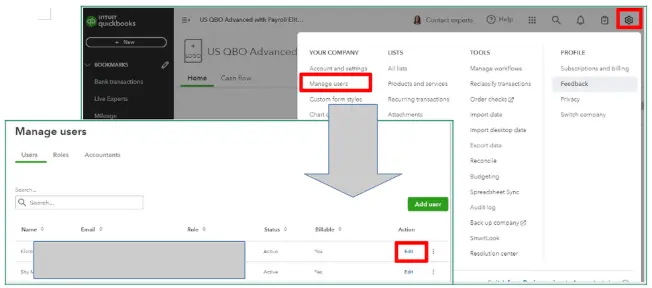
  • Go to Settings and choose Manage users.
  • Look for the user you wish to make the primary admin. 
  • Make sure the user profile is listed as Company admin in the Role column. If not, click Edit in the Action column to modify the roles of admin. 
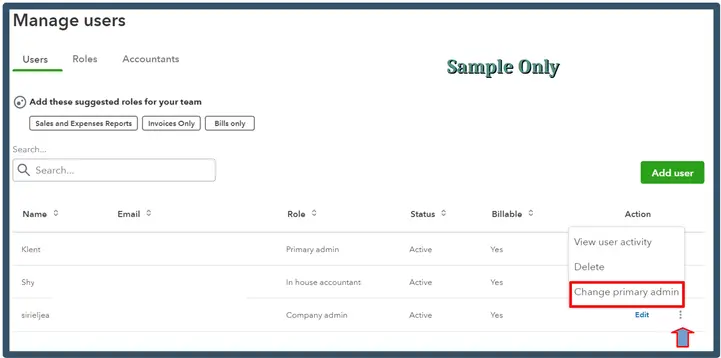
  • Choose the drop-down from the Action column and select Make primary admin.
  • Click on Change primary admin to confirm the change.
Change primary admin
  • Finally, sign out of QuickBooks.

Note: The option to transfer the primary admin is available only if the incoming user is already a company admin. The new primary admin won’t need to take any action as the transition is automatic.

Request the primary admin role if the current admin is unavailable

click Save Changes

If the current primary admin of QuickBooks is no longer with your company and you can’t sign out of their account, you won’t be able to follow the usual transfer process. Instead, you’ll need to submit a request to our account protection team to take over as the primary admin.

To do this, you will also need to complete the request form and provide documents proving that you own the business or have sufficient permissions to take over the admin account. 

a. You will need the following account 

  • Your driver’s license, government ID, or passport. 
  • The driver’s license, government ID, or passport of any other majority owners, business partners, non-profit directors or presidents, or estate executors.
  • If you don’t own the business, a letter of permission naming you as the business’s new primary admin. It needs signatures from any other majority owners, business partners, non-profit directors or presidents, or estate executors.
  • If the previous owner is deceased, a notarized document with the name of the executor of their estate is required.
  • Depending on the type of business, one of the following documents, with the owner, chairperson, or president’s name and title:
    • Sole proprietorship or self-employed: business license.
    • Corporation / S Corporation: articles of organization, corporation bylaws, or shareholders’ agreements.
    • Limited Liability Company (LLC): articles of organization or an operating agreement.
    • Limited partnership: certificate of limited partnership or certificate of limited liability partnership.
    • Non-profit organization: A board of trustees meeting minutes identifying the new primary admin. If you don’t have this, articles of incorporation, or non-profit corporate bylaws.
    • Other business: articles of organization, articles of incorporation, corporation bylaws, or shareholders’ agreements.

b. Here are the detailed steps 

  • Open the Business Change Request form.
  • Choose the company you are requesting to be the primary admin for or contact for

Note: Choose a relatable answer to the questions from each of the drop-downs. 

  • Click Continue.
  • Verify all the business details and click Continue. Otherwise, choose This is not the right business, then return to Step 3.
  • Check your personal details and select Continue.
  • Make sure all the business information is correct on the Summary page, and select Continue.

Important : Once you proceed further, you won’t be able to make any changes. 

  • Share all the required documents and click Submit request

Note: If you require more time to finish the requirements, you can close the form. It will remain in draft status for 30 days. When you’re ready, reopen the form to continue where you left off.

Next steps

Intuit will review this request as soon as possible. Once the review is complete, you will receive an update email with the status of your request. Wait until the email response from no_response@intuit.com.

You can check the status of your request at any time once available.

If we approve your request:
We’ll notify you that you’ve been assigned the primary admin or contact role. Simply sign in with the email you provided the next time you access QuickBooks.

If we can’t approve your request:
We’ll inform you of the reason and provide guidance on the next steps. For instance, if a document is missing, unclear, or doesn’t meet approval standards, we’ll ask you to resubmit the form with all required documents for security verification.

Conclusion 

In this blog, we explained who a primary admin is, why the role matters, and how to transfer admin rights correctly. You must have also learned how to submit a request to be primary admin QuickBooks Online when the original admin is unavailable and what documents Intuit requires to approve the request.

Whether you are managing Change the primary admin user in QuickBooks Time, or taking over an account due to unexpected circumstances, this guide gives you the clarity to manage the process correctly. With QuickBookSupportNet team, you can ensure a smooth transition without risking your business data or account security.

Frequently Asked Questions 

What is a primary admin in QuickBooks?

A primary admin in QuickBooks is the main user with full rights to add, edit, or remove any user, and to transfer admin rights to another user. They can manage everyone and every task running in the program. By default, the person who set up the software for their business is a primary admin, who can be transferred to another user. 

Can you have more than one primary admin in QuickBooks Online?

No, you cannot have more than one primary admin in QuickBooks Online. However, multiple company admins can have the same level of rights to make the required changes in QuickBooks, except for the ability to add or remove the primary admin. 

What is the role of the primary admin in QuickBooks Online?

The primary admin in QuickBooks Online is the main user who has access to all aspects of the account, can make any changes, such as managing users, roles, and settings, and is the person who initially set up the account.

Can an accountant change the primary admin in QuickBooks Online? 

Yes, an accountant can change the primary admin in QuickBooks Online only if they are signed in as a user with primary admin. An accountant can also transfer the primary admin rights if you are signed in as the accounting firm through QuickBooks Online Accountant.

How do I transfer a primary admin in QuickBooks Online? 

To transfer the primary admin in QB Online, the current primary admin must go to Settings > Manage users, find the new user, click the Action drop-down, and select Make primary admin.

Can I change the primary admin if I am not a company admin?

No. Only a company admin can be promoted to a primary admin. If you are not listed as a company admin, the current primary admin must update your role first.

How long does Intuit take to approve a primary admin request?

Approval times vary depending on document verification. Most requests are reviewed within a few business days, and updates are sent by email once the review is complete.

What documents are required to request primary admin access?

You need a valid government issued ID and business ownership documents. Additional paperwork may be required depending on the business type and ownership structure.

Can I check the status of my primary admin request?

Yes. You can track the status of your request after submission. Intuit will also notify you by email about approval or if more information is needed.

About The Author

Lana Creston

Lana Creston is an experienced technical and accounting writer with a total of 9 years of experience. She currently works on QuickBooks accounting and technical guides at QuickBookSupportNet. Lana has a passion for reading and writing about various technical topics, especially exploring new accounting methods and software, while continuously expanding her expertise in the ever-evolving field of finance and technology.

Quick, clear, and hassle-free QuickBooks assistance.

Get a Free Consultation with Our QB Tax Experts
Connect with Our Certified QuickBooks Professionals - Dial Tollfree: +1(866)500-0076