Dec 16, 2025
Admin |
Estimated Read Time : 5 MIN
QuickBooks Shipping Manager helps businesses streamline their shipping processes by allowing them to print shipping labels directly within the software. This eliminates the need to switch between platforms for a more efficient shipping experience.
However, if you haven’t updated to the latest version, it’s common to encounter issues with QuickBooks Shipping Manager not working. These issues typically arise due to outdated updates or other factors, which we’ll explore below. Learn how to troubleshoot and resolve these problems to ensure smooth and uninterrupted shipping.
Table of Contents
ToggleBelow are several reasons why QuickBooks Shipping Manager may not be working, along with potential database issues:
The new Shipping Manager is introduced with enhanced features and a mandatory transition, which can often lead to issues when switching from the old version.
You may encounter problems with the Shipping Manager in QuickBooks Desktop due to various factors, as outlined above. Follow the troubleshooting steps below to ensure smooth shipment processing:
| Important Note: If you haven’t already, download the new QuickBooks Shipping Manager for QuickBooks Desktop; otherwise, the old version may cause problems. |
An outdated version of QuickBooks Desktop causes incompatibility with the integrated apps or features, making it challenging to run the process. This could be why QuickBooks Shipping Manager not working. Make sure to update QuickBooks Desktop to the latest release for an uninterrupted workflow.
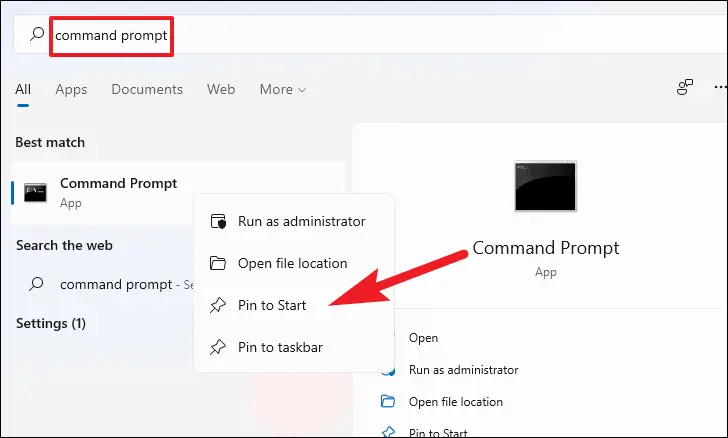
Registering the ShipRush OCX file makes the necessary software component (the OCX file) available to Windows and QuickBooks for better communication:

Let’s rename the Shipping Manager folders to replace them with the new folders, resolving the QuickBooks Shipping Manager not working issue:
When you recreate the Shipping Manager account, it resets the corrupted settings, re-establishes carrier connections (UPS, FedEx), resolves authentication problems, and allows you to re-enter accurate account details and preferences:
When done, proceed further to set up the new account.
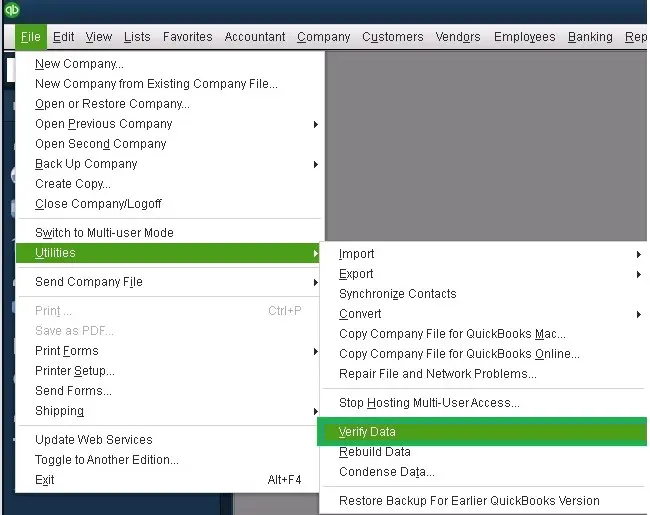
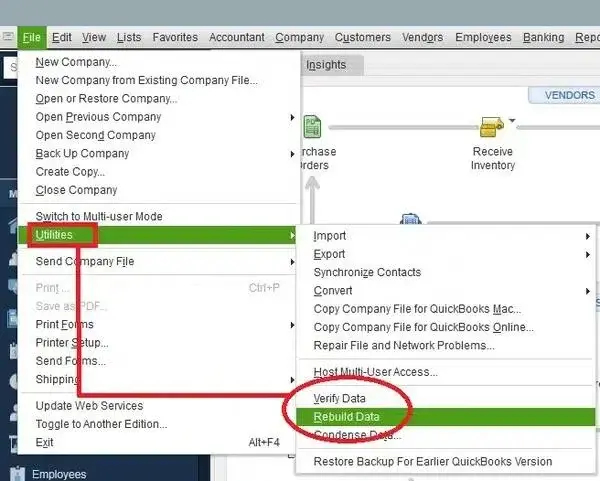
The Verify and Rebuild Data utility verifies the company file data and runs a quick repair to resolve all the associated issues:


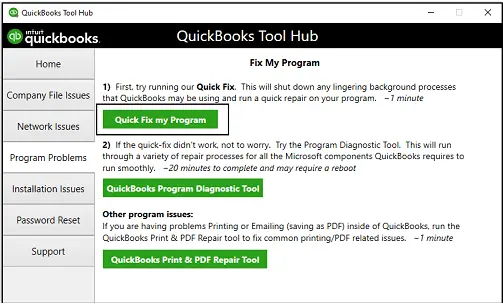
To clear background processes, use Quick Fix my Program to repair the QuickBooks installation as described below. If that doesn’t work, run the QB Install Diagnostic Tool.
The Quick Fix my Program closes the QuickBooks processes running in the background, then runs a quick repair to your program.

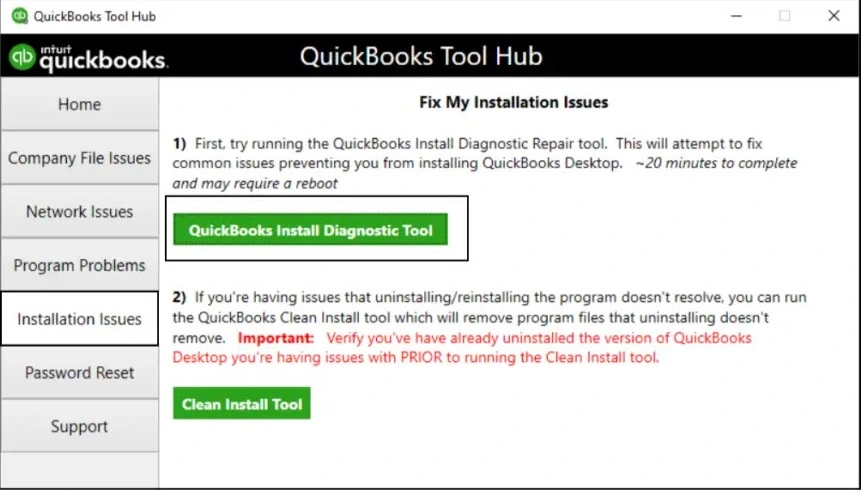
If something went wrong during the software installation, it can cause issues when trying to run or use it. Run the QuickBooks Install Diagnostic tool to fix the common installation issues:

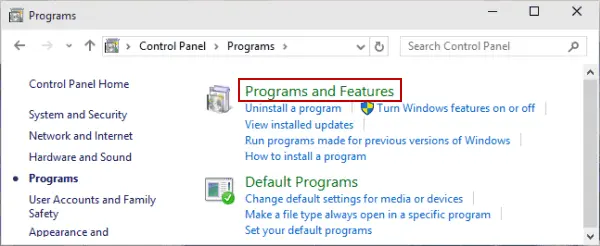
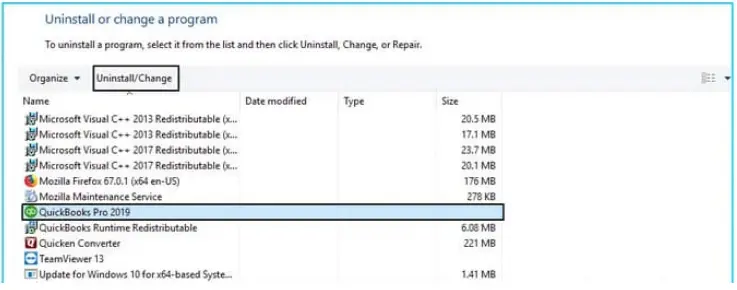
Replace the corrupted program files, reset configurations, and resolve underlying installation errors by reinstalling QuickBooks POS:


Some users may get an access violation error when they go to the shipping module to create a UPS shipment. If you are using QuickBooks in multi-user mode, here is what you should do:
Now, open QB Desktop on the workstation:
This should fix access violation errors within the shipping module in QuickBooks Desktop.
Delays in shipping or the inability to generate and print shipping labels can significantly disrupt business operations. If your QuickBooks Shipping Manager not working as expected, it’s natural to seek quick solutions.
This guide has provided steps to help you identify potential issues and implement effective fixes to ensure smooth shipping processes.
For further assistance, consider reaching out to ProAdvisors at QuickBookSupportNet. Dial Call Us : +1(866)500-0076 to speak with an expert today!
How to set up shipping in QuickBooks?
To set up shipping in QuickBooks Online, enable the Shipping Manager feature in Account Settings or from the File menu if you use QBDT. Create Ship Via in the Lists menu and finally connect carrier accounts via the new Shipping Manager to rate shop and print labels directly from invoices or sales orders.
How do I fix Shipping Manager in QuickBooks?
To fix Shipping Manager in QBDT, make sure you use the new QuickBooks Shipping Manager and not the discontinued one. If this does not fix the problem, update QuickBooks, run QuickBooks Tool Hub, and set the preferences again.
Why is my Shipping Manager database not working?
The Shipping Manager Database might not work due to corrupted files, network problems, outdated drivers/software, firewall conflicts, or incorrect settings, which are often resolved by restarting, checking configurations in Preferences, repairing the installation, or ensuring proper network path setup.
What is QuickBooks Shipping Manager Access?
QuickBooks Shipping Manager Access is a built-in feature and an integrated application in both QuickBooks Online and Desktop. This allows businesses to streamline the shipping, creating and printing labels all within the software, while keeping a track of the shipment.
What are the benefits of using FedEx Ship Manager?
Using FedEx Ship Manager with QuickBooks streamlines shipping by automating data entry, reducing errors, saving time, and improving efficiency through direct integration, allowing you to process labels, track shipments, and manage customer info all within QuickBooks for better financial control and customer service.
Lana Creston is an experienced technical and accounting writer with a total of 9 years of experience. She currently works on QuickBooks accounting and technical guides at QuickBookSupportNet. Lana has a passion for reading and writing about various technical topics, especially exploring new accounting methods and software, while continuously expanding her expertise in the ever-evolving field of finance and technology.
Quick, clear, and hassle-free QuickBooks assistance.