
QuickBooks Error UEXP: Fix Error with Complete Guide
Oct 6, 2026
Admin |
Estimated Read Time : 5 MIN
QuickBooks Error UEXP occurs when your QuickBooks application fails to verify the payroll account status, preventing the download of payroll updates. This seems to be a major issue for any QuickBooks users trying to process payroll.
We know the importance of such an issue and posted this blog that has the potential to resolve all your issues related to QuickBooks error code UEXP. In this blog, we will first discuss the common causes behind the error and then the top-rated solutions that are recognized as effective fixes.
Learn how to fix QuickBooks Error UEXP while downloading your updates for the payroll.
The error message appear with a phrase like “We are having difficulties verifying your account status. Error=UEXP“.
Error UEXP when activating retail payroll
It could be caused by a disabled retail payroll license or by special characters in your company name, legal address, chart of accounts, or contact me.
Common Causes of QuickBooks Error Code UEXP when downloading payroll update:
Theerror UEXP may be caused by any of the following:
Outdated QuickBooks Desktop: Your version of QuickBooks Desktop may be out of date and not compatible with the latest payroll services.
Inactivated payroll subscription: The payroll service may not be fully activated for your company file.
Special characters: Special characters in your company name, legal address, chart of accounts, or contact name can interfere with the verification process.
Note:- Click on Automatically download and install updates in the future to make sure that your updates get automatically installed in the future.
Unable to install the update
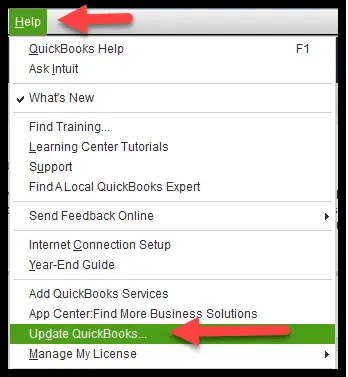
Solution 1: Again, download the update
Open the QuickBooks menu.
Then, click on Check for QuickBooks Updates.
Click on Install and Relaunch.
Solution 2: Get updates from Intuit’s download site
Click on the Downloads & Updates page and click on standard setup.
Select your country from the Select Country option.
Now, select your product from the Select Product option.
Finally, select your version (year) from the Select Version.
Click on Search and select Get the latest Updates.
Once the download is finished, click to open the file and install the updates. and install the updates.
In the final step, restart your PC after installation.
Conclusion
We believe that in this blog, we have brought everything that would help you in fixing the QuickBooks error UEXP. However, depending on your system requirements, QuickBooks version, and other utilities, the solution may vary. In case the error still requires a solution, then it means it needs advanced diagnosis to resolve the error.
Contact our senior QuickBooks specialist at +1(866)500-0076.
Frequently Asked Questions
What is QuickBooks Error UEXP?
QuickBooks Error UEXP is an account verification error that typically occurs when downloading payroll updates or activating retail payroll. It indicates that there is an issue with your license or subscription.
What are the common causes behind the QuickBooks error code UEXP?
Common causes include an outdated QuickBooks Desktop version, an inactive payroll subscription, or special characters in your company name or address.
How can I fix the QuickBooks UEXP error?
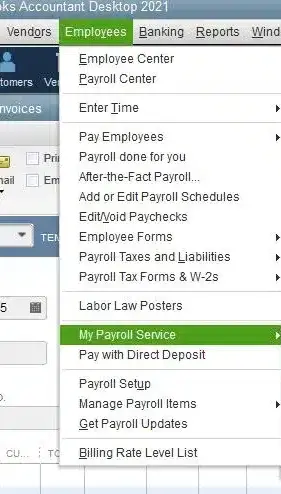
If you are looking for a complete and top-rated guide on UEXP error, visit QuickBooksupportne.To fix QuickBooks error UEXP, update your QuickBooks Desktop to the latest release, then manage your payroll service key by going to Employees > My Payroll Service > Manage Service Key.
About The Author
Lana Creston is an experienced technical and accounting writer with a total of 9 years of experience. She currently works on QuickBooks accounting and technical guides at QuickBookSupportNet. Lana has a passion for reading and writing about various technical topics, especially exploring new accounting methods and software, while continuously expanding her expertise in the ever-evolving field of finance and technology.
Effortlessly handle data tasks or get expert assistance with:
Data Automation
Conversion & Migration
Integration
Tax Filing & Compliance
QuickBooks Desktop 2023 is ending — Upgrade QuickBooks Desktop 2023 to 2024 for continued performance and support.