Mar 30, 2026
Admin |
Estimated Read Time : 5 MIN
QuickBooks Desktop 2023 introduces the latest updates that would help you simplify daily accounting and offer better financial visibility for your business. With the recent updates, including the New Shipping Manager, Cash Flow Hub, enhanced payroll and tax compliance, and more, QuickBooks has focused on automation and smarter decision-making.
Whether you are managing inventory, tracking mileage, handling payroll taxes, or processing payments faster, QuickBooks Desktop Pro 2023 helps streamline workflows. In this guide, we will explore all the new features, system requirements, release updates, and concrete steps of installation instructions.
Table of Contents
ToggleQuickBooks has made some major changes in the Desktop 2023 that would help you automate and streamline your daily accounting tasks. Below, we have discussed the features that are added in the QuickBooks 2023 Desktop and how you can use them.
QuickBooks removed the old shipping Manager from the version since December 7, 2025. Now, you need to set up a New Shipping Manager. In case you did not find it, update your QuickBooks to the latest version.
If any of your employees is subject to Virginia payroll taxes, the “Job Title” field is now required. Now, you need to enter a job title, and then you can save or update records for employees in Virginia.
From Box 14, the account mappings for “Excess golden parachute” have been removed from 1099-MISC to Box 3 on 1099-NEC. These changes are made in line with the latest 1099-form requirements.
Using Inter-company transactions, you can easily switch between separate company files and issue or check them anytime. It is noted that this is applicable to shared companies that conduct business with one another.
Now, you can organise your inventory by grouping items into categories. You can use categories to get insights into inventory stock.
This feature will reduce the risk of selling any expired product/item(s). It will help you in making sales decisions. For instance, if a group of certain items is about to expire in a few days or months, you can sell them as discount items. You need to add mandatory expiration dates to your serial/lot numbers.
With the track vehicle mileage, you can now track the miles you would cover for your business drive and vehicle information.
You will get the status of the available cash of your organisation at the Cash Flow Hub.
Now, you can quickly receive payments that do not belong to an invoice. It requires a payment link.
Below, we will have accurate facts regarding QuickBooks Desktop 2023 system requirements:
Operating systems
Using Windows 8.1?
If you are using Windows 8.1, then you must know that Microsoft no longer provides security updates or support for computers running Windows 8.1 after Jan 10, 2023. Because of this, the QuickBooks 2023 program won’t support Windows 8.1 and cannot be installed on it.
Using Windows Server 2012?
Microsoft stopped providing any support for security updates or support for PCs running Windows Standard and Essentials Server 2012 and Server 2012 R2 after Oct 10, 2023. This is the reason behind QuickBooks 2023 not supporting Windows Server 2012 and cannot be installed on it.
Database Servers
Windows
| Processor | 2.4 GHz minimum Note: QuickBooks Desktop is built on the x86 architecture and requires a dedicated x86 processor (Intel or AMD). ARM-based processors, such as those found in many modern thin clients or tablets, are not supported. While virtualisation or emulation layers may sometimes allow the application to run on ARM, these configurations are not tested, supported, or guaranteed to be stable. |
| RAM (workstation) | 8 GB minimum, 16 GB recommended |
| RAM (server) | • 1-5 Users: 8 GB • 10 Users: 12 GB • 15 Users: 16 GB • 20+ users: 20+ GB |
| Disk Space | • 2.5GB of disk space (additional required for data files). Additional software: 60MB for Microsoft .NET 4.8 Runtime, provided with the installation files. • Additional requirements for Intuit Data Protect in QuickBooks Connected Services offerings: • Requires minimum 4.0GB RAM • Twice the size of the largest file set to back up + 100MB or twice the size to restore. The space is only required from the work folder LocalApplicationData+”Intuit\Intuit Data Protect”. Note: For the best performance, store your QuickBooks data file on a solid-state drive (SSD). |
| Windows | • North American version of Windows. • Regional settings are supported when set to English. • Administrator rights are required for the server computer when hosting multi-user access. • Natively installed and doesn’t need to run in a virtual environment or emulation software. |
| Optical drive | A 4X DVD-ROM drive is required for physical CD installations. |
| Screen resolution | • Display optimised for 1280 x 1024 resolution or higher with up to 2 extended monitors. • Best optimised for the default DPI setting for a given computer. |
Minimum system requirements
Release 17 (R17_19.1) December 11, 2025
| New Shipping Manager | QuickBooks removed the old shipping Manager from the version since December 7, 2025. Now, you need to set up a New Shipping Manager. In case you did not find it, update your QuickBooks to the latest version. |
| Mandatory Job Title for VA payroll employees | If any of your employees is subject to Virginia payroll taxes, the “Job Title” field is now required. Now, you need to enter a job title, and then you can save or update records for employees in Virginia. |
| 1099-MISC | If any of your employees is subject to Virginia payroll taxes, the “Job Title” field is now required. Now, you need to enter a job title, and then you can save or update records for employees in Virginia. |
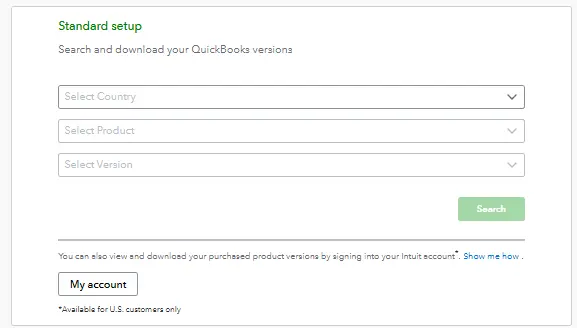
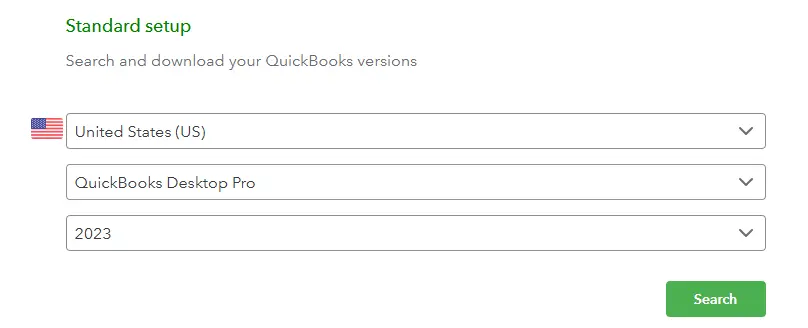
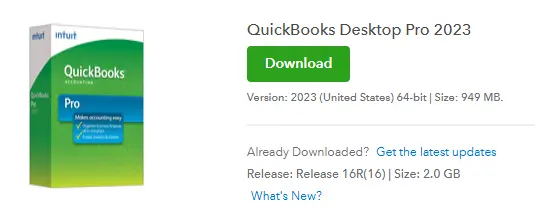
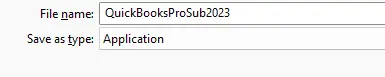
Visit Intuit’s Official download site.


Note:- If you are looking to install QuickBooks on a dedicated server or workstations, ensure to install the QuickBooks database server manager on your server computer.
Read More – Download QuickBooks Desktop
Now, we will create a folder for you to store your QuickBooks company file. In case your data is shared on a server, you are required to set up a shared folder. For this, you are required to have the admin rights to the server that has the company file(s) or to the workstations to create shared folders.
QuickBooks Desktop 2023 is the latest update that comprises smart tools to make your workflow smooth. Using this guide, you would be able to download, install, activate, and set up QuickBooks Desktop 2023 without hassle, whether on a single computer or across a multi-user network.
If you still need help with installation, upgrades, troubleshooting, or choosing the right QuickBooks version, connect with a certified QuickBooks ProAdvisor at (866)500-0076 for expert assistance. We are here to help you every step of the way.
How do I find my license and product numbers?
To get your license and product numbers, log in to your Customer Account Management Portal. In the portal, click on View details, and you have all your license and product details.
How to Install QuickBooks Desktop?
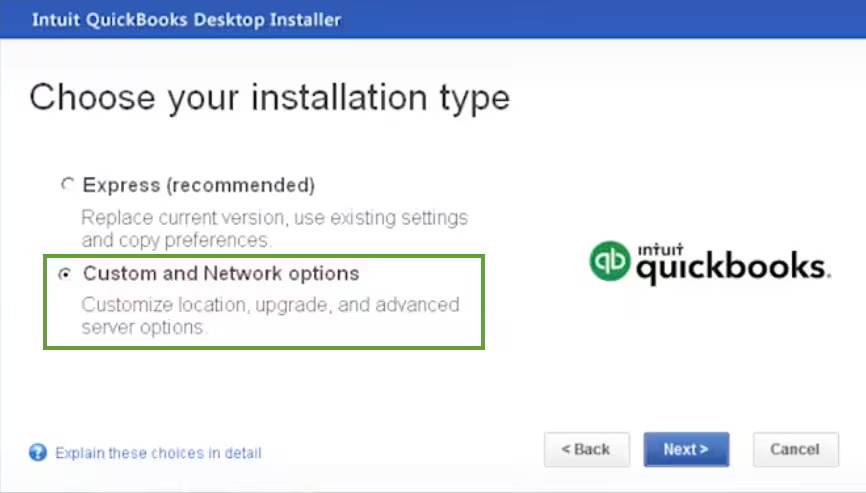
To install QuickBooks Desktop, you need to follow this guide on QuickBookSupportNet that provides you with all the steps, including activation of QuickBooks Desktop and creating your company file folder for one computer and on a dedicated server or workstations.
What are the major new features in QuickBooks Desktop 2023 free download?
QuickBooks Desktop 2023 includes the New Shipping Manager, Cash Flow Hub, inventory categories, inventory expiration tracking, vehicle mileage tracking, payment links, enhanced inter-company transactions, and updated payroll and 1099 compliance features.
Why was the old Shipping Manager removed in the QuickBooks Desktop 2023 download?
Intuit retired the old Shipping Manager on December 7, 2025, to improve performance and reliability. Users must now set up the New Shipping Manager by updating QuickBooks Desktop to the latest release.
Is the Job Title mandatory for all payroll employees?
The Job Title field is mandatory only for employees subject to Virginia payroll taxes. Without entering a job title, you won’t be able to save or update employee records for Virginia payroll.
What changes were made to 1099-MISC and 1099-NEC in QuickBooks 2023?
The account mapping for “Excess Golden Parachute Payments” was removed from Box 14 of 1099-MISC and reassigned to Box 3 of 1099-NEC, in compliance with the latest IRS requirements.
Does QuickBooks Desktop 2023 support Windows 8.1 or Windows Server 2012?
QuickBooks Desktop 2023 does not support Windows 8.1 or Windows Server 2012/R2, as Microsoft ended security updates and support for these operating systems.
Can I track inventory expiration dates in QuickBooks Desktop 2023?
You can now assign mandatory expiration dates to serial or lot numbers, helping prevent the sale of expired products and allowing you to plan discounts for items nearing expiration.
Can I install QuickBooks Desktop 2023 on a Mac?
QuickBooks Desktop for Windows cannot be installed on macOS. However, QuickBooks Mac Plus 2023 is available and supports both Intel and Apple Silicon (M1/M2) processors with macOS Monterey (12.0) or later.
Can I download a free trial of QuickBooks Desktop 2023?
Yes, you can download and opt for the available free trial of QuickBooks Desktop 2023, which you can download directly from Intuit’s official website to test features before purchasing.
Lana Creston is an experienced technical and accounting writer with a total of 9 years of experience. She currently works on QuickBooks accounting and technical guides at QuickBookSupportNet. Lana has a passion for reading and writing about various technical topics, especially exploring new accounting methods and software, while continuously expanding her expertise in the ever-evolving field of finance and technology.
Quick, clear, and hassle-free QuickBooks assistance.