Fix QuickBooks Error 6176 and Know the Causes
Dec 29, 2025
Sep 23, 2025
Admin |
Estimated Read Time : 5 MIN
Are you facing issues with QuickBooks Payroll not calculating taxes correctly? This frustrating problem can disrupt your payroll process, leaving you unable to manage employee payments effectively. Common causes include incorrect employee, tax, or payroll item setups, outdated tax tables, reached wage limits, incorrect federal filing status, employees not meeting the taxable wage base, or employees set to “Do Not Withhold” for taxes. In this comprehensive guide, we’ll dive into the reasons behind QuickBooks Payroll tax calculation failures and provide clear, step-by-step solutions to help you resolve the issue and restore accurate payroll processing.
Table of Contents
ToggleThere isn’t a specific cause why QuickBooks is not calculating taxes correctly. Below, we will discover all the possible reasons why this hindrance occurs:
After understanding the reasons for the incorrect tax calculation in QuickBooks Desktop, finding suitable fixes to resolve these issues is crucial. Proceed below to explore the troubleshooting methods to get past the problem and ensure accurate tax calculation:
Using outdated software for payroll or tax tables is often the reason why ‘QuickBooks payroll not calculating taxes‘ due to incorrect rates or certain features.
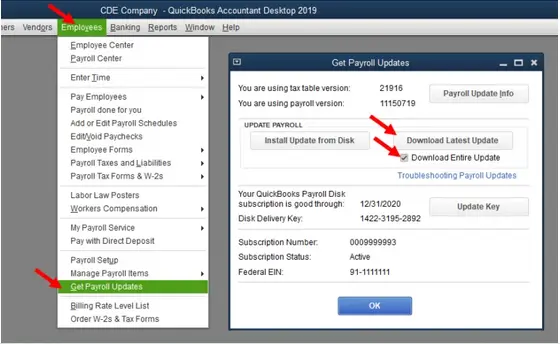
Keep your QuickBooks Desktop up-to-date to the latest release and get the payroll tax table updates in the steps below:

Payroll tax settings can be responsible for why QuickBooks Desktop payroll not calculating state taxes:

Ensure the filling status isn’t set to ‘Do not Withhold‘ otherwise, you might see QuickBooks Desktop not calculating payroll taxes. To verify this, you can check your employee’s profile. Here’s how:
The update to the tax system may affect tax calculations in QuickBooks Desktop Payroll. For accurate tax calculation, let’s revert your employee’s paycheck so any changes that ensued will be applied to the paychecks in the following steps:
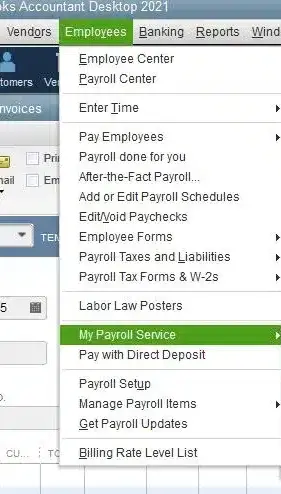
If QuickBooks is not calculating payroll taxes, you must review the payroll subscription in QuickBooks Desktop. Let’s proceed to the following steps:
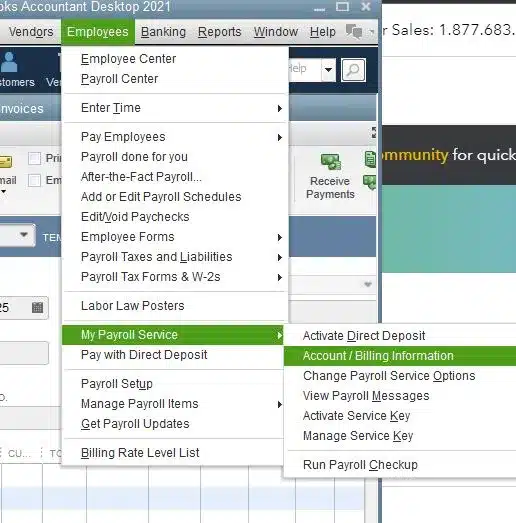
If the payroll subscription isn’t active, the payroll won’t calculate your taxes. Proceed to the steps below to ensure the subscription isn’t active:
Here’s how to get the payroll subscription:
a. Through your company file
The best and easiest way to turn on the payroll service is directly from your QuickBooks Desktop company file:


b. Through your Intuit account
You can also get your payroll services back from the web:
Note: The tool may take up to 24 hours to reactivate the subscription to finish the process. Once the reactivation is done, the subscription will show Active.
If a payroll item is duplicated in the records, it can result in incorrect tax calculations or may even be the reason why ‘QuickBooks Payroll not calculating taxes’ correctly. Let’s delete the double entry by following the steps below:
The reports below provide detailed information on how QuickBooks Desktop calculates the tax amount for each employee and the wage basis range for each employee for each tax period.
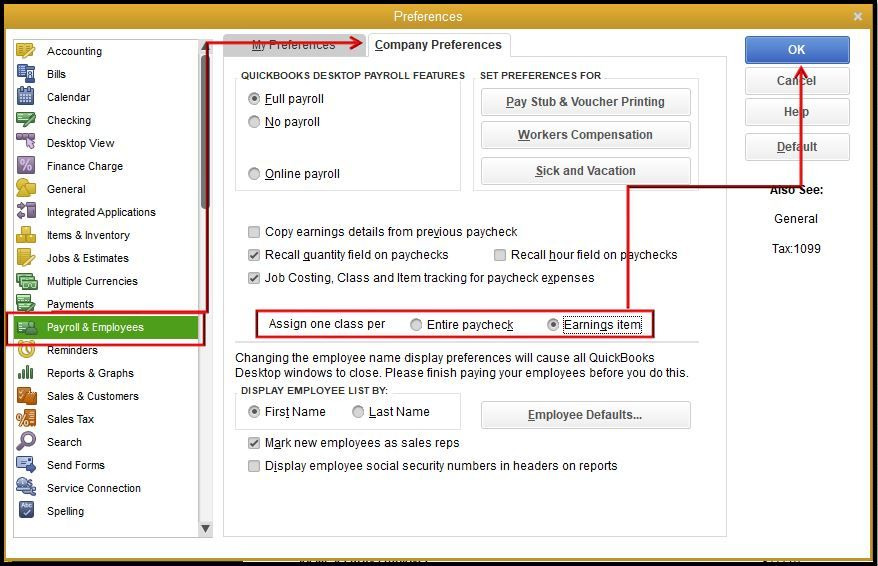
An incorrect payroll setup means that either the information is not correct or the settings are not selected correctly. This can be the reason why payroll taxes not calculating in QuickBooks Desktop and may result in taxes not being deducted from payroll. Let us follow the steps below to ensure that the payroll tax setup is correct:
We’ve outlined several methods to help you troubleshoot and resolve issues with QuickBooks Payroll not calculating taxes correctly. We hope this guide has helped you identify the root cause and implement the necessary fixes to ensure accurate tax calculations.
For additional support, our QuickBooks experts are available 24/7 to assist you. Contact them now by dialing our toll-free number +1(866)500-0076!
Why is my QuickBooks not calculating payroll taxes?
QuickBooks payroll may fail in calculating taxes due to outdated software or tax tables, incorrect employee setup, tax-exempt employees, exceeding annual wage limits, low gross wages, incorrect payroll subscription, or incorrect payroll setup.
Are QuickBooks tax deduction errors causing payroll problems?
Yes, tax deduction errors in QuickBooks Payroll can absolutely cause payroll problems, such as incorrect pay stubs, missed tax payments, and even penalties from the IRS, because the system relies on accurate tax settings, up-to-date tax tables, and proper employee configurations.
How do I revert a paycheck if QuickBooks is not calculating taxes?
To revert a paycheck in QuickBooks when taxes aren’t calculated, open the Employees tab, go to Pay Employees, and then select Resume Scheduled Payroll or Start Scheduled Payroll. Locate the employee name highlighted in yellow and right-click on it, then choose Revert Paychecks. This will allow you to correct the paycheck data and ensure taxes are computed correctly before you save and close.
What happens if you don’t file taxes in QuickBooks?
Failure to file taxes is a serious matter with significant consequences from tax authorities, regardless of whether you use QuickBooks. The software is simply a tool for organizing your financial information; it does not handle the official filing process with the IRS or other tax agencies for you.
Does QuickBooks calculate payroll taxes if an employee claims tax-exempt?
Yes, QuickBooks can handle tax-exempt employees for payroll, but this depends on the type of tax exemption. When an employee claims tax-exempt status, QuickBooks will stop calculating and withholding certain taxes from their paychecks, but not all of them.
Lana Creston is an experienced technical and accounting writer with a total of 9 years of experience. She currently works on QuickBooks accounting and technical guides at QuickBookSupportNet. Lana has a passion for reading and writing about various technical topics, especially exploring new accounting methods and software, while continuously expanding her expertise in the ever-evolving field of finance and technology.
Quick, clear, and hassle-free QuickBooks assistance.
Fix QuickBooks Error 6176 and Know the Causes
Dec 29, 2025
Learn to fix QuickBooks Error 12002
Dec 29, 2025
Fix QuickBooks Error 6000, 83 with Preventive Tips
Dec 27, 2025