Jul 26, 2023
Admin |
Estimated Read Time : 5 MIN
Are you confused while picking the right accounting software for your business? In that scenario, you mustn’t think anymore and read this entire blog to get a clear vision of both Xero VS QuickBooks Online applications. Both accounting software is utilized by businesses to streamline complex accounting tasks. But, both of them have some different features and functions, which makes them different from each other. So, it is beneficial to know about both the accounting software and then make the decision keeping your business requirement and budget in your mind.
Table of Contents
ToggleXero is a top-rated accounting solution mainly designed for accountants and bookkeepers. Moreover, it is an incredible, user-friendly software that is designed to fulfill the company’s accounting needs. In addition to this, using this accounting solution, you can take the estimate of each project’s cost in real-time and then match it to your estimated profits.
Moreover, this accounting software comes along with the various top-notch set of Accounting Tools and features that can enhance your accounting experience. Features that are included with this accounting solution are as follows:
QuickBooks Online is a cloud-based accounting software that helps small and medium-sized businesses to accomplish their accounting tasks. Moreover, it helps business owners to handle accounting, accept online payments, manage and pay bills, etc.
Apart from these, QuickBooks Online is a complete accounting package offering various top-notch features and functions to simplify your accounting process. Here, we have listed some of the features of the QuickBooks accounting software; check them out.
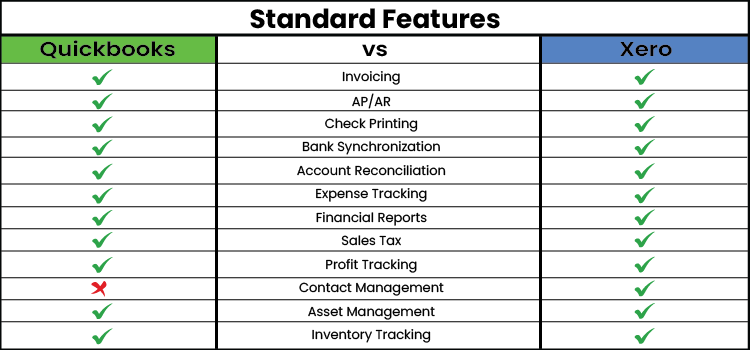
If you are still confused about Xero Vs QuickBooks Online, which accounting software must you use? Then, don’t think anymore. Instead, look at the difference given below, which will help you make a better decision.
| Basis | Xero | QuickBooks Online |
| Feature | Xero is an accounting software mainly used for inventory, expense, project, and bill payment management. Moreover, it also comprises a mobile application and is supported by unlimited users. | QuickBooks Online is a cloud-based accounting software that can be used remotely, sitting anywhere with a stable internet connection. Moreover, it includes extensive reporting functions and has multi-user access plans that up to 25 users can use. |
| Best For:- | This accounting solution is suitable for sole proprietors. | On the other hand, this accounting software is best for small-scale medium-sized, and large businesses. |
| Integrations:- | You can integrate the Xero application with more than 1000 applications. | The users can combine the QuickBooks Online application with more than 750 applications. Moreover, you may also combine with the in-house bookkeeping and add-ons. |
| Customer Support:- | No Live chat facility is available for Xero users. | You can grab the customer support facility 24/7 with all the QuickBooks Online plans. |
| Cost | The best part about this accounting solution is that its plans are affordable, starting at $13 per month. The users won’t get free access to this accounting software. | The plans start at $30 per month. |
| Ease of sharing with Accountants | With the Xero accounting software, you can get audit trials and easy accountant access. | On the other hand, QuickBooks Online also consists of audit trials and easy accountant access. |
| Scalability | Xero accounting software best supports small businesses having several employees. Moreover, all of the three plans comprise an unlimited number of users. | QBO users can also use the mobile application to use this software on both iOS and Android devices. |
| Inventory Management | The users can access the inventory management feature with every plan of Xero software. | Whereas QuickBooks Online users having high-tier plans can only use the inventory management feature. |
| Multi-Currency Support | You can get Multi-Currency Support only with the highest pricing plans. | The users with the cheapest plan can also access the Multi-Currency Support facility. |
| Mobile Application | You can utilize the mobile application on both iOS and Android devices. | The QBO users can also use the mobile application to use this software on both iOS and Android devices. |
After knowing the major differences between Xero Vs QuickBooks, if you are still confused about what to use for your business, well, don’t worry. Here, we have discussed both the instances when to use QuickBooks Online and Xero, which will provide the user with a clear vision for choosing the appropriate fit.

Here, we have listed the instances when you can use Xero so that you can identify which one is best for you.
1-You require Advanced Reporting:-QuickBooks Online has an excellent reporting feature, especially if you can afford the Pro plan for $70 monthly. Moreover, this plan includes enhanced reports and project profitability feature to enhance your accounting experience
2-You Wish to Create Invoices:-You can create and send invoices to your clients, vendors, and customers using the QuickBooks Online application.
3-Your Business is In US:-If you are working in the US, then QuickBooks Online is the best software you must opt for to meet your day-to-day business requirements. In comparison to Xero, QuickBooks is the most preferred accounting software for many accountants. This is so because the QBO software is the top-leading application in the market and there are fewer chances of accountants to compliant for this application.
4-You are a small, medium, and large scale business:-QuickBooks Online is the widely used software that is mainly preferred by small, medium, and large scale businesses.
Go through the pointers below to know about the fact what is the best time to use the Xero application.
All of you are very well aware of the fact that Xero is the best accounting solution that excels in both functionality and user experience. However, if you start operating Xero while running a startup business, this software will provide you with complete support as the company grows. Moreover, the best part is that it includes the best features for processing payments and invoices, time tracking, and expenses.
For instance, if you want multiple users to get access to the accounting software, Xero then it is best you must go for this software. In addition to this, this software provides unlimited access to the accounting application.
Xero is an outstanding accounting software that is used by accountants staying outside North America, especially in New Zealand and Europe. So, it has been advised that the businesses must go with Xero if living outside North America.
Well, both Xero and QuickBooks Online software is well-equipped in streamlining business accounting tasks. As per your business requirement and preferences, you have to choose between QuickBooks Online Vs Xero which one is suitable for your company. However, if you are facing any further issues, consult with our professionals available round the clock through live chat or through email support facility for a quick resolution to your query. Henceforth, our experts will guide you with some useful tips that will help you make the best choice for your business asap without any further delays.
Q1. Which accounting software is preferred for sole proprietors and freelancers?
Ans. Xero is the best accounting solution suitable for freelancers and sole proprietors. In short, this software is also best for startup companies as it is user-friendly and provides unlimited user access. Moreover, it is also budget-friendly software, so you won’t have to pay much charges for this software.
Q2. How does the Xero application differ from the QuickBooks Online application?
Ans. QuickBooks Online is a cloud-based application that is preferred mainly by small, medium, and large-scale businesses. On the other hand, Xero is mainly preferred by small-scale businesses and sole proprietors.
Q3. What makes the Xero application better than QuickBooks?
Ans. Xero is known to be the best accounting solution which makes it easier to keep track of expenses and manage bills in one place. Moreover, you may also see financial trends and plan for cash flow accordingly.
Q4. What is the significance of using the QuickBooks Online application?
Ans. The benefits of accessing the QuickBooks Online application is as follows;
Q5. What must you keep in mind before choosing the appropriate accounting software?
Ans. To pick the right accounting software for your business accounting task, remember the following things.
Lana Creston is an experienced technical and accounting writer with a total of 9 years of experience. She currently works on QuickBooks accounting and technical guides at QuickBookSupportNet. Lana has a passion for reading and writing about various technical topics, especially exploring new accounting methods and software, while continuously expanding her expertise in the ever-evolving field of finance and technology.
Quick, clear, and hassle-free QuickBooks assistance.
Top 7 Methods to Fix QuickBooks Error 557 Promptly
Dec 19, 2025