Feb 2, 2026
Admin |
Estimated Read Time : 5 MIN
Have you received a notification from the IRS or a state tax agency stating that your QuickBooks tax payment was rejected? Over time, some concrete solutions were identified that could fix this issue at an early stage. Whether you are using QuickBooks Desktop Payroll Enhanced or QuickBooks Online Payroll, understanding the rejection reason is key to resolving it in a timely manner.
A rejected e-payment or e-filed tax form can occur due to reasons including incorrect EIN details, invalid bank account information and others. You cannot afford to delay its resolution since these errors may lead to IRS penalties, interest charges, or delayed payroll tax processing.
In this guide, you will learn why tax payments get rejected in QuickBooks, how to identify the exact error, and the process to resubmit a rejected tax payment in QuickBooks Desktop and Online Payroll, ensuring your payroll taxes are filed accurately on time.
Table of Contents
ToggleDealing with a rejected tax payment can be confusing, especially when the reason isn’t clear. Learn the common causes of rejection and follow the steps to successfully resubmit a rejected tax payment in QuickBooks.
This means the IRS or state agency received two tax forms with your information for the same period. It usually happens if you’ve used multiple payroll providers in the same quarter and forgot to cancel one.
a. QuickBooks Online Payroll
Contact the IRS or state agency to check if they accepted one form or rejected both. Reach out to us to see if we can help fix your forms.
b. QuickBooks Desktop Payroll Enhanced
Contact the IRS or state agency to confirm whether they accepted one form or rejected both. Depending on the case, you may need to file an amendment or resend the form through the agency.
Read More – QuickBooks Form 940
This means your Federal Employer Identification Number (EIN) or state account number in QuickBooks doesn’t match what the agencies have on file for your business.
a. QuickBooks Online Payroll

b. QuickBooks Desktop Payroll Enhanced
You may need to resubmit a rejected tax payment in QuickBooks if you’re trying to e-file or e-pay before the filing period ends. Some agencies don’t accept the early payments, so resend your filing or payment closer to the due date.
Learn More – How to E-file QuickBooks Form 941
This means the payment or form you sent was submitted at the wrong time, mainly because of a change in the IRS or state tax deposit schedule, or a change in the agency’s filing schedule.
a. QuickBooks Online Payroll
b. QuickBooks Desktop Payroll Enhanced
Read Also – How to file a W-2 form in QuickBooks
Below are the reasons and learn what to do to “resubmit a rejected tax payment in QuickBooks” Desktop Payroll Enhanced only. Keep the payroll services up-to-date with an active payroll subscription.
The rejection may occur if you have recently changed the bank account for e-payments on the EFTPS website, but forgot to update the PIN saved in QuickBooks. Proceed below to update the PIN in your QuickBooks:

Don’t know your PIN? Contact the IRS.
Your e-file will be rejected if an incorrect PIN is entered. Try removing or changing the PIN, then re-entering it.
Don’t know your PIN? Contact the IRS.
The character length for the EFTPS Internet password is between 12 and 30, which is used when logging into EFTPS.gov. Your e-pay PIN is a 4-digit code linked to your e-pay bank account. Update your EFTPS Internet password, then resend your e-payment or e-filing.
a. Update your password with EFTPS
b. Change your EFTPS internet password in QuickBooks Desktop
Now, you must change your QuickBooks Desktop password to match the new EFTPS internet password.

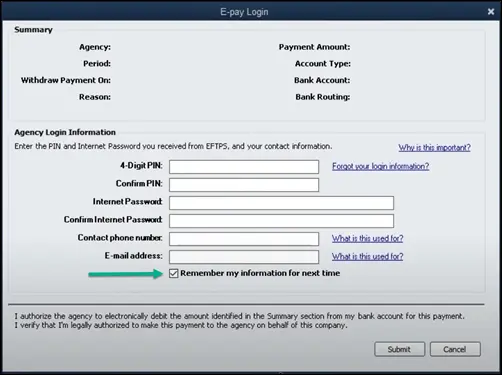
Enter the 4-digit PIN and internet password again when making an e-payment next time and then select Remember My Information for Next Time.
A rejected tax payment in QuickBooks is undoubtedly stressful, but it does not have to disrupt your payroll or tax compliance. Most rejections, whether due to incorrect EINs, or invalid e-pay PINs, can be resolved if you have followed this blog. and resubmitting the tax payment through QuickBooks Payroll.
Staying proactive and keeping your payroll settings up to date ensures smoother tax filings in the future. If you need expert help to fix rejected payroll tax payments or communicate with the IRS and/or state agencies, our QuickBooks and tax professionals at +1(866)500-0076 are available 24/7.
How to resubmit a rejected tax payment in QuickBooks Desktop?
First, identify the rejected tax payment in QuickBooks and make the necessary changes, such as removing a duplicate entry or providing missing information. Next, resubmit the rejected tax payment in QuickBooks Desktop.
Can I resubmit a rejected tax form return?
Yes, you can easily resubmit a rejected tax form. An e-filed tax return is not considered filed until the tax authority accepts it. To successfully resubmit it, you must correct the error and resubmit it.
How do I record a rejected payment in QuickBooks?
The steps below will help you record customer returned payments using an expense:
How do I resubmit a rejected tax payment in QuickBooks Desktop?
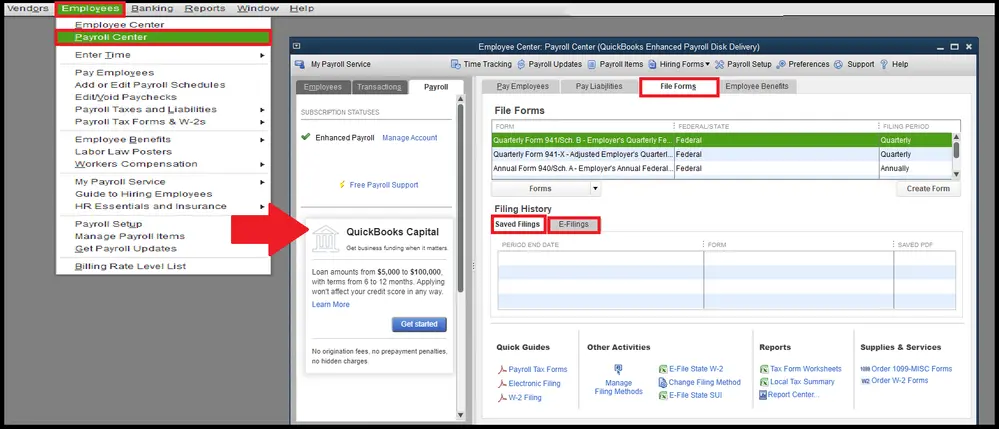
To resubmit a rejected tax payment in QuickBooks Desktop Payroll Enhanced, first identify the rejection reason from the IRS or state agency notice. Correct the issue, such as an incorrect EIN, expired EFTPS password, or wrong tax schedule then resend the payment through the Payroll Center > Pay Liabilities section.
How do I fix a rejected tax payment in QuickBooks Online Payroll?
If your QuickBooks Online tax payment was rejected, verify your bank account details, EIN, and payroll tax settings. Once corrected, go to the Payroll Overview, follow the To Do List instructions, and resubmit the tax payment if required. You may also need to contact the IRS or state agency to confirm acceptance.
Why was my QuickBooks tax payment rejected by the IRS?
A QuickBooks payroll tax payment may be rejected due to duplicate tax filing, invalid or incorrect EIN, expired EFTPS internet password, incorrect e-pay PIN, or submitting the payment outside the allowed filing period. Reviewing the rejection notice will help identify the exact cause.
Can I resubmit a rejected tax form return in QuickBooks?
An e-filed tax return in QuickBooks is not considered filed until accepted by the IRS or state agency. If it is rejected, correct the reported error and resubmit the rejected tax form through QuickBooks Payroll.
How long does it take for the IRS to accept a resubmitted tax payment?
After you resubmit a rejected tax payment in QuickBooks, acceptance typically takes 24–72 hours, depending on the IRS or state agency. Processing times may vary during peak tax seasons.
Will I be charged penalties if my tax payment is rejected in QuickBooks?
Penalties and interest may apply if the rejected payment is not corrected promptly. To avoid IRS late payment penalties, resolve the issue and resubmit the tax payment as soon as possible. Contact the tax agency if the delay was due to a system or banking error.
How do I record a rejected tax payment in QuickBooks?
To record a rejected or returned payment in QuickBooks, enter it as an expense, unmark it from the original transaction, and record any bank fees. This ensures your payroll and accounting records remain accurate.
Lana Creston is an experienced technical and accounting writer with a total of 9 years of experience. She currently works on QuickBooks accounting and technical guides at QuickBookSupportNet. Lana has a passion for reading and writing about various technical topics, especially exploring new accounting methods and software, while continuously expanding her expertise in the ever-evolving field of finance and technology.
Quick, clear, and hassle-free QuickBooks assistance.