Mar 16, 2026
Admin |
Estimated Read Time : 5 MIN
Printing allows you to take copies of your invoices, reports, reconciled accounts, tax forms, and more for record-keeping, better financial management, and to maintain accuracy. If you cannot print invoices in QuickBooks Desktop, your business processes will be hampered, and the invoices you are trying to print may be damaged.
Corrupted printing components and incorrect setup or settings are common reasons this happens; however, other factors may also contribute to printing issues. Let’s explore all the reasons this interruption occurs and how you can resolve it promptly.
Table of Contents
ToggleBelow is a list of reasons you cannot print invoices in QuickBooks Desktop. Let’s explore them one by one:
As discussed earlier, there are several reasons you may encounter printing issues in QuickBooks Desktop. Now, let’s proceed to the steps below to resolve the error using step-by-step instructions.
Before getting started, make sure
Make sure you can print the documents from any program. In these steps, we will use Notepad. You may have different programs, but not QuickBooks.
The following steps will help you test the printer’s setup.
Note: If the printer is a network printer and the test page doesn’t print, network issues could be the cause.
Examine your company file for possible damage, corruption, or other problems. If you find anything, follow the steps below to fix it:
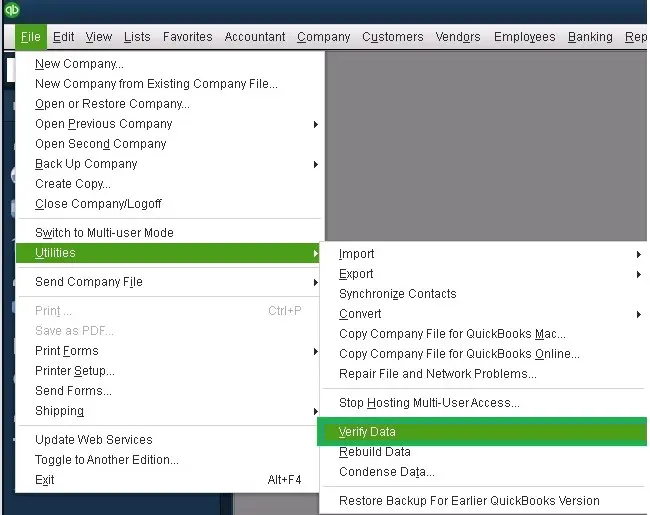
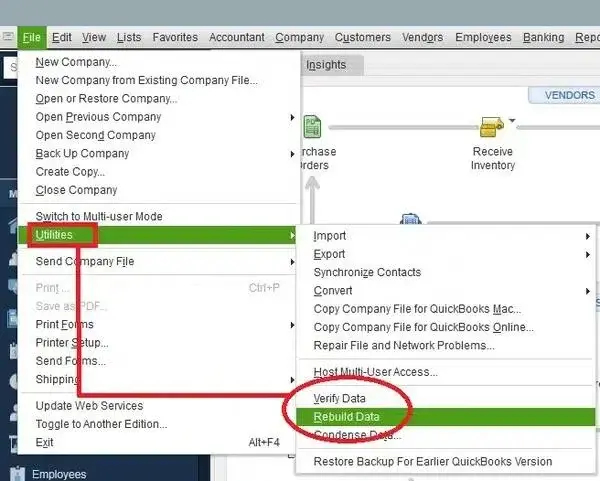
Resolve the data damages using the Verify and Rebuild Data utility:
Verify the data file

Rebuild the damaged data

If you still cannot print invoices in QuickBooks, go to the next solution.
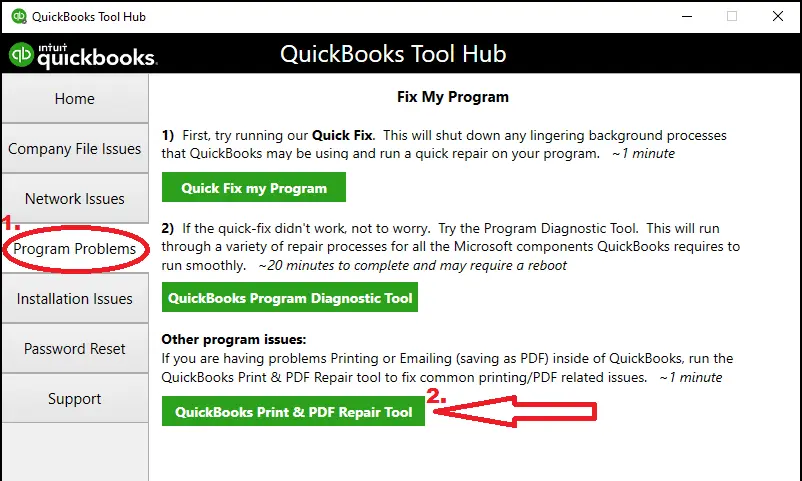
Let’s repair the QuickBooks Desktop installation or the program files using the different tools in QuickBooks Tool Hub:
Note – Download and install QuickBooks Tool Hub (1.6.0.8). For the best experience, we recommend using Tool Hub on Windows 11 (64-bit).
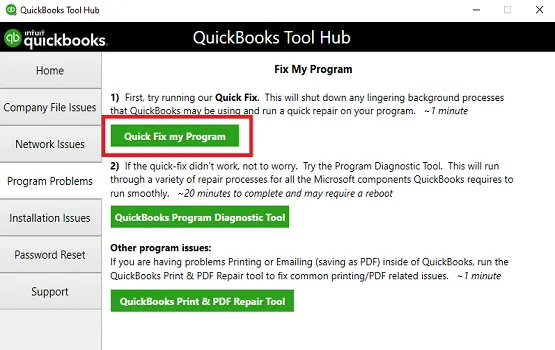
a. Run Quick Fix on my program
The Quick Fix my Program utility closes the QuickBooks processes in the background and then runs a quick repair on the program.

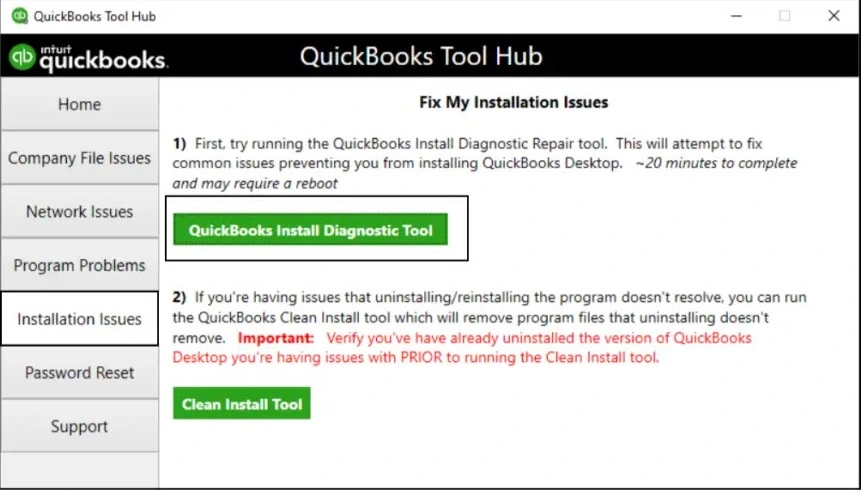
b. Run the QuickBooks Install Diagnostic tool
If something goes wrong during installation, it can hamper common QB operations or cause other problems. Run the QuickBooks Install Diagnostic Tool to fix the common installation issues:

The QuickBooks Print & PDF Repair Tool is a utility that fixes problems that prevent you from printing invoices in QuickBooks and other printing and saving documents as PDFs, from QuickBooks Desktop.

Renaming the QBPrint.QBP file replaces the files with a new one, resolving all associated issues. You may also lose all the custom printer settings for forms and other documents.
Note: Terminal Service users report duplicate Qbprint.qbp files appearing with stored client data; carefully check all folders for unusual copies.Tip: You may need to show hidden files and folders or use Windows Search to locate these files in Windows.
Reinstalling QuickBooks Desktop removes all version-specific files and folders, replacing them with fresh ones to resolve errors or issues that might cause PDF and printing problems in the software, ensuring smoother performance and improved functionality overall.
In conclusion, printing invoices in QuickBooks Desktop ensures seamless record-keeping, efficient invoice processing, and a streamlined workflow. However, if you cannot print invoices in QuickBooks, the following information will help you identify the root causes and guide you through various steps, such as verifying your printer setup, repairing the data file, and more.
For further assistance, reach out to the QuickBooks Support Team at +1 (866) 500-0076 and talk to an expert today!
How do I print invoices from QuickBooks?
To print invoices from QuickBooks, go to Sales and choose Invoices. Locate the invoice, and if the transaction is already paid, click on Print. If not, select the drop-down arrow under Action and click on Print.
How do I repair QuickBooks print and PDF?
To repair QuickBooks print and PDF components, you can access and run the QuickBooks Print and PDF Repair tool in QuickBooks Tool Hub. This runs a quick scan to identify what’s gone wrong and runs a quick repair promptly. If the error persists, consider renaming QBPrint.QBP file and make sure the printing setup is correct.
Why is my QuickBooks invoice template not printing correctly?
A QuickBooks invoice template may not print correctly due to a number of issues, including incorrect printer setup, corrupt template or company files, outdated software or drivers, and specific formatting errors.
How to reset the printer print settings in QuickBooks?
To reset QuickBooks printer settings, first try renaming or deleting the QBPrint.qbp file, which will force QuickBooks to generate a new one. If that doesn’t work, use the QuickBooks Print and PDF Repair Tool to fix issues.
Why am I having trouble printing QuickBooks Desktop?
Trouble printing from QuickBooks Desktop often stems from outdated printer drivers, a corrupted or incorrectly configured printer setup in QuickBooks, or general Windows and network issues.
Other causes can include problems with the system’s temporary files, user permissions, or a conflict with security software.
Lana Creston is an experienced technical and accounting writer with a total of 9 years of experience. She currently works on QuickBooks accounting and technical guides at QuickBookSupportNet. Lana has a passion for reading and writing about various technical topics, especially exploring new accounting methods and software, while continuously expanding her expertise in the ever-evolving field of finance and technology.
Quick, clear, and hassle-free QuickBooks assistance.
Change Sales Tax Rate in QuickBooks Online
Mar 16, 2026