QuickBooks Clean Install Tool: Reinstall QuickBooks Desktop

Dec 15, 2025

Admin |

Estimated Read Time : 5 MIN

When you rely on QuickBooks, even a minor technical glitch can cause major disturbances. Facing QuickBooks error, damaged or corrupted files, and incomplete updates can cost you valuable time. This is the time when the QuickBooks Clean Install tool comes in as a time and energy saver. 

The QuickBooks clean install tool is designed to remove corrupt files and reinstall QuickBooks from scratch. With this tool, you can restore program stability and improve performance. At QuickBookSupportNet, we understand how stressful accounting issues can be. We not only fix QuickBooks issues but also bring you peace of mind with your business workflow. 

Before you start

  • Ensure to download the Latest version of QuickBooks.
  • Keep your license number handy. You may find it on your product’s original packaging.
  • Did you buy it online? If yes, you can find it in your purchasing mail confirmation.

What is the difference between a Standard install and a clean install in QuickBooks? 

Feature Standard InstallClean Install
ProcessReinstalls QuickBooks over existing installation files.Uninstalls the program completely, removes associated files, and then installs fresh.
PurposeA basic reinstallation to fix minor issues.To resolve persistent errors, corrupted files, or company file issues that a standard reinstallation doesn’t fix.
DataYour company files are not affected.Your company files are not affected, but it’s still recommended to back them up.

What is the QuickBooks Clean Install Tool? 

The QuickBooks Clean Install Tool is a utility tool designed for fresh reinstallation of QuickBooks accounting software on the Desktop. QuickBooks Desktop clean install helps in fixing deep installation or performance issues. It is because a simple uninstall and install process can not fix various issues. 

Learn how to clean install QuickBooks Desktop.

We are proceeding towards the solution, and before that, you must know that Clean Install was once a utility feature in the QuickBooks Tool Hub

QuickBooks Clean Install Tool

Solution 1: Completely remove the QuickBooks Desktop application and then reinstall it.

Step 1: Remove QuickBooks

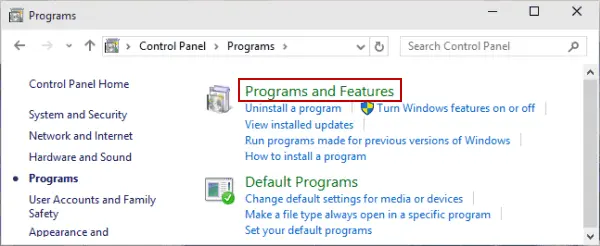
  • Click on the Windows Start menu and search for Control Panel.
  • Open the Control Panel.
  • Click on Programs and Features or Uninstall a Program.
Programs and Features
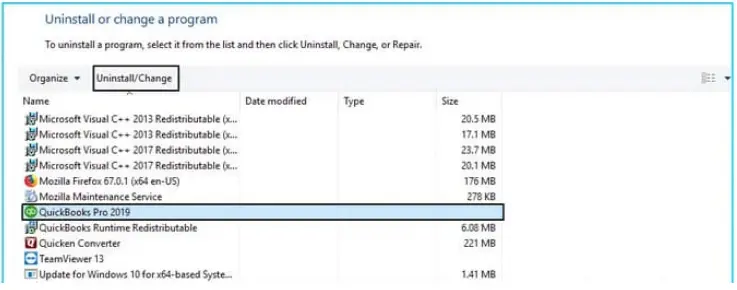
  • Select the version of QuickBooks Desktop that you would want to remove from the list of programs.
  • Click on Uninstall/Change, Remove > Next.
uninstall or change a program
  • In case you do find these options, sign in and sign back into your Windows as an admin.

Step 2: Again, Install the QuickBooks Desktop 

Once you are done with Step 1, install the QuickBooks Desktop software. When you proceed with the installation, QuickBooks will automatically install the new folders and rename the old ones.

Solution 2: Manually uninstall the QuickBooks application and rename the installation folders.

  • Remove your QuickBooks application again.
  • Click on the Windows Start menu.
  • In the search field, look for File Explorer and open it.
  • Fetch the folder that has your company files. This must be your QuickBooks folder.
    • C:\ProgramData\Intuit\QuickBooks (year)
    • C:\Users\(current user)\AppData\Local\Intuit\QuickBooks (year)
    • C:\Program Files\Intuit\QuickBooks (year)
    • 64-bit version C:\Program Files (x86)\Intuit\QuickBooks (year)
  • Right-click on the company file folder and rename it.
  • Add the extension .old at the end of the folder name.
  • Doing so would prevent QuickBooks from opening the folder when you reinstall the application.
  • Now, you can reinstall QuickBooks Desktop software.
  • While renaming the folder, if you get an access error message:
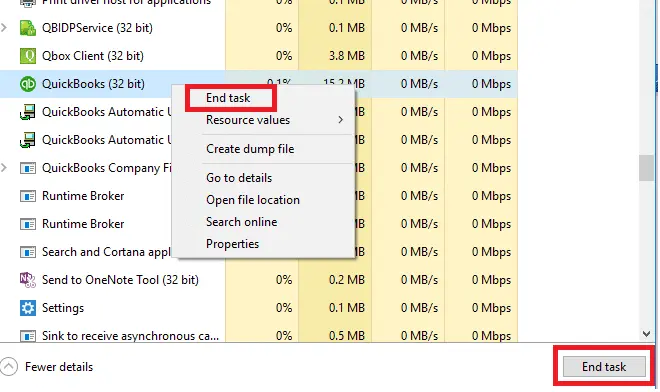
  • Click on the Windows Taskbar and open the Task Manager.
  • Click on the Processes tab.
End all the QB processes from Task Manager
  • Now, to sort the list, select the Name column header.
  • Select the following processes and click on End Process for each:
    • QBDBMgrN.exe, 
    • QBDBMgr.exe, 
    • QBCFMonitorService.exe, 
    • Qbw32.exe. 

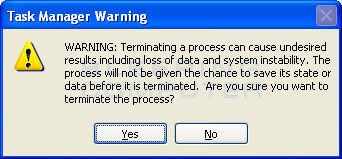
If a message appears with the phrase, “WARNING: Terminating a process can cause undesired results…“, click on Yes

Task Manager Warning

Conclusion

The QuickBooks Clean Install Tool is more than a troubleshooting solution; it is a time-saver tool for your accounting system. It ensures a clean reinstallation of QuickBooks with improved reliability. However, using the tool correctly is required to avoid risk data. 

That is why QuickBookSupportNet is always here to stand by you. Our team of QuickBooks experts ensures all data safety and fixes issues in a timely manner. You can 100% trust QuickBookSupportNet to turn your frustration into relief. Your business deserves dependable support. For any assistance, contact us at +1(866)500-0076

Frequently Asked Questions

What is QuickBooks Clean Install on Windows?

QuickBooks Clean Install is a process to install QuickBooks with a complete fresh start and new files. There is no connection remaining with the previous QuickBooks installation files and data. 

Can I Uninstall QuickBooks and reinstall without losing my data? 

Yes, you can easily uninstall and reinstall QuickBooks without losing any data. You just need the correct steps to Clean Install QuickBooks Desktop, which you will find at QuickBooks Support Net. 

Do I need to uninstall QuickBooks before installing it on a new computer? 

Keep your product and license info available. Uninstall the existing QuickBooks program before attempting a reinstall. On your PC where you want to install QuickBooks Desktop, download the installation files or insert the CD.

How do I run the QuickBooks Install Diagnostic tool? 

To run the QuickBooks Install Diagnostic tool, you are required to first download and install the QuickBooks Tool Hub from Intuit’s official website.

  • Open the Tool Hub.
  • Click on Installation Issues and run the tool.

Once done, you can now restart the PC.

About The Author

Lana Creston

Lana Creston is an experienced technical and accounting writer with a total of 9 years of experience. She currently works on QuickBooks accounting and technical guides at QuickBookSupportNet. Lana has a passion for reading and writing about various technical topics, especially exploring new accounting methods and software, while continuously expanding her expertise in the ever-evolving field of finance and technology.

Quick, clear, and hassle-free QuickBooks assistance.

Get a Free Consultation with Our QB Tax Experts
Connnect with Our Certified QuickBooks Professionals - Dial Tollfree: +1(866)500-0076