Jan 10, 2026
Admin |
Estimated Read Time : 5 MIN
Spreadsheet Sync, a feature of QuickBooks Online Advanced & Accountant that allows you to integrate Excel or Google Sheets with QBO seamlessly. This way, you can export or import your manually entered data from the sheets into the software to perform bulk actions, such as custom reporting, bulk changes or edits, data updates, and consolidations.
When performing the sync, it is common to face the general QuickBooks Spreadsheet Sync issues or errors. Often, connectivity issues, incorrect data format, and/or incorrect login credentials are the primary reasons this happens. Depending on the issue you encounter, you will need to follow the appropriate troubleshooting steps outlined below.
Table of Contents
ToggleHere’s why your bulk data updates and deeper financial insights may be hampered when using the QuickBooks Spreadsheet Sync Manager:
To prevent QuickBooks Spreadsheet Sync issues, make sure to
Despite taking all precautions to avoid common issues, you may still encounter problems syncing QuickBooks Online Spreadsheet Sync with Excel or Google Sheets. You may experience general issues during setup, data import, or other stages of the process.
Explore the scenarios where you might get stuck, and follow the steps below to ensure a smooth sync of QuickBooks Spreadsheet Sync Manager with Excel or Google Sheets.
I can’t access Spreadsheet Sync from QuickBooks Online Advanced. How do I find it?
Note: Only the primary and company admins, as well as standard (all access) users, of QuickBooks Online Advanced can access and manage Spreadsheet Sync.
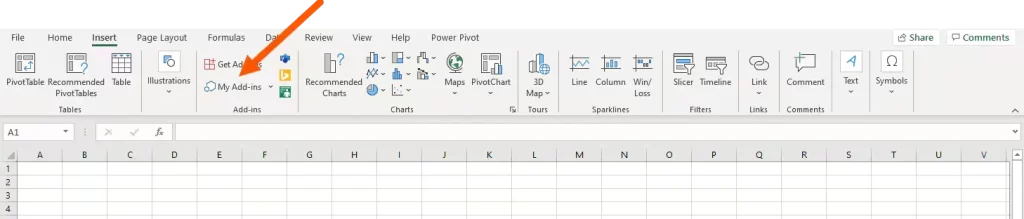
To open Spreadsheet Sync in Excel for Office 365, choose the Insert tab on the ribbon, navigate to My Add-ins, pick Admin Managed, and finally click Spreadsheet Sync.

Spreadsheet Sync won’t load in Excel if your computer’s embedded browser is Internet Explorer 11, as it is discontinued.
Note: If you have installed the Spreadsheet Sync, access it through the Settings in QuickBooks Online Advanced or from the Spreadsheet Sync tab on the navigation ribbon in Excel.
I’m trying to install and use Spreadsheet Sync, but I’m not able to. What do I do?
Only admins of QuickBooks Online Advanced can first access Spreadsheet Sync. Admins can navigate to Company Settings in the Spreadsheet Sync toolbar to add users.
My accountant manages my books, can they use Spreadsheet Sync?
If your accountant has admin privileges in your QuickBooks Online Advanced account, they will be able to access and use Spreadsheet Sync.
What login am I supposed to use?
Log in to Spreadsheet Sync using your QuickBooks Online Advanced admin credentials.
How do I change the filters used for refreshing my sheet in Current Sheet (Quick)?
In the toolbar, select Refresh and choose Current Sheet to select new data filters.
How do I refresh a pivot table I created from a report template? When I refresh the report sheet, the sheet containing the pivot table doesn’t update.
Right-click on a cell and select Refresh to refresh a pivot table.
When trying to post data to QuickBooks Online in the transaction template, for example, invoices and bills, or purchase & sales receipts, you may see errors if the data doesn’t match the criteria validated.
Common posting errors
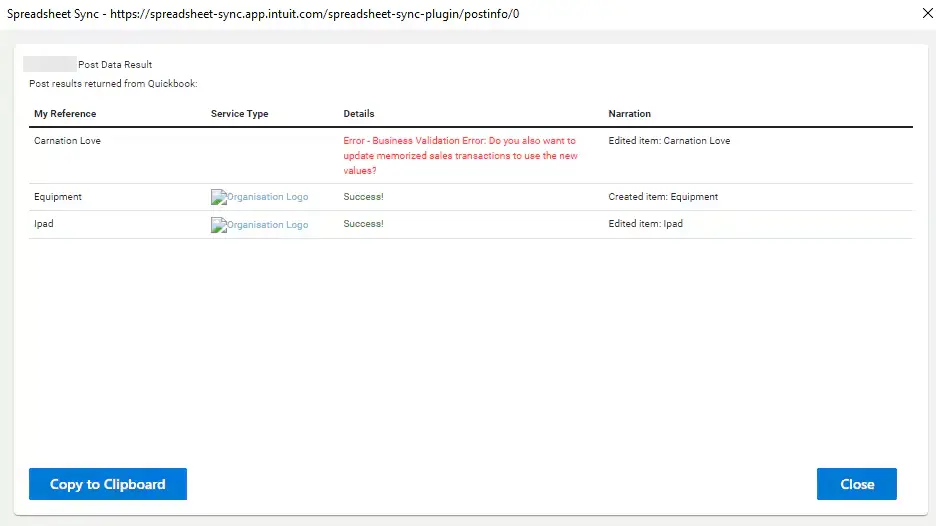
If you enter data incorrectly into a transaction or posting template, Spreadsheet Sync will display an error message. Some specific error messages explain how to fix the data. If the error message isn’t specific, check the inputs against this list:

OLE action error: This is an Excel message that usually occurs when pulling or simply downloading data from QuickBooks Online Advanced into Spreadsheet Sync. Here are the reasons why this happens:
This isn’t an error message but a warning from Excel that the download request is taking longer than 90 seconds to process. Click OK/Proceed if it takes more than 90 seconds,, and either select OK/Proceed again just after or ignore the message until the download finishes. Make sure not to cancel the download.
I was working in Spreadsheet Sync and accidentally pulled data into my current sheet rather than a new sheet. How can I get the original data back?
In case you already have the previous version of the Excel sheet, you can retrieve the data you were editing by opening the already saved version. If you do not have previously saved data, there is no option other than to start over.
Both my colleague and I need to use Spreadsheet Sync at the same time to work on data. Why isn’t it letting us?
Spreadsheet Sync allows multiple users to log in simultaneously using their individual logins, even while working with different company data. Two or more users who are working with the same company data won’t be able to update reports or post data to your QuickBooks Online Advanced.
My colleague made changes to a sheet in Spreadsheet Sync but I’m not seeing them. Is there an audit log I can use to find them?
To view an audit log in QuickBooks Online Advanced, go to Settings and choose Audit log.
Facing the QuickBooks Spreadsheet Sync issue when signing in/ importing or exporting data, or in other instances, is way more common than encountering an error. The above section will help you with common issues. However, if you see an error code/message, following the steps below will help resolve the error promptly.
Understand when you see the error and proceed with the steps accordingly:
Errors can occur when recording transactions (such as invoices, bills, or receipts) if the entered information doesn’t meet QuickBooks’ validation requirements.
Common posting errors
Specific error messages and fixes
Error: “Oops, something went wrong while generating the Excel spreadsheet”
Error: “This value doesn’t match data validation requirements”
OLE action error in Excel
This message appears when downloading large datasets or when the internet connection is slow.
I accidentally pulled data into my current sheet instead of a new one. How can I recover my original data?
Can multiple users work in Spreadsheet Sync simultaneously?
Can I track changes made by my colleague in Spreadsheet Sync?
Common QuickBooks spreadsheet sync issues make it challenging to integrate Excel or Google Sheets with QBO, which may require manually entering all the data or using a workaround. Ensure an active internet connection, and you have all the admin rights and other considerations to avoid such hampers.
If you still get stuck or have further queries, we recommend you consult QuickBooks Online support at 1(866)500-0076.
What is QuickBooks spreadsheet Sync?
QuickBooks Spreadsheet Sync is a QuickBooks Online Advanced & Accountant feature that lets you securely connect to Excel or Google Sheets for data import or export. This way, you can avoid unnecessary manual effort, update all the data in one go, make bulk edits if required, and more.
What does Spreadsheet Sync cost?
Spreadsheet Sync is an in-built feature of QuickBooks Online Advanced and Accountant, so you don’t need to pay for it separately. If you don’t have either the QBO Advanced or Accountant subscription, you will need to pay $137.50 for Advanced or ~$38-$275/month for Accountant.
How can I access Spreadsheet Sync?
To access Spreadsheet Sync, you first install the add-in for Excel (or Google Sheets), then open it from the Excel ribbon, click ‘Get started‘ or ‘Sign in‘, and log in with your QuickBooks Online Advanced/Accountant credentials to connect your company data and run reports or edit records.
What if QuickBooks Sync Manager is not set up to sync?
If QuickBooks Sync Manager is not set up to sync, you will need to manually enter the data in Excel for exporting to QBO or importing from QBO. This may lead to discrepancies or general data entry issues.
How to fix QuickBooks not linking to Microsoft Excel to allow export to Excel?
To fix QuickBooks not linking to Excel for export, ensure both apps are updated, compatible (desktop Excel needed), and restart everything; if issues persist, try repairing Office, toggling Windows UAC settings, or even reinstalling QuickBooks after Office is installed.
Who do I contact for help with Spreadsheet Sync?
To get help with Spreadsheet Sync, you must get help from QuickBooks Online experts. Either visit Intuit’s Help page and leave your query or connect with us at 1(866)500-0076 to get instant help from QuickBooks ProAdvisors.
Lana Creston is an experienced technical and accounting writer with a total of 9 years of experience. She currently works on QuickBooks accounting and technical guides at QuickBookSupportNet. Lana has a passion for reading and writing about various technical topics, especially exploring new accounting methods and software, while continuously expanding her expertise in the ever-evolving field of finance and technology.
Quick, clear, and hassle-free QuickBooks assistance.