Feb 23, 2026
Admin |
Estimated Read Time : 5 MIN
Is QuickBooks Desktop showing error PS036 when you try to download payroll updates? This error can prevent tax tables from updating properly, leading to incorrect paycheck calculations and potential compliance risks.
QuickBooks error PS036 typically appears when there’s an issue with your payroll subscription, billing details, or an incomplete payroll update. If not resolved quickly, it can interrupt payroll processing and create unnecessary stress during tax season.
In this guide, we’ll break down the common causes of the error and provide simple, step-by-step solutions to help you restore payroll updates and keep your payroll running accurately and on time.
Table of Contents
ToggleExplore the possible causes that prevent payroll updates and trigger QuickBooks error code PS036:
Discover effective troubleshooting methods to fix QuickBooks error PS036 Window 10/11 and successfully update your payroll without interruptions:
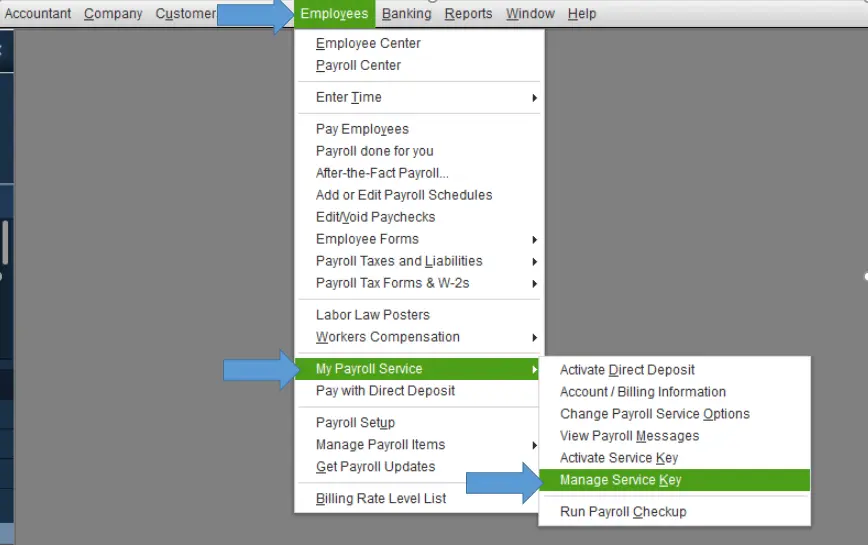
Check your payroll subscription and make sure it’s active so you can update the services:

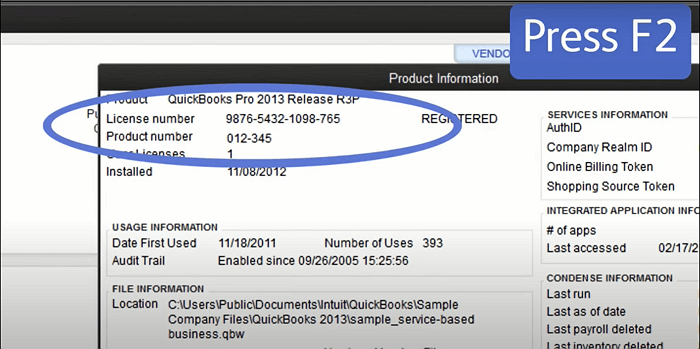
It’s crucial to have the latest security and software improvements for an uninterrupted software experience. Learn how you can check if the software is registered to fix QB error PS036:

Note: If it doesn’t say “Activated,” make sure to register QuickBooks Desktop.
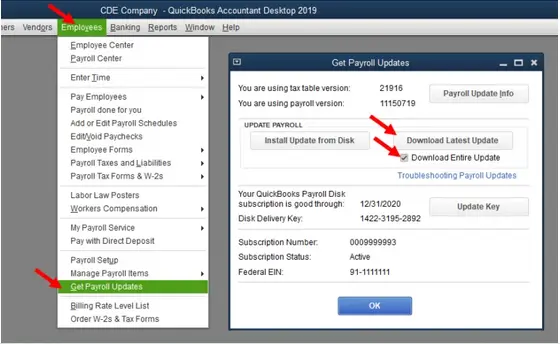
Now, get the latest payroll tax table update.

Updating the service key revalidates the payroll license, renews the connection to the Intuit servers, and ensures that the payroll service is considered active.
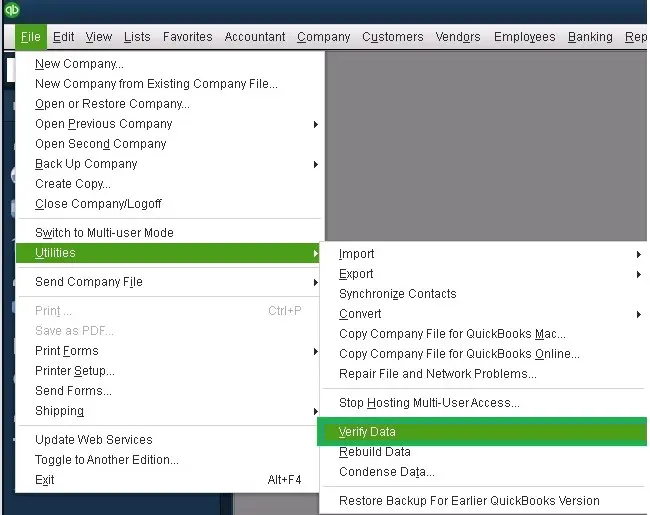
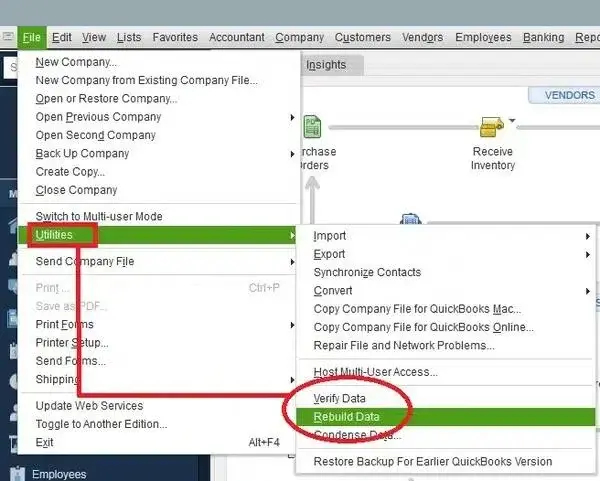
The Verify and Rebuild Data utility verifies the file for potential damage and then performs a quick rebuild, ensuring it won’t affect payroll data and resolve QB error code PS036.
Use the Verify tool to check your company file for possible errors or data issues.

Results:
If the Verify tool detects damage in your data, run the Rebuild tool to fix your company file. You’ll need to create a backup before starting the rebuild process.
Note: If you’re using Assisted Payroll, reach out to support before rebuilding your data.

Renaming the Paysub.ini file forces the application to create a new, uncorrupted configuration file upon restart.
A corrupted file in the CPS folder prevents QuickBooks from reading existing tax tables and other data, resulting in the QuickBooks Desktop payroll error PS036. Let’s learn how to fix the file:
Update the Federal Employer Identification Number (EIN) in the company settings and verify the subscription in the Payroll Service portal to make sure the PS036 error in QuickBooks Desktop is resolved:
i. Update your company’s legal name
Note: If you also need to change the Intuit Account name, mark the check box under the new fax number field.
Every time you process payroll, the company name will automatically be updated in QuickBooks Desktop.
ii. Update your Federal EIN
You’ll receive an email confirmation within 3–5 business days confirming that we’ve received your entity change forms and supporting documentation.
In the meantime, you may continue processing payroll until one of our specialists reaches out to you. If you have any questions about the entity change process, please contact us at EntityChanges@intuit.com.
i. Update your company’s legal name
ii. Update your Federal EIN
If your EIN changes, contact Intuit first so they can update it in their system.
To resolve this issue, the QuickBooks Tool Hub now includes a feature that lets you exclude certain QuickBooks files from being scanned. When these files are added to the exclusion list, Microsoft Defender will skip scanning them during installation, which helps the update run at normal speed. Follow the steps below to enable this option.
Note: You must be logged into Windows with administrator privileges to add exclusions. If you’re not signed in as an admin, the “Add Defender Exclusion” option will be disabled. In that case, please contact your system administrator to set up the exclusion.
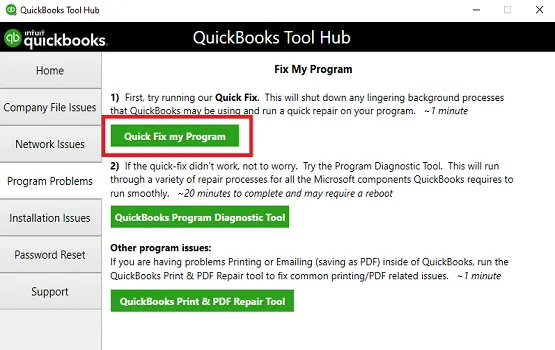
The Quick Fix my Program closes the background processes that QuickBooks uses and then runs a quick repair on your computer.
Note: Make sure to download and install QuickBooks Tool Hub to the latest release (1.6.0.8).

Windows Firewall is a system security application that controls incoming and outgoing network traffic to protect your computer from viruses and malware. If QuickBooks is considered a threat to your computer, it will block those processes and their sources. To resolve this, ensure Windows Firewall is configured for QuickBooks Desktop and allow access.
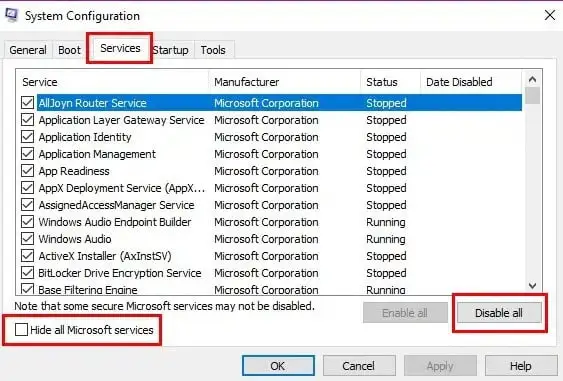
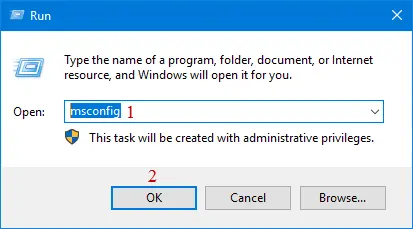
Reinstalling QuickBooks Desktop in Selective Startup ensures that no other or third-party applications interfere while you download or install your payroll updates.
Before you start, make sure you:
To make sure no other apps come in between, switch to Selective startup. If you are not comfortable performing these steps, consult your computer’s manufacturer or a Windows expert.


Finally, we conclude this blog with a quick guide to resolving QuickBooks error PS036, which typically occurs during payroll updates or payroll subscription verification. By carefully following the troubleshooting steps, you can fix the issue and continue processing payroll smoothly.
If the error persists or you need expert assistance, feel free to consult certified QuickBooks professionals. Dial our +1 (866) 500-0076 to connect with a QuickBooks ProAdvisor today!
What is error code PS036 in QuickBooks?
Error code PS036 in QuickBooks Desktop Payroll indicates a “trouble verifying payroll subscription” message, typically occurring when the system cannot validate your payroll service, leading to failed tax table updates or payroll processing errors.
How do I fix a QuickBooks error?
Fixing a QuickBooks error generally involves using the QuickBooks Tool Hub, a centralized, automated utility designed by Intuit to resolve common issues with company files, program performance, and installation.
What is error code PS033 in QuickBooks?
QuickBooks Error PS033 is a payroll update error indicating that the application cannot read or load payroll setup files, often due to damaged tax table files, an inactive subscription, or outdated software.
How to fix the QuickBooks payroll subscription issue?
To fix a QuickBooks payroll subscription issue, verify the subscription is active, update the service key, and ensure your billing information is current in CAMPs. Run the QuickBooks Tool Hub to resolve connectivity errors and ensure you are using the latest tax tables.
Lana Creston is an experienced technical and accounting writer with a total of 9 years of experience. She currently works on QuickBooks accounting and technical guides at QuickBookSupportNet. Lana has a passion for reading and writing about various technical topics, especially exploring new accounting methods and software, while continuously expanding her expertise in the ever-evolving field of finance and technology.
Quick, clear, and hassle-free QuickBooks assistance.
Learn How to Merge Vendors in QuickBooks Desktop
Mar 19, 2026