QuickBooks Component Repair Tool: Learn to Install and Use

Jan 26, 2026

Admin |

Estimated Read Time : 5 MIN

TheQuickBooks Component Repair Tool,developed by Intuit, is an important functionality to repair QuickBooks in certain ways. You can use it to repair multiple issues such as PDF and Print error, .NET Framework, MSXML, and more that affect the QuickBooks program.

It is easy to use the QuickBooks component repair tool. You need to click on Program Problems and then select QuickBooks Program Diagnostic Tool . . . .  Walk through this guide based on the component repair tool in QuickBooks. In this guide, we have shared concrete steps to install the QuickBooks component repair tool, how to use it, and fix the errors. 

Steps to Install and Use the QuickBooks Component Repair Tool 

Step 1: Install the QuickBooks Tool Hub

  • Close the QuickBooks application.
  • Download the QuickBooks Tool Hub (1.6.0.8) latest version.
  • Save the file you have just downloaded to an easy-to-reach location, for example, in the downloads folder. 

Note:- In case you already have an installed QuickBooks Tool Hub, you can confirm its version. Simply, click on the Home tab, and you can see the version at the bottom.

  • Open the QuickBooksToolHub.exe (downloaded file).
  • Continue with the on-screen instructions, install, and agree to their terms and conditions
  • Once the installation is finished, double-click on the QuickBooks tool hub icon, as you can see in the image below. You may find it on your Windows desktop. 
qb tool hub

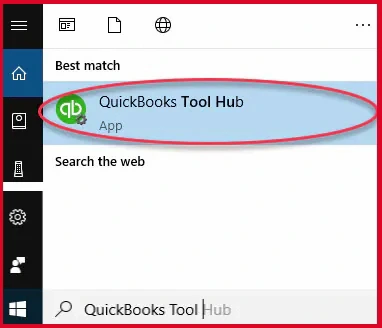
Note:- If there is no icon on the desktop or if you are unable to find the icon, click on the Windows Start menu, type tool hub and open the program. 

QuickBooks Tool Hub

Step 2: Run Quick Fix my program

  • Within the QuickBooks Tool Hub application, click on Program Problems.
  • Now, select Quick Fix my Program.
  • Launch QuickBooks Desktop and open your data file.

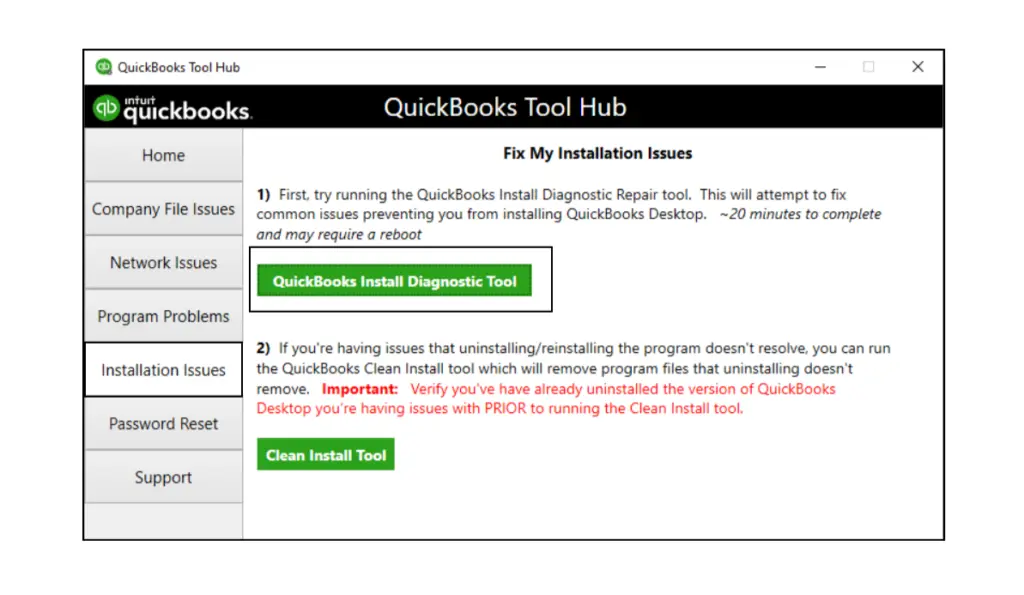
Step 3: Run QuickBooks Install Diagnostic Tool 

QuickBooks Install Diagnostic Tool
  • The QB tool will start scanning the files and any issues related to QuickBooks. 

Issue with the Script-based Install: Error 1628

Error 1628: Failed to complete script-based install or failed to complete installation

Quickbooks error 1628

Cause 

It happens when your Windows Installer detects any installation progress of a different application. This could be due to double-clicking on the install option

Resolution 

If this message appears in front of you, close it and confirm if the installation is running.

Still, the issue is not resolved:

Rename the InstallShield folder in:

  • 32 bit: C:\Program Files\Common Files
  • 64 bit: C:\Program Files (x86)\Common Files

To perform this, right-click on the folder, click on Rename, and change the name to Installshield_old.

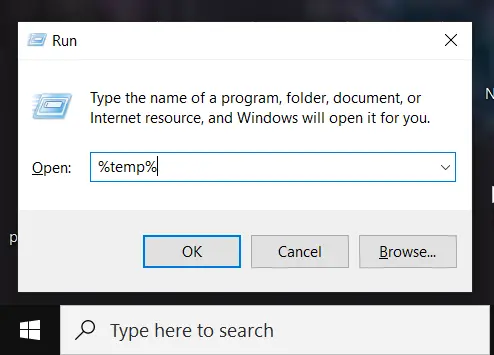
  • Press the Windows key + R.
  • In the open field, enter %temp% and then click OK.
Type TEMP
  • Within the temporary folder, delete the contents. 
  • Finally, try the installation again.

Conclusion 

Thanks for being with us! We hope that you have successfully repaired your QuickBooks component using QuickBooks Tool Hub and its features. If you are still struggling with the QuickBooks component repair tool, reach out to our senior QuickBooks specialist at +1(866)500-0076

Frequently Asked Questions 

1. What is the QuickBooks Component Repair Tool?

It is a utility by Intuit designed to repair damaged or missing QuickBooks components to help restore normal program functionality.

2. When should I use the component repair tool in QuickBooks?

You can use the component repair tool if QuickBooks is crashing, freezing, not opening, or you see error codes related to components like QBXML, .NET/MSXML, or other components.

3. Is this tool safe for my QuickBooks data?

Yes, the tool is completely safe as it repairs software components only and does not modify your company’s files or data.

4. Do I need to back up before running it?

It is recommended to back up your company file and any important data before making changes to QuickBooks.

About The Author

Lana Creston

Lana Creston is an experienced technical and accounting writer with a total of 9 years of experience. She currently works on QuickBooks accounting and technical guides at QuickBookSupportNet. Lana has a passion for reading and writing about various technical topics, especially exploring new accounting methods and software, while continuously expanding her expertise in the ever-evolving field of finance and technology.

Quick, clear, and hassle-free QuickBooks assistance.

Get a Free Consultation with Our QB Tax Experts
Connect with Our Certified QuickBooks Professionals - Dial Tollfree: +1(866)500-0076