Mar 5, 2026
Admin |
Estimated Read Time : 5 MIN
QuickBooks error 6069 is a common issue that occurs when the software fails to access the company file. Users may encounter an unexpected error message like:
“An unexpected error has occurred in QuickBooks Desktop Pro 2021: DBConnPool::HandleConnectionError errorCode:-6069, dbCode:-103 from file:’src\connpool.cpp’ at line 1043 from function:’DBMgr::DBConnPool::init'”
This error can disrupt your workflow, preventing you from opening or working on your company file. It often arises due to corrupted company files, damaged QuickBooks program components, insufficient Windows permissions, or conflicts with user profiles. Understanding the causes and following the correct troubleshooting steps can help restore access and prevent future errors.
Table of Contents
ToggleQuickBooks error code 6069 usually occurs due to permission issues, corrupted user profiles, damaged company files, or problems within the program or its installation:
If QuickBooks unexpectedly closes due to QuickBooks error 6069 when opening the company file or in other instances, you can follow these effective troubleshooting steps to resolve the issue.
When you close your company file, QuickBooks automatically reopens any open windows. If multiple windows or large reports are set to open on startup, this can cause an unrecoverable error when the program launches.
Here’s how to open the company file with all windows closed:

Try accessing your company file by signing in with another QuickBooks user account.
Note: If the issue occurs while logging in as the admin user, run the QuickBooks File Doctor tool to repair the company file.
Windows Server 2012 and newer
Note: It’s recommended to check with your IT specialist before performing the steps below.
If the error no longer appears, it indicates that your original Windows user account may be corrupted or lacks sufficient permissions. In this case, contact your IT professional for assistance in repairing or replacing the Windows user profile.
Windows Server 2012 and newer
Note: Speak with your IT administrator before proceeding with the steps below.
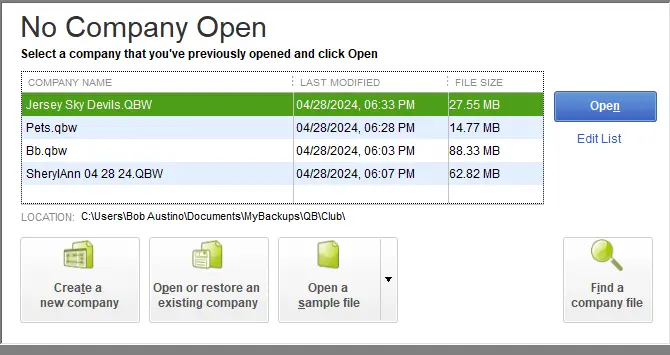
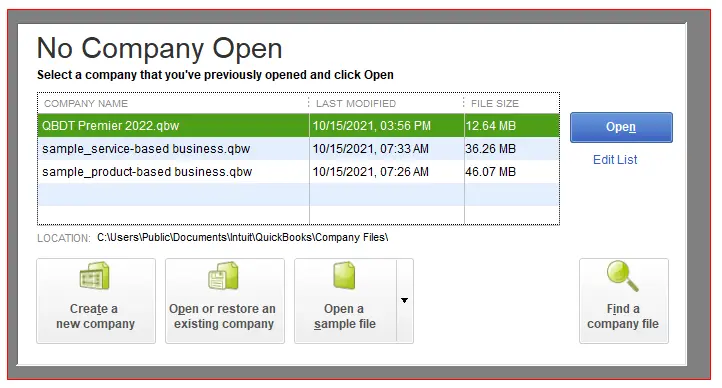
Opening a sample company file can help determine whether the issue lies in your company file or in QuickBooks.
Let’s open a sample file

If the sample file works without errors, it indicates that your company file—or the folder containing it—may be damaged. In that case, you can try restoring a recent backup or using the Auto Data Recovery (ADR) feature. If these options don’t resolve the problem, perform basic troubleshooting to repair any data damage.
Simply copy your company file to a new folder to verify whether the folder you use to open it is damaged.
Copy the company file to a different location
If you don’t see any error when opening the company file from a different location, it means the company file folder is damaged, or the folder path might be too long. Now, you must create a new folder to save the company file.
If you still get the same error, proceed with the next solution.
The QuickBooks File Doctor verifies the company file for potential damage and network connectivity issues, then runs a quick repair to resolve QB error 6069.
Note: Make sure to download and install QuickBooks Tool Hub (1.6.0.8) in the most recent version available.
The scan duration varies based on the size of your file and may take 10 to 15 minutes. Even if the scan resolves the problem, it might still indicate that it was unsuccessful. After the scan completes, open QuickBooks and open your company file.
The repair process directly addresses the root cause of the error by replacing corrupt system files and ensuring proper communication between the software and the data file.
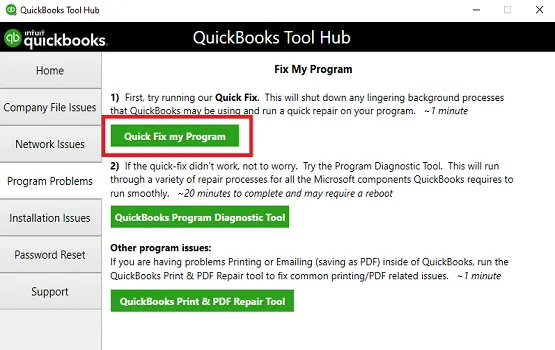
The Quick Fix my Program ends all the background processes that QuickBooks uses. It will also run a quick repair on the program.

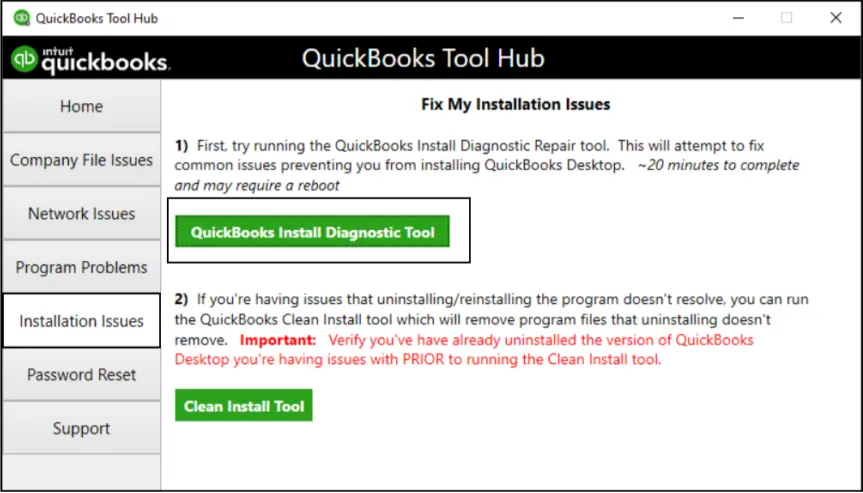
b. Run the QuickBooks Install Diagnostic tool
The QuickBooks Install Diagnostic tool automatically verifies your QuickBooks, diagnoses issues, and then runs a quick repair of the Microsoft components that the QB program uses.

Reinstalling QuickBooks Desktop, specifically by performing a clean install, helps resolve QuickBooks error 6069 (which typically occurs when the company file cannot be accessed due to damaged program files, incorrect folder permissions, or interference from security software).
A clean install removes corrupted installation components, resets system and folder permissions, and re-registers essential QuickBooks services. This process ensures that QuickBooks can properly communicate with the company file location and run without conflicts, restoring normal access to your data and application functionality.
Finally, we are wrapping up this comprehensive guide on the possible causes and effective troubleshooting methods for QuickBooks error 6069 when accessing your company file. By following the steps mentioned above, you can ensure smoother operations and prevent disruptions while working in QuickBooks.
For additional support, don’t hesitate to consult a QuickBooks ProAdvisor. Dial +1 (866) 500-0076 and speak with a certified expert today!
How to fix error 6069 in Intuit QuickBooks?
To fix QuickBooks error 6069, which typically occurs when opening a company file from a network location, run the QuickBooks File Doctor from the Tool Hub, or rename the .ND and .TLG files. Other effective solutions include moving the file to a local drive, updating QuickBooks, or checking file permissions.
What causes a company file error 6069?
Error 6069 occurs when the software cannot open, save, or access the company file, often due to file corruption, damaged installation, improper file permissions, or network connectivity issues.
How to fix QuickBooks error code 4_6069-associate?
QuickBooks error code 6069 (often associated with 4_6069) typically occurs when the software cannot open the company file, often due to file permission issues, improper file locations, or interference from security software.
What is error code 6000?
Error code 6000 on Canon Pixma/Maxify printers indicates a mechanical, paper, or sensor obstruction, often a line feed error or carriage jam. To resolve this, power off the printer, unplug it, and check for paper jams or foreign objects. Ensure ink cartridges are properly seated.
What is error code 6069 in QuickBooks?
Error code 6069 in QuickBooks occurs when the software cannot open, access, or save to the company file (.QBW), often indicating data damage, improper file location, or network connection issues.
Lana Creston is an experienced technical and accounting writer with a total of 9 years of experience. She currently works on QuickBooks accounting and technical guides at QuickBookSupportNet. Lana has a passion for reading and writing about various technical topics, especially exploring new accounting methods and software, while continuously expanding her expertise in the ever-evolving field of finance and technology.
Quick, clear, and hassle-free QuickBooks assistance.
A Quick Guide to Troubleshoot QuickBooks Error C 184
Mar 26, 2026