Dec 24, 2025
Admin |
Estimated Read Time : 5 MIN
As of June 1, 2022, the independent version of QuickBooks Assisted Payroll was discontinued and is no longer available for purchase. Now, QuickBooks Desktop Enterprise offers Enhanced or Assisted Payroll as part of its subscription, fully integrated with no additional subscription fees.
Depending on your QuickBooks Desktop subscription, you’ll have access to a variety of payroll services and features. To access QuickBooks Assisted Payroll specifically, you’ll need the QuickBooks Desktop Enterprise Diamond subscription.
In this post, we’ll explore the features it offers, the available add-ons and their associated fees, and guide you through the process of activating and setting up the service.
Table of Contents
ToggleQuickBooks Assisted Payroll is an integrated payroll service included with QuickBooks Desktop Enterprise Diamond, so you don’t pay additional service charges.
However, there are ancillary fees you’ll pay for services that aren’t included in your regular monthly subscription. Below is a table that explains how you need to pay the ancillary fees and the amount:
| Fee | Description | Fee Amount |
| Late or Backdated Payroll | Payroll not received by 5 PM PT at least two banking days before the pay date Note: Saturdays, Sundays & Federal Reserve Holidays aren’t banking days. | $100 |
| Payroll Non-Sufficient Funds (NSF) | Payroll debits (payroll, payroll taxes and payroll service fees) returned by your financial institution for insufficient or uncollected funds | $100 |
| Monthly Service Fee Non-Sufficient Funds (NSF) | Monthly service fees, returned by your financial institution for insufficient or uncollected funds | $25 |
| DD Reversal | Request to reverse Direct Deposit paychecks sent in error | $75 per payroll |
| Form or Return Copies | Request to create a new data file | $150 |
| Form or Return Copies (prior year) | Request for an additional copy of a current-year payroll tax return | $25 per form |
| Form or Return Copies (prior year) | Request for an additional copy of a payroll tax return prior to the year 2000 | $100 per year + $25 per form |
| Cancellations + Year-End Filings | Request the preparation of year-end filings when you cancel your payroll service | $150 per cancelation |
| Amendments | Request for alteration to a prior tax return for any closed quarter | Wage & Tax = $375 per amendment caseEmployee* = $250 per amendment case *Social Security Number and employee-only changes |
| Legal Entity Change | Request a change in EIN, ownership or company type; i.e. partnership to LLC | Included in the plan—no fee |
| Tax Notice | Request assistance with the resolution of a tax notice received from a federal or state agency | Included in the plan—no fee |
| Corrections | Request to correct payroll set-up or prior data errors | Included in the plan—no fee |
Important Note:
Terms, conditions, pricing, features, service and support options are subject to change without notice.
If you did everything correctly and on time (for example, entered accurate payroll info and submitted it when required), then QuickBooks will not charge you for certain services if a problem happens because of an error on their side with QuickBooks Desktop Assisted Payroll.There is an additional fee to the $100 late payroll fee, your company is still liable to pay a penalty directly to the tax agency if you submit or send the payroll late. Delivery charges: fax = no fee; UPS Next Day = $30; UPS Standard = $20.Payroll taxes, direct deposits, and fees will be split into two debits per payroll in Intuit QuickBooks Desktop Assisted Payroll. If your account doesn’t have enough funds to cover the amounts, your bank might reject one or both debits. then, Intuit will also charge the $100 NSF fee once. However, your bank might add the service charges for both debits.
Intuit QuickBooks Assisted Payroll is the most advanced payroll solution integrated with QuickBooks Desktop that automates various payroll tasks, including tax calculation, tax filing, and direct deposit.
Let’s explore the section below for all the advanced features you will have access for better payroll management:
Let Assisted Payroll QuickBooks use the already-submitted company-specific tax info to automatically calculate federal, state, and local payroll taxes.
This way, it automatically handles electronic payments and the filing of forms like QuickBooks forms 941, W-2s, and state equivalents directly with tax agencies. Reducing errors and manual efforts, and ensuring compliance with penalty protection.
New to QuickBooks Payroll and need consultancy, or require someone to take care of payroll processing for you?
Enjoy the U.S.-based QuickBooks Live expert-assisted support, available 24/7 for Enterprise, handling tax filings and setup. Let experts provide general resources and support, and explore chat or callback options for seamless integration and compliance.
Automates complex calculations, such as taxes and deductions, and integrates seamlessly to move data with QuickBooks payroll.
This ensures up-to-date tax tables while offering flexible payment options with direct deposit or check printing, ensuring compliance and helping you meet deadlines with reminders and e-filing features.
Enjoy seamless integration for better time tracking, manage HR & payroll, expenses, and all payroll tasks in one place.
Sync your payroll data directly into QuickBooks, eliminating manual entry, reducing errors, and providing real-time financial insights for better control, project tracking, and compliance.
Securely collect your employees’ bank details in QuickBooks Payroll Assisted and automate direct deposit of paychecks for faster and safer payments.
Manage tax deductions and give employees online access to payslips, eliminating paper checks and manual banking, while ensuring compliance and ease of setup – all with QuickBooks Payroll.
QuickBooks allows you to invite your employees to the QuickBooks Workforce portal so they can access their payroll details.
Let your staff access pay stubs, W-2s, time-off balances, and track their hours in the Workforce app. QuickBooks Assisted Payroll services also ensure you can easily connect with QuickBooks Time for enhanced time tracking.
Intuit QuickBooks Payroll Assisted lets you prepare 1099 tax forms for contractors, automating e-filing and mailing for streamlined 1099 management.
Handle complex tasks and easily integrate with your existing QuickBooks Payroll data, ensuring compliance with IRS tax regulations.
Now, Intuit has improved the security of payroll info in QuickBooks Desktop payroll, letting you invite someone to set up or sign in to your Intuit account and verify your contact info.
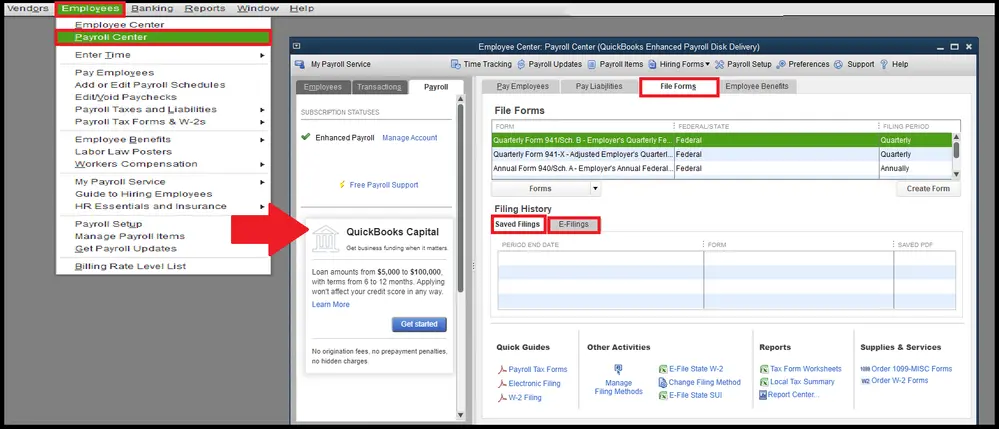
Intuit will send you a verification code required to process direct deposit payroll and set up your account. Proceed below to learn how to set up or sign in to the Intuit account for running payroll:
First, set up an Intuit account if you haven’t already. If you have an Intuit account, make sure to sign in and verify it using your mobile number.

While using QuickBooks, you may encounter various errors related to payroll updates or subscription verifications. Below are some common errors you might face:
| Note: We provide interlinked articles with troubleshooting steps to help resolve these issues at various stages. |
Managing payroll can be overwhelming, but with QuickBooks Assisted Payroll, you can leave the complexities to the experts. Whether you’re a small business or a larger enterprise, QuickBooks offers a tailored solution that streamlines payroll, tax filing, and employee management. Discover the right plan for you, and let QuickBooks simplify your payroll processes.
For additional help, contact the QuickBooks Payroll support number Call Us : +1(866)500-0076. Focus on growing your business, while QuickBookSupportNet handles the rest!
Is QuickBooks Desktop no longer supporting payroll?
Yes, QuickBooks Desktop no longer supports payroll as an independent software. Now, QuickBooks Desktop Enterprise comes automatically integrated with QuickBooks Assisted and QuickBooks Enhanced payroll within the software subscription without needing to pay additional charges.
What is the difference between QuickBooks Desktop payroll Assisted and Enhanced?
QuickBooks Desktop Enhanced Payroll allows you to run in-house payroll with automated tax calculations and e-filing. At the same time, Assisted Payroll is a hands-off, full-service option in which QuickBooks handles tax filing and payments for you, providing penalty protection.
Is QuickBooks Payroll better than ADP?
ADP is best for larger businesses needing robust HR, scalability, and global payroll with deep compliance, while QuickBooks is ideal for small businesses seeking an easy-to-use, integrated accounting and payroll solution.
What does QuickBooks Assisted Payroll include?
QuickBooks Assisted Payroll is a full-service payroll solution, primarily for QuickBooks Desktop Enterprise Diamond users, that handles all your payroll tasks: calculating, filing, and paying federal and state payroll taxes, offering free direct deposit/paychecks, employee self-service, and expert support, integrating time tracking, and even managing 1099s.
What is QuickBooks self-service payroll?
QuickBooks Self-Service Payroll lets businesses handle payroll tasks like running payroll, paying employees, and managing taxes themselves, offering control and flexibility, with features for after-the-fact corrections and employee self-service portals.
Lana Creston is an experienced technical and accounting writer with a total of 9 years of experience. She currently works on QuickBooks accounting and technical guides at QuickBookSupportNet. Lana has a passion for reading and writing about various technical topics, especially exploring new accounting methods and software, while continuously expanding her expertise in the ever-evolving field of finance and technology.
Quick, clear, and hassle-free QuickBooks assistance.