Jan 16, 2026
Admin |
Estimated Read Time : 5 MIN
Are you unable to download transactions or even log in to your QuickBooks software? While performing routine tasks such as logging in, updating the software, opening a company file, or managing data, you may encounter the QuickBooks ‘Something’s Not Quite Right’ error.
This error indicates underlying technical issues in QuickBooks—commonly caused by browser cache problems, login conflicts, server glitches, or company file data corruption.
Let’s explore why this error appears and walk through detailed troubleshooting steps to restore smooth functionality in both QuickBooks Desktop and QuickBooks Online.
Table of Contents
ToggleHere’s a list of possible reasons why “Something’s Not Quite Right – An Unexpected Problem Has Occurred” error in QuickBooks occurs in both the Desktop and Online versions:
When the “Something’s not quite right” error appears in QuickBooks Online (QBO), it’s usually a temporary system, browser, or data-loading issue, not a data loss problem. Follow these steps in order—most cases are fixed within minutes.
Try running QuickBooks Online in the private window to ensure nothing comes in between the software processes:
Make sure the browser you use is up-to-date and meets the minimum requirements of QuickBooks Online:
Note: To preview and print forms on Mac OS, you’ll also need the Firefox PDF plugin.
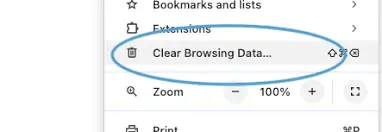
If the browser is compatible and everything is fine, you must resolve the problem by clearing the excessive cookies and cache. Choose the browser you use and proceed with the suitable steps below:
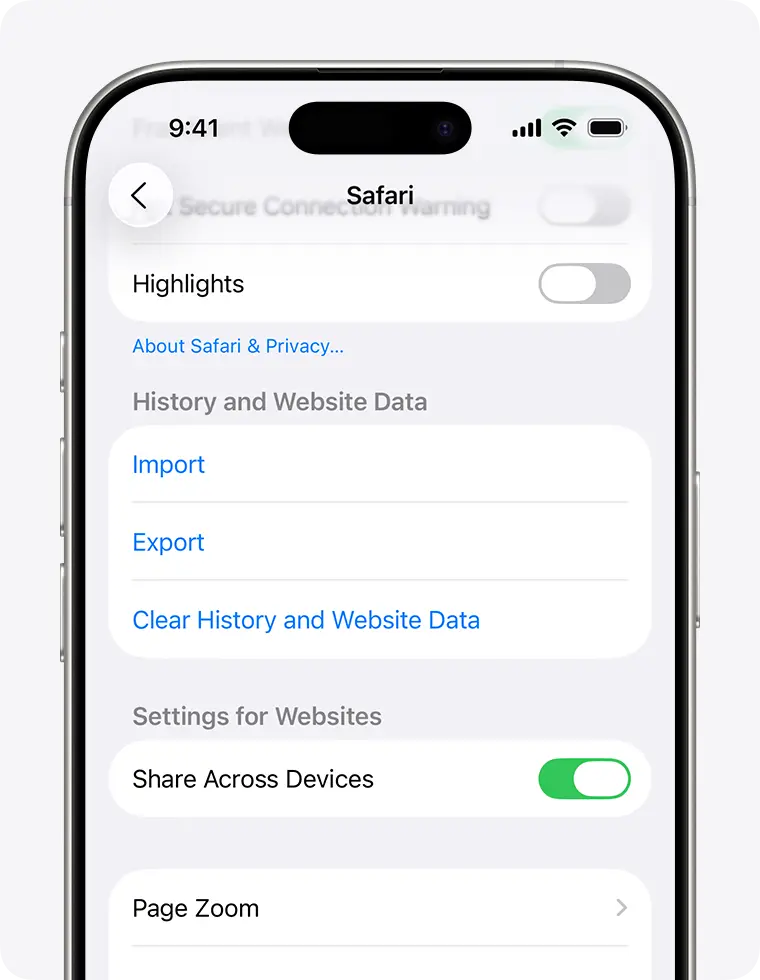
This will open the Clear browsing data and cookies dialog.

Verify the period you wish to erase, then tap Clear History. This will not affect your AutoFill details. If the button is gray, there may be no data to remove, or you may need to review your web content limits in Screen Time.

Here’s how to clear only Intuit-specific cookies (without deleting everything) in the most common browsers. This helps fix login or loading issues with QuickBooks Online:
The QuickBooks Desktop ‘Something’s Not Quite Right’ error is fairly common. Here’s a structured way to fix it, from quickest to most advanced:
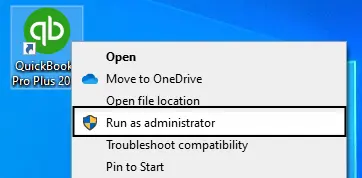
Allow QuickBooks to make the required changes in your system with sufficient admin permissions:

Not using an up-to-date version of QuickBooks Desktop can cause compatibility issues with the Windows OS or other system components, resulting in the ‘QuickBooks Something’s Not Quite Right’ error. To fix this, make sure to update QuickBooks Desktop to the latest version available.
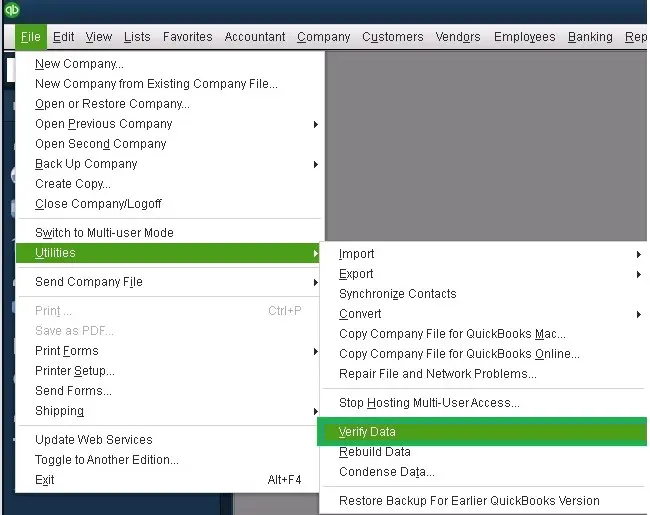
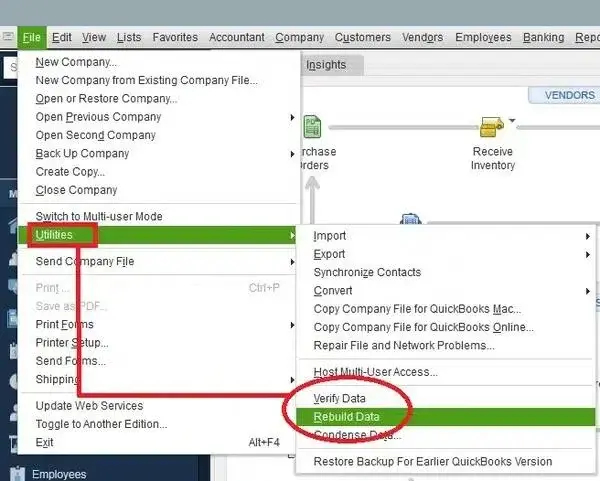
Let’s run the Verify and Rebuild Data utilities to resolve the common problems that might occur due to data damage or integrity issues:
Let’s scan the company file using the verify utility for possible errors or data damage:

Results:
If the verify tool detected the data damage, run the Rebuild utility to repair the company file. Back up your company file before rebuilding.
Note: If you use Assisted Payroll, contact us before you rebuild the company file data.

Windows Firewall is a built-in system security feature that protects your system by controlling the ports for incoming and outgoing data. If it detects anything, the Firewall blocks all processes and their sources. You must configure the Windows Firewall settings for QuickBooks Desktop by creating an exception to resolve the error.
If something went wrong during the QuickBooks install, it could cause problems when you try to use it. Run the QuickBooks Install Diagnostic Tool to fix common install issues.
| Important Note: Download and install the QuickBooks Tool Hub (1.6.0.8) in the most recent version. For an uninterrupted experience, use Windows 11 (64-bit). |
Seamless software functionality and compliance with system requirements are crucial for opening QuickBooks and performing basic operations, such as opening a company file, saving data, and more. This guide will help you ensure the ‘QuickBooks something’s not quite right’ error is fixed both in the Desktop and Online versions.
If nothing works or you need professional assistance, we highly recommend seeking help from experts. Dial +1(866)500-0076 to talk to a ProAdvisor at QuickBookSupportNet now!
What does ‘QuickBooks something’s not quite right’ mean?
The QuickBooks ‘Something’s Not Quite Right’ error indicates a temporary issue that prevents the software from functioning properly. It is commonly caused by browser-related problems in QuickBooks Online or firewall, permission, and system conflicts in QuickBooks Desktop.
Why is QuickBooks not working?
QuickBooks may stop working due to internet connectivity issues, Windows Firewall or third-party security software restrictions, outdated software versions, or operating system instability.
What causes a QuickBooks unrecoverable error?
A QuickBooks unrecoverable error can be caused by corrupted company files, damaged program components, missing Windows or QuickBooks updates, or network and system-related issues.
Why does QuickBooks keep saying something went wrong?
QuickBooks may display the ‘Something went wrong’ message due to browser-related issues, invalid characters in company names or lists, outdated software, data corruption, internet connectivity problems, or security settings blocking connections.
Why does QuickBooks show ‘Something’s Not Quite Right’ after an update?
QuickBooks shows ‘Something’s Not Quite Right’ after an update, often due to corrupted or damaged program files, including restrictions caused by Windows Firewall or antivirus security settings, permissions issues, or conflicts with other background programs.
Lana Creston is an experienced technical and accounting writer with a total of 9 years of experience. She currently works on QuickBooks accounting and technical guides at QuickBookSupportNet. Lana has a passion for reading and writing about various technical topics, especially exploring new accounting methods and software, while continuously expanding her expertise in the ever-evolving field of finance and technology.
Quick, clear, and hassle-free QuickBooks assistance.