
May 13, 2026
Admin |
Estimated Read Time : 5 MIN
Is QuickBooks failing to update payroll and showing error code PS107? Don’t panic—this issue can disrupt tax table updates and lead to inaccurate payroll calculations. If left unresolved, it may even result in compliance issues and penalties.
QuickBooks error PS107 is one of the PSXXX series errors that interrupts the payroll updates, resulting in inaccurate tax calculation, compliance with legal regulations and tax obligations, and any delays in taxes can result in tax penalties.
In this guide, we’ll explain why QuickBooks fails to update payroll and walk you through step-by-step solutions to ensure smooth, accurate tax table updates.
Table of Contents
ToggleThere’s no single factor that interrupts your payroll updates in QuickBooks. Let’s see all the possible reasons why you see QuickBooks payroll error PS107:
In this section, we will walk through step-by-step solutions to address the root causes discussed above. Be sure to try each method to successfully fix QuickBooks error code PS107 and ensure smooth, uninterrupted payroll updates.
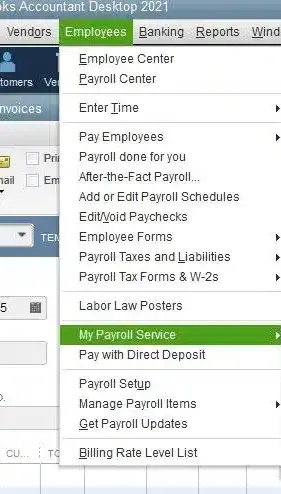
An active payroll subscription to have access to the current or latest updates and install them and resolve QB error PS107:

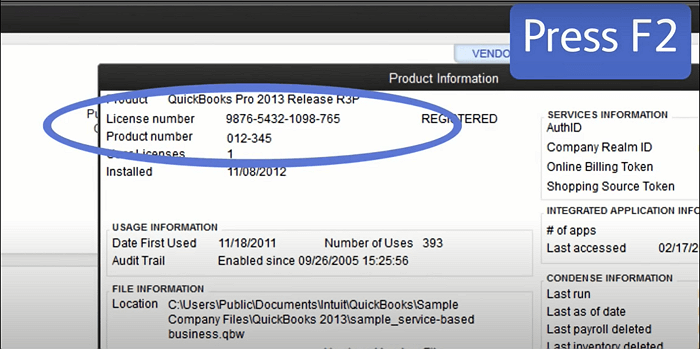
It’s important to have the latest security and software improvements. Here’s how to check if your software is registered:

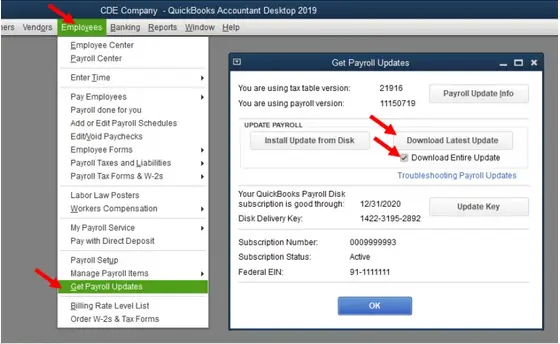
An up-to-date version of payroll tax table is crucial to process the payroll or direct deposit or else getting the server is quite common. Here’s how you can update the payroll services:

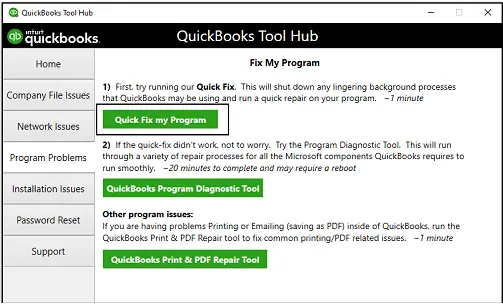
Let’s repair the incorrect installation of QuickBooks and repair the damaged program files using different tools in the QuickBooks Tool Hub:
| Important Note: Make sure to download and install QuickBooks Tool Hub (1.6.0.8) and use the Windows 11 operating system. |
The Quick Fix my Program will shut down the processes that QuickBooks uses and then runs a quick repair to your program.

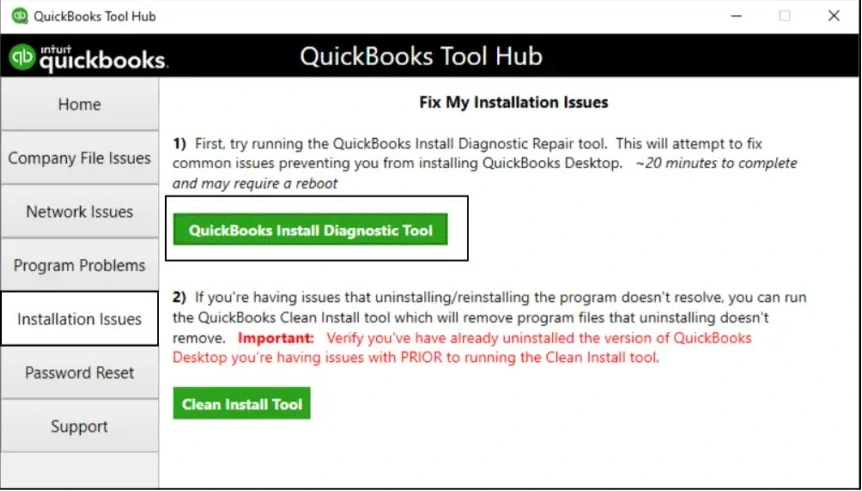
If there was an issue during the QuickBooks installation, it might cause problems when using the program. To resolve common installation errors, use the QuickBooks Install Diagnostic Tool.

Let’s make sure Windows Defender isn’t blocking the QuickBooks software either due to incorrect settings and ensure QB error code PS107 is resolved:
| Executable files | Location |
| AutoBackupExe.exe | C:\Program Files\Intuit\QUICKBOOKS YEAR |
| Dbmlsync.exe | C:\Program Files\Intuit\QUICKBOOKS YEAR |
| DBManagerExe.exe | C:\Program Files\Intuit\QUICKBOOKS YEAR |
| FileManagement.exe | C:\Program Files\Intuit\QUICKBOOKS YEAR |
| FileMovementExe.exe | C:\Program Files\Intuit\QUICKBOOKS YEAR |
| QuickBooksMessaging.exe | C:\Program Files\Intuit\QUICKBOOKS YEAR |
| QBW32.exe | C:\Program Files\Intuit\QUICKBOOKS YEAR |
| QBDBMgrN.exe | C:\Program Files\Intuit\QUICKBOOKS YEAR |
| QBDBMgrN.exe | C:\Program Files\Intuit\QUICKBOOKS YEAR |
| QBServerUtilityMgr.exe | C:\Program Files\Common Files\Intuit\QuickBooks |
| QBCFMonitorService.exe | C:\Program Files\Common Files\Intuit\QuickBooks |
| QBLaunch.exe | C:\Program Files\Common Files\Intuit\QuickBooks |
| QBUpdate.exe | C:\Program Files\Common Files\Intuit\QuickBooks\QBUpdate |
| IntuitSyncManager.exe | C:\Program Files\Common Files\Intuit\Sync |
| OnlineBackup.exe | C:\Program Files\QuickBooks Online Backup |
The CPS folder stores payroll tax table updates, subscription data, and related payroll files. Any damage to this folder means the payroll data is damaged and the process can’t be completed. Let’s rename the folder to replace it with the new one and resolve the associated issues:
Windows Firewall is a system security application that controls the incoming and outgoing ports to protect your computer from virus or malware attacks. If detected anything wrong, it blocks the source and all the processes related to that program. To make sure it isn’t blocked due to incorrect settings, you must configure Windows Firewall for QuickBooks Desktop and allow access.
We all know how crucial payroll updates are for compliance, accurate and on-time direct deposit, and more, but QuickBooks error PS107 must be making it challenging. By following the method above, such as updating QuickBooks, repairing an incorrect installation, and other steps, the error might be resolved.
What is error code PS107 in QuickBooks?
Error code PS107 in QuickBooks is one of the PSXXX series that occurs when trying to get the payroll or QuickBooks updates. You may also see a warning message stating, ‘You’ve retrieved the latest payroll update and need to validate your Payroll subscription.’
How to fix QuickBooks error PS077?
To fix QuickBooks error PS077, update QuickBooks Desktop, make sure QB is registered and the new releases are available, repair the software, and make Windows Firewall is not blocking the software updates.
What is QuickBooks Desktop error PSXXX?
QuickBooks Desktop error PSXXX (e.g., PS032, PS077) indicates a series of payroll update failures, preventing the software from downloading tax tables or validating subscription data.
Why is my payroll service not working in QuickBooks?
QuickBooks payroll issues often stem from an inactive subscription, outdated tax tables, internet connectivity errors, or, for desktop users, trying to run payroll in multi-user mode.
How to update the payroll tax table services?
To update payroll tax tables in QuickBooks Desktop, ensure you have an active payroll subscription, then navigate to the Employees menu, select Get Payroll Updates, and choose Download Entire Update. Finally, click Update to install the latest federal and state tax rates and calculations
Lana Creston is an experienced technical and accounting writer with a total of 9 years of experience. She currently works on QuickBooks accounting and technical guides at QuickBookSupportNet. Lana has a passion for reading and writing about various technical topics, especially exploring new accounting methods and software, while continuously expanding her expertise in the ever-evolving field of finance and technology.
How to Fix QuickBooks Error 15311 During Updates
Oct 22, 2026
How to Fix QuickBooks Payroll Error 15301
Oct 22, 2026