Oct 23, 2025
Admin |
Estimated Read Time : 5 MIN
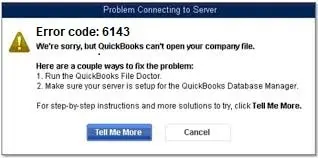
Incorrect network settings and data damage can make your QuickBooks Desktop behave unexpectedly, which would lead to your data loss or a long-term interruption to your workflow. You must be dealing with QuickBooks error 6143 since this is the error that indicates a data integrity issue, considering incorrect network settings and a corrupt company file.

To make sure that you start your work ASAP, let us perform some troubleshooting fixes to fix this error. You can bookmark this guide for further use.
Before you start
Table of Contents
Toggle| Damaged Company File | The .QBW file may have internal inconsistencies or data damage that blocks access. |
| Incorrect Network setup | Incorrectly configured hosting or firewall rules are preventing connections when multiple users access QuickBooks |
| File location issues | Storing the company file on an external drive or in a restricted folder often blocks access to QB. |
| Incorrect Folder permissions | Windows does not provide QuickBooks with the necessary rights to open or write to the file. |
| Outdated QB Version | Compatibility issues arise if the program has not been updated while the file structure has changed. |
| Antivirus interference | Security software misreads QB processes as threats, blocking them from the network. |
| Network Data, or TLF Issues | These supporting files go out of sync and prevent the main file from loading. |
Below are the solutions that would fix the error. We recommend that you continue with the solutions, and in case you need a quick fix if the issue is taking time, contact our senior QuickBooks specialist.


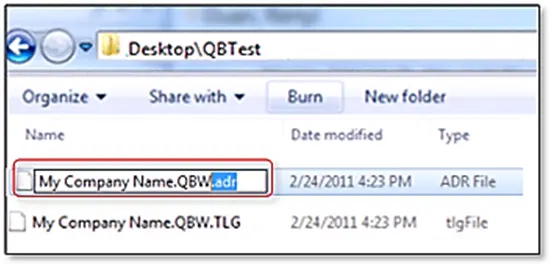
The .ND and TLG files are configuration files of your QuickBooks files that permit the QB application to access a company file in a network or multi-user environment.
You see these 6143 series errors in QuickBooks when these .ND and .TLG get damaged. And, if you rename these files, you would not lose any data. These files get created again when you scan them with QuickBooks Database Server Manager.
If the QB error code 6143 occurs again, try the next solution.
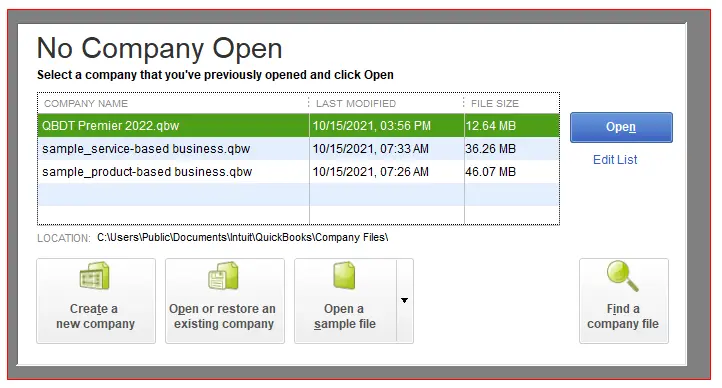
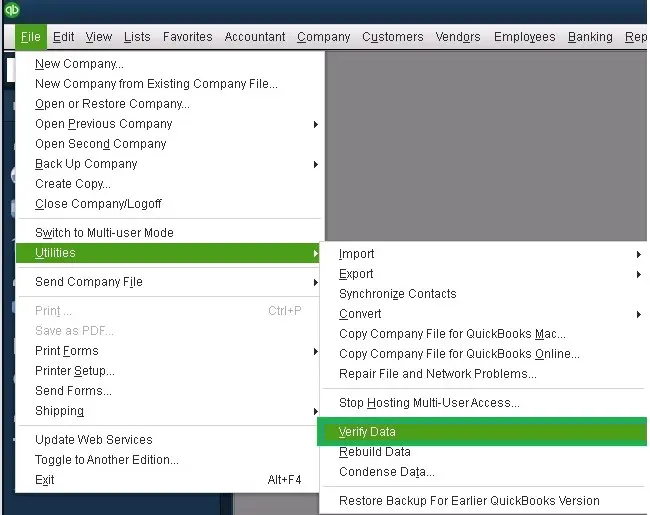
The concept of using the sample company file is to test if there is a problem with the company file’s location. In case your sample company file failed to open, then it means your application is not properly installed.

If the sample company file opens up, apply solution 4. If not, repair your QuickBooks installation files.
Confirm if the error 6143 is resolved or if it still requires another solution. If you are still facing the QB error code 6143, try the next solution 5.


| Error | Possible Cause |
| -6176,0 | Your firewall blocks the connection between two computers |
| -6143, -107 | The .TLG file is damaged |
| -6143, -1076 | Your QuickBooks installation is damaged |
| -6010, -100 | The company file is hosted by a computer that’s not the server. |
| -6138, -105 | The company file is hosted by a computer that’s not the server. |
| -6210, 0 | The company file is hosted by a computer that’s not the server. |
| -6189, -83 | The company file is hosted by a computer that’s not the server. |
| -6190, -83 | The company file is hosted by a computer that’s not the server. |
| -6012, -1061 | Wrong network setup |
| -6144, -82 | Wrong network setup |
| -6143, -82 | Wrong network setup |
| -6129, -101 | Wrong folder permissions or the QB Database Server Manager isn’t working right |
| -6190, 816 | A user is in single-user mode instead of multi-user while they work in the file. It can be a mismatch between the transaction log file (.tlg) and the company file (.qbw) |
| -6190, -85 | A user is in single-user mode instead of multi-user while they work in the file. It can be a mismatch between the transaction log file (.tlg) and the company file (.qbw) |
| -6190, -82 | A user is in single-user mode instead of multi-user while they work in the file. It can be a mismatch between the transaction log file (.tlg) and the company file (.qbw) |
| -6143, -832 | Hosting is on or the .ND file doesn’t work right |
| -6144, -304 | Something went wrong when you tried to open QuickBooks |
| -6190, 1005 | Something went wrong when you tried to open QuickBooks |
| -6189, 1005 | Something went wrong when you tried to open QuickBooks |
| -6143, -305 | Wrong network setup, or there’s damage to your company file |
| -6073, -816 | Multiple computers are hosting the file, firewall settings block the connection, or there’s damage to the company file |
| -6144,-103 | The .ND file has an incorrect path to your company file, or there’s damage to the QuickBooks Database Manager Windows user account |
| -6144, 0 | The .ND file has an incorrect path to your company fil,e or there’s damage to the QuickBooks Database Manager Windows user account |
| -6120, 0 | One of the workstations is hosting the company file, or the firewall port (8019) is blocked |
| -6087, 0 | File is open locally |
| -6131, 0 | File is open locally |
| -6147, 0 | You open the company file or restore a company backup (.QBB) |
QuickBooks error 6143 is not a common error and indicates that something is wrong with how QuickBooks Desktop is accessing or reading your company file. We have shared all the solutions that have worked for QuickBooks users to resolve the error. However, depending on your system settings, network settings, and .tlg and .ND files, you may need our QuickBookSupportNet specialist to fix the error.
If you are running a business where downtime costs real money, do not hesitate to contact a QuickBooks expert at +1(866)500-0076.
What is the QuickBooks error code 6143?
QuickBooks 6143 error is an issue within the 6XXX series error that belongs to either damaged or corrupt network files or incorrect network setup.
How can I resolve the error 6143 in QuickBooks?
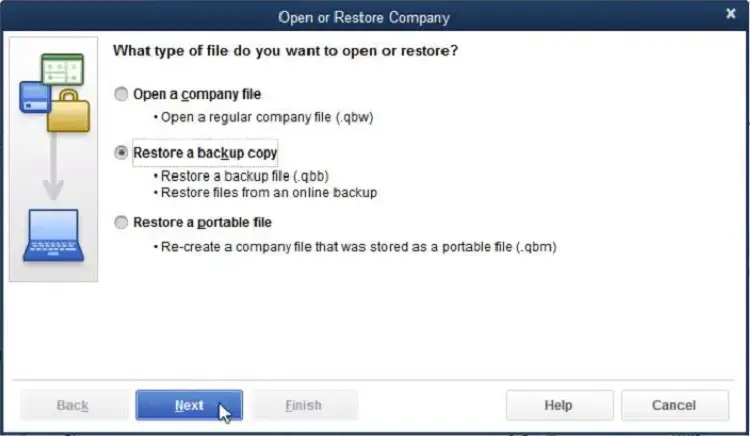
In short, you could resolve it by renaming the .ND and .TLG file, or using a restoration of a backup. If you are looking for a quick fix, contact our senior QuickBooks specialist at +1(866)500-0076.
What are.ND and .TLG file in QuickBooks?
Network file, that is .ND file is a Network Data file that allows you to manage user access and communicate with the company file in a multi-user environment. Whereas the Transaction Log file .TLG file is a set of records that contains changes in your company file(s).
What is the purpose of .ND File and .TLG file?
The purpose of The .ND file is to enable QuickBooks Desktop to connect with your company file, on the other hand. The .TLG file’s purpose is to record all the transactions that you have made in the company file.
Lana Creston is an experienced technical and accounting writer with a total of 9 years of experience. She currently works on QuickBooks accounting and technical guides at QuickBookSupportNet. Lana has a passion for reading and writing about various technical topics, especially exploring new accounting methods and software, while continuously expanding her expertise in the ever-evolving field of finance and technology.
Quick, clear, and hassle-free QuickBooks assistance.