Fix QuickBooks Error 6176 and Know the Causes

Dec 29, 2025

Admin |

Estimated Read Time : 5 MIN

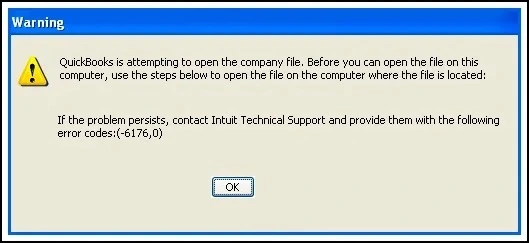
Incorrect network settings and data damage can make your QuickBooks Desktop behave unexpectedly, which could lead to your data loss or a long-term interruption to your workflow. You must be dealing with QuickBooks error 6176 since this is the error that indicates a data integrity issue, considering incorrect network settings and a corrupt company file. 

QUICKBOOKS ERROR MESSAGE 6176

To make sure that you start your work ASAP, let us perform some fixes to resolve this error. You can bookmark this guide for further use. 

Common Reasons Behind the QuickBooks Error Code 6176

Damaged Company FileYour company file, network data file, or transactions log file might be corrupted.  
Incorrect Network setupWhen multiple users access QuickBooks, misconfigured hosting or firewall rules prevent connections with the company file.
File location issuesQuickBooks might not be able to access the file because there is a possibility that it might be stored in a restricted folder or the file location path may be complex. 
Incorrect Folder permissionsYou may not have enough permissions to access the QuickBooks program. 
Outdated QuickBooks VersionCompatibility issues arise if the program has not been updated while the file structure has changed.
Antivirus interferenceThe antivirus installed in your PC might be considering the file as a threat to the system. 
Company file in use on another stationYour company file may be in use on another workstation or it may be in read-only mode. 

Learn to Fix QuickBooks Error 6176

Walk through these solutions and check if they work for you. Now, you can continue with Solution 1. 

Solution 1: Update QuickBooks

1: Download the update again

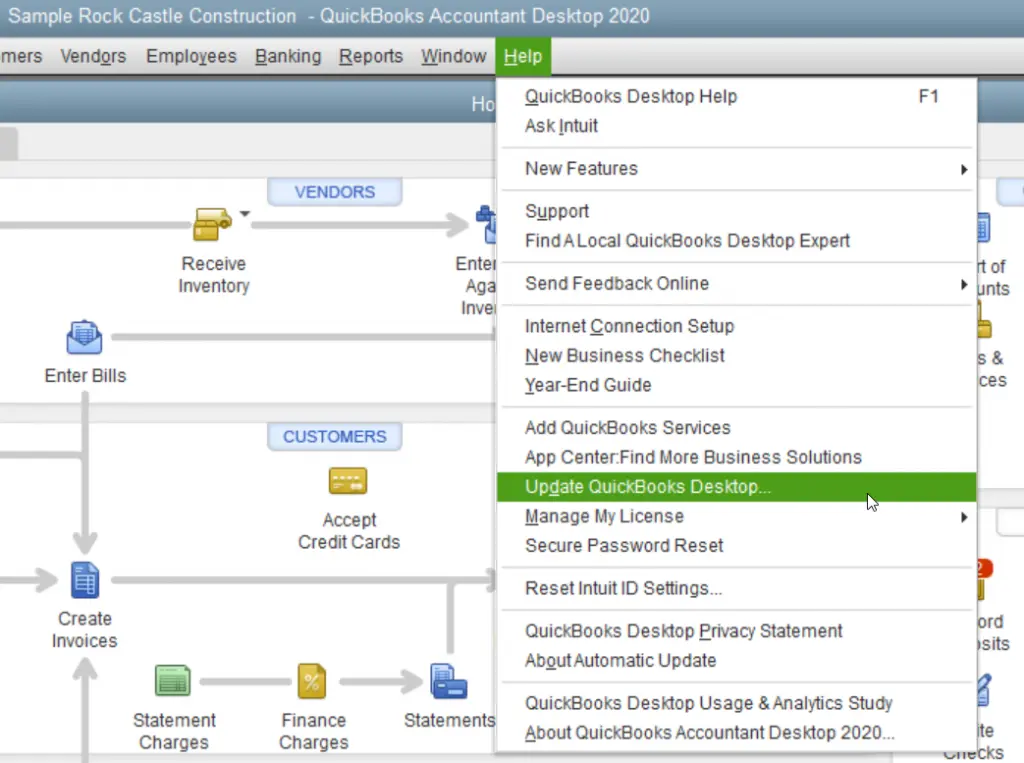
Update QuickBooks Desktop
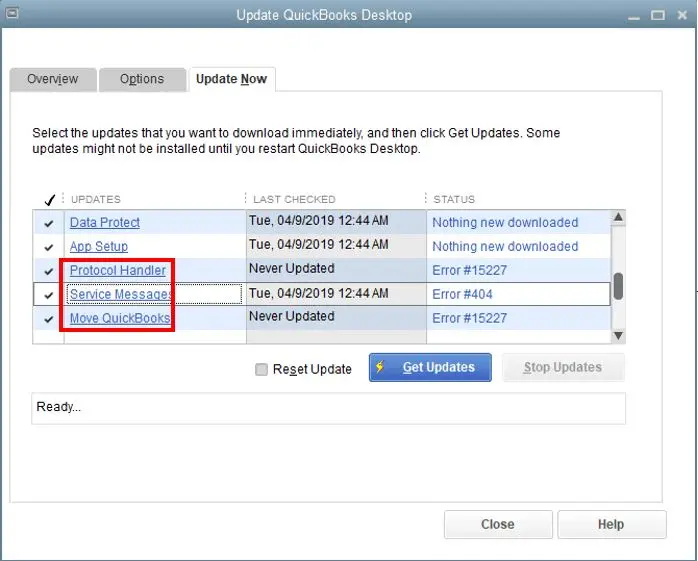
  • Click on Update now > Get Updates.
Get Payroll Updates
  • Close and launch QuickBooks to install the update.

2: End Task on the Programs

  • Close QuickBooks programs.
  • Right-click on the taskbar and click on Task Manager.
  • Under the details tab, look for these background processes, select them, and click on End task.
  • QBW32.exe or QBW.exe
  • QBCFMonitorService.exe
  • qbupdate.exe
  • QBDBMgr.exe or QBDBMgrN.exe
  • QBMapi32.exe
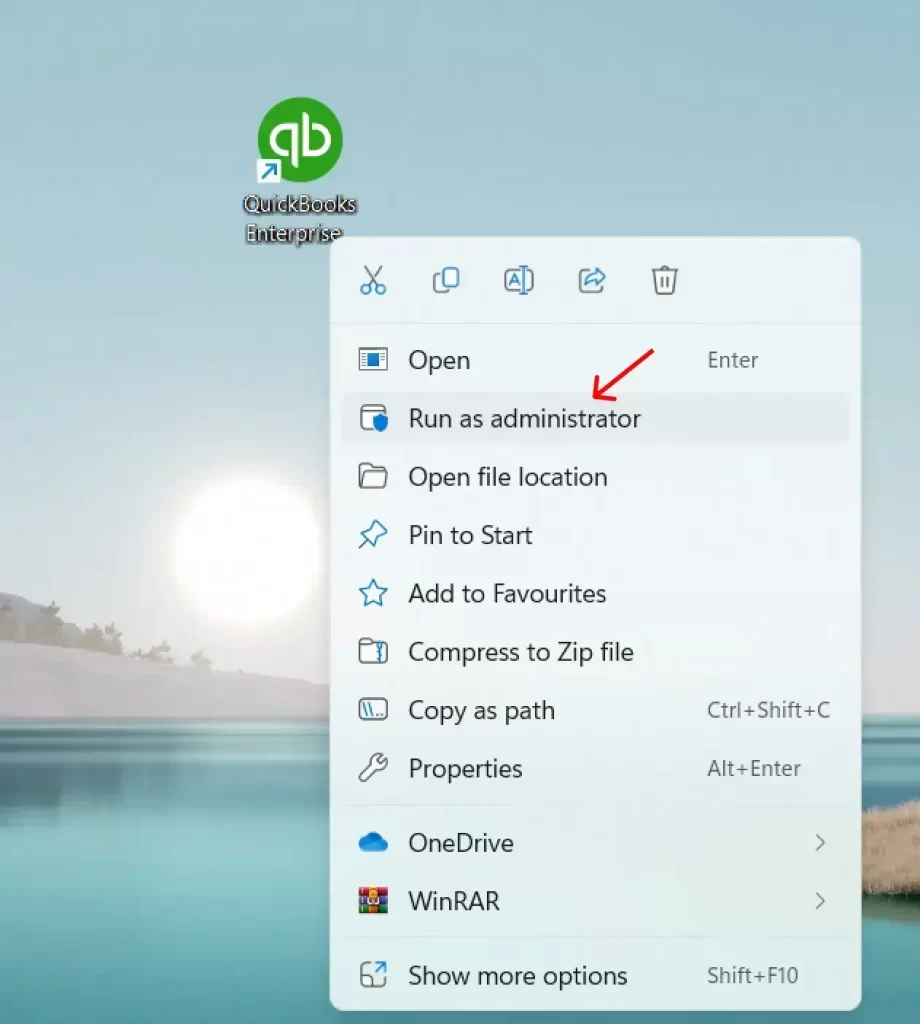
  • Right-click on the icon of QuickBooks and click on Run as administrator.
run as administrator
  • Now, run the update again.

3: Run File Doctor 

  • Close the QuickBooks application.
  • Download the version 1.6.0.8 of the QuickBooks Tool Hub
  • You should save this downloaded file to an easy-to-reach location. 
  • Open the QuickBooksToolHub.exe file that you downloaded.
  • Follow the on-screen steps and install the application.
  • Agree to their terms and conditions.
  • Once you have finished the installation, double-click on the Tool Hub’s icon to launch it. 
qb tool hub

4: Run QuickBooks File Doctor

  • Within the QuickBooks Tool Hub, click on Company File Issues.
  • Click on Run QuickBooks File Doctor.
  • In the application of File Doctor, choose your company file from the drop-down menu. 
  • In case you do not find any file, continue with the Browse and search option to get the file.
  • Click on Check your file and hit Continue.
  • Enter QuickBooks login credentials and click on Next.

Solution 2: Rename the.ND and TLG files

The .ND and TLG files are configuration files of your QuickBooks files that permit the QB application to access a company file in a network or multi-user environment.

You see these 6000 series errors in QuickBooks when these .ND and .TLG get damaged. And, if you rename these files, you would not lose any data. These files get created again when you scan them with QuickBooks Database Server Manager

  • Open the folder where you stored your company file.
  • Search for the files with a similar name to your company files with the extension .ND and TLG.
    • company_file.qbw.nd
    • company_file.qbw.tlg
  • Right-click on each company file and click on Rename
  • Add an extension OLD at the end (for example: company_file.qbw.nd.OLD).
  • Launch QuickBooks again and log in to your company file.

If the QB error code 6176 occurs again, try the next solution.

Solution 3: Open a sample company file

You must be wondering why we are using the sample company file. By doing so, we will confirm if there is an issue with the company file’s location or actually an issue with your company file. If you find that your sample company file failed to open it indicates that your application is improperly installed. 

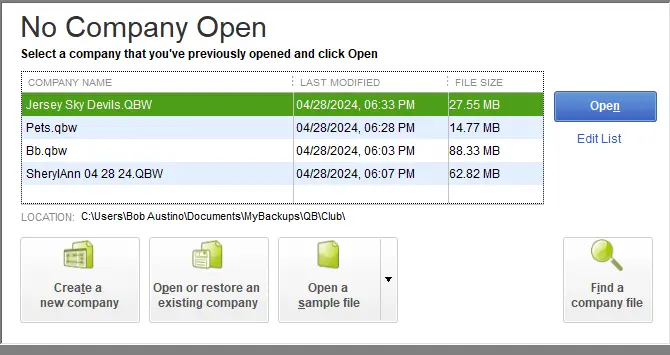
  • Open the No Company Open window, click on Open a Sample File.
no company open
  • Choose any company file from the list.

In case the company file opens up and if everything is good to go, apply solution 4. If you are still dealing with the error, repair your QuickBooks installation files. 

Solution 4: Copy your QuickBooks file to the Desktop

  • Copy the company file to the Desktop and open it to check whether there is an issue with your company file’s location. 
  • When the files open up from the desktop, it means your file location is damaged. 
  • You must have saved your file in the sub-folders that would have exceeded the file system path limitation. 
  • In case you change the company file’s location and still the file is not opened, it means you have a damaged company file. 
  • Open the folder with your company file.
  • You can search for the file with the extension .QBW.
  • Copy the company file. 
  • Now, right-click anywhere on the desktop and paste the file.
  • Hold the control key and launch QuickBooks. It will open the No Company Open window. 
  • Click on Open or restore an existing company.
  • Now, go back to your desktop screen, fetch the company file, and open it. 

Confirm if the QuickBooks Desktop Error 6176 is resolved or if it still requires another solution. Still struggling with the error? Continue with the solution 5.

Solution 5: Restore a backup

  • While restoring a backup company file, QuickBooks uses the backup to create a new company file (.qbw).
  • Click on the File menu. 
  • Choose Open or Restore Company.
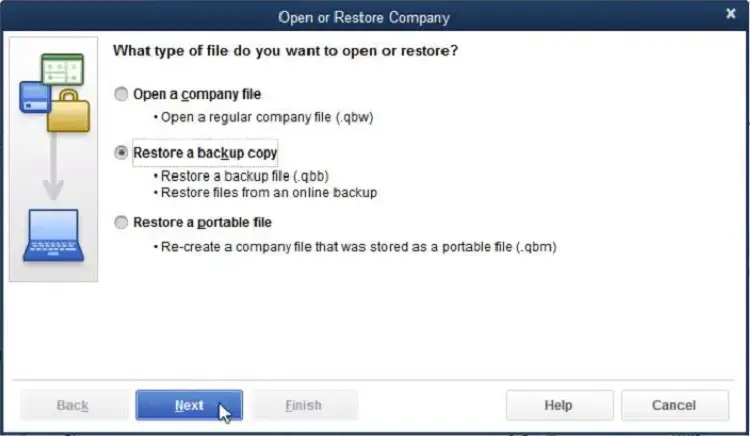
  • Click on Restore a backup copy and hit Next.
Open or Restore Company
  • Choose Local Backup > Next.
  • You can browse your PC to fetch the backup company file.
  • Choose a short file path folder to save your restored company file.
  • Click on Open, and to avoid overwriting the same files, you can rename the existing company file.
  • Once done, click on Save

Solution 6: Use the ADR Tool to restore your backup

  • On your desktop, create a new folder with the name QBTest.
  • Open the company file’s folder.
  • Fetch the .tlg file in your company file’s folder. 
  • In case you are not able to identify the .tlg file, use these steps to confirm the file.
  • Press Windows + E and launch the File Explorer.
  • Click on Organize and select Folder and search options.
  • Click on Hide extensions for known file types. 
  • Click on Apply > OK.
  • Copy the .tlg file (Corresponding) of your company file.
  • Paste it into the QBTest folder. 
  • Open your QuickBooksAutoDataRecovery folder.
  • Copy the QBW.adr file and paste it into the QBTest folder. 
  • Now, you have the QBW.adr and .tlg files in the same QBTest folder.
  • Right-click on the .QBW.adr file and rename it. 
  • Delete the file with the extension .adr.
  • Launch QuickBooks and open your company file that you previously saved in the QBTest folder. 
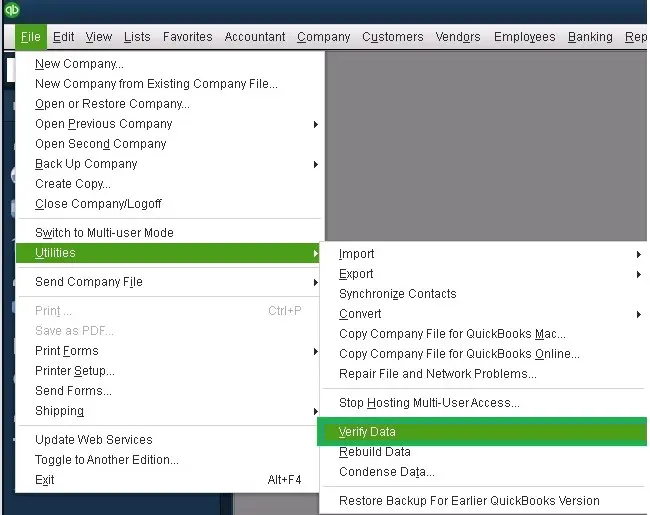
  • Click on File > Utilities.
  • Choose Verify Data and confirm the data integrity of the file you have recovered. 
verify and rebuild company file data

Recover the latest transactions using the QBW.adr and TLG.adr files

  • On your Desktop, create a new folder with the name QBTest.
  • Open the company file’s folder and search for the QuickBooksAutoDataRecovery folder.
  • Now, look for .TLG.adr. And QBW. adr files.
  • These files have a similar name to your company file.
  • In case these files .TLG.adr and QBW.adr are not identified. Use these steps to fetch them:
  • Press Windows + E key and open the File Explorer.
  • Click on Organize.
  • Now, choose Folder and search options.
  • Click on Hide extensions for known file types.
  • Click on Apply > OK.
  • Now, you need to copy the .TLG.adr and QBW.adr files and paste them in the QBTest folder. 
  • Remove the .adr file from the QBTest folder.
  • Launch QuickBooks and open the company file that you have saved in the QBTest folder. 
  • Click on File, select Utilities, and click on Verify Data. This step will check the data integrity of the recovered file.  
verify and rebuild company file data
  • If you find this company file fit to use, move the damaged company file to any other location.
  • Now, you can copy the healthy company file from QBTest to its original location.

Pro-tips to Avoid QuickBooks Error 6176 

  • Ensure that you have a short location file path. 
  • Properly specify backups with date/time.
  • Periodically run the Verify and Rebuild Data utility.
  • Update the QuickBooks Database Server Manager.
  • Document your network setup.

Conclusion

Thanks for trusting us! This guide covers the most trending solutions that smoothly remove the QuickBooks error 6176. QuickBooks accessing the company file does not have any alternative, and at any cost, such an issue must be fixed. 

If QuickBooks fails to connect with the company file, it could disrupt your company’s business operations. Make sure the error is resolved, and if the standard fixes did not work, it means that it requires an advanced technical solution. 

If you are running a business where downtime costs real money, do not hesitate to contact a QuickBooks expert at Call Us : +1(866)500-0076

Frequently Asked Questions 

What is the QuickBooks error code 6176?

The error 6176 pops up when QuickBooks fails to access your company file due to multiple reasons or any one of the reasons. It includes a network or permission issue, or you may have a corrupt file, or there is a firewall blocking your company file.

How can I resolve the error 6176 in QuickBooks? 

You can fix the error 6176 using the following guidelines:

  • Ensure that you have a stable network connection and enough permission to access the company file.
  • Your firewall settings must be set in a way that does not block QuickBooks from accessing your company file.
  • Your company file might get damaged or corrupted.
  • You may have Network Data and transaction log files in a corrupt position. 

What are .ND and .TLG file in QuickBooks? 

An. An ND file is a Network Data file, which allows QuickBooks to access the company file. On the other hand, .The TLG file is a transactions file that saves the changes you would have made in the company file. 

What is the purpose of .ND File and .TLG file? 

The purpose of the.ND file is allowing QuickBooks to manage user access & communicate with the company file in a multi-user environment. Whereas the TLG file records all the changes that you must have made to your company file. 

Why you must not delete .ND and .TLG file?

These files help QuickBooks to function correctly, and if you find an issue using QuickBooks, you may try renaming the file to fix the error. You can add an extension .OLD to the old file, as QuickBooks would automatically generate a new and clean version of a company file.

About The Author

Lana Creston

Lana Creston is an experienced technical and accounting writer with a total of 9 years of experience. She currently works on QuickBooks accounting and technical guides at QuickBookSupportNet. Lana has a passion for reading and writing about various technical topics, especially exploring new accounting methods and software, while continuously expanding her expertise in the ever-evolving field of finance and technology.

Quick, clear, and hassle-free QuickBooks assistance.

Get a Free Consultation with Our QB Tax Experts
Connect with Our Certified QuickBooks Professionals - Dial Tollfree: +1(866)500-0076