Learn to Recover Lost QuickBooks Files
Apr 9, 2026


Dec 3, 2025
Admin |
Estimated Read Time : 5 MIN
The QuickBooks program may shut down at various times while working. You may experience QuickBooks closes unexpectedly when performing the following tasks:
The QuickBooks crash when opening the company file in multi-user mode, updating, or running other operations, often with different warning messages.
The errors you may see include:
For the software to function smoothly, you will need to identify the root causes and the methods to resolve them in different situations. Let’s walk you through this detailed guide to unfreeze QuickBooks Desktop and resolve the error messages.
Find out the different reasons why QuickBooks crashes when emailing a report, opening a company file, or starting up:
If QuickBooks just disappears while you’re working, or if you’re experiencing freezes, follow the detailed steps below to troubleshoot and unfreeze QuickBooks Desktop, ensuring smooth performance.
Updating QuickBooks Desktop ensures there are no outdated components or features that hamper software performance, that you use up-to-date security patches and bug fixes, and that you stay compliant with the latest tax laws, improving integration with other apps and streamlining your financial management and workflow.
If QuickBooks is still closes suddenly, move to the next solution.
See whether QuickBooks crashes when opening the company file due to damage, corruption, issues with the location, or QuickBooks Desktop.
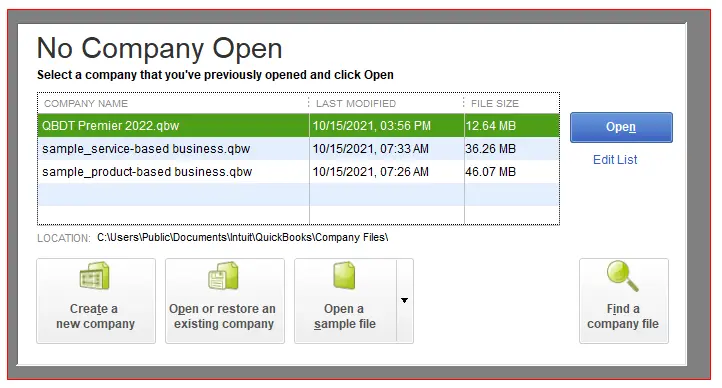
If QuickBooks closes unexpectedly even after this, go to the next step.
Important: Don’t release the Ctrl key until you see the No Company Open window, QuickBooks freezes, or gives you an error.
A sample company file will help determine whether the problem lies in your company file itself.
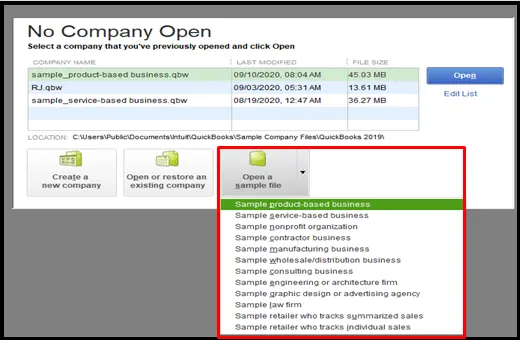
If the sample company file opens and you don’t see the error, the data file might be damaged, or the location might have a problem. For this, you can restore a recent backup or ADR to restore the file. Repair the QB data if a backup or ADR isn’t enough to restore your data.
If you see the error in the sample company file, go to Solution 3.
Copy the company file to a new folder to see if the problem is in the folder you use to open the company file, which is damaged.
Copy the company file to a different location
If QuickBooks won’t start even after this, go to Solution 5.
The QuickBooks File Doctor will help you resolve the data damage and the network connectivity issues.
| Note: You must ensure to download and install QuickBooks Tool Hub (1.6.0.8) or update it to the latest release. |
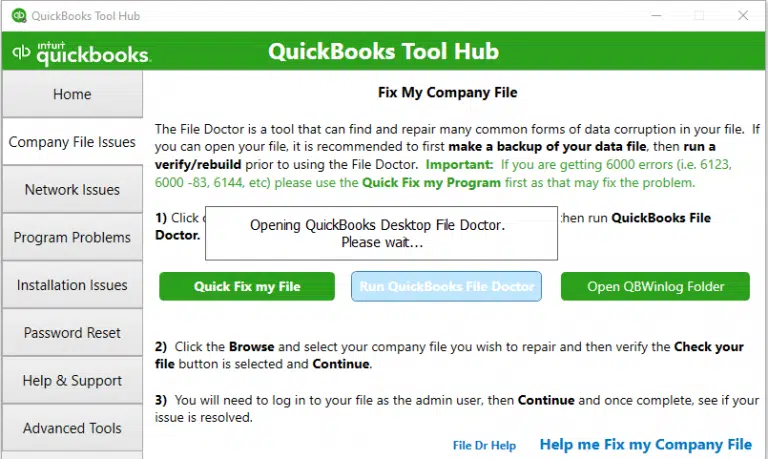
Note: If the QuickBooks File Doctor doesn’t open, look for the QuickBooks Desktop File Doc and open the tool manually.
The scan time usually depends on the company file size, which can take 10-15 minutes. The scan time may even say it’s unsuccessful even after fixing the issue. When done, open QuickBooks and your company file.
Still, QuickBooks closes unexpectedly? Go to the next solution.
Your QuickBooks user profile may become damaged or corrupted, causing problems when running the software. Therefore, consider creating a new user profile:
For QuickBooks Enterprise users, go to Company > Users > Set Up Users and Roles.
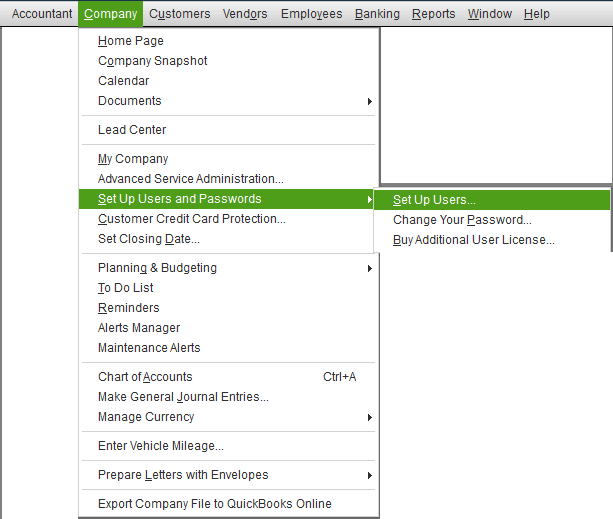
Note: Only use a different username that’s not already in use.
Now, use the same credentials to log in to the QuickBooks file.
If QuickBooks still crashes or stops working, go to Solution 7.
If your QBWUSER.ini file is damaged or missing, you can resolve the error by renaming it.
| Note: Renaming the QBWUSER.INI file erases the list of your previously opened company files. You will need to reopen your company file manually. |
Rename the QBWUSER.INI file:
Enable hidden files and folders if you can’t see the folder.
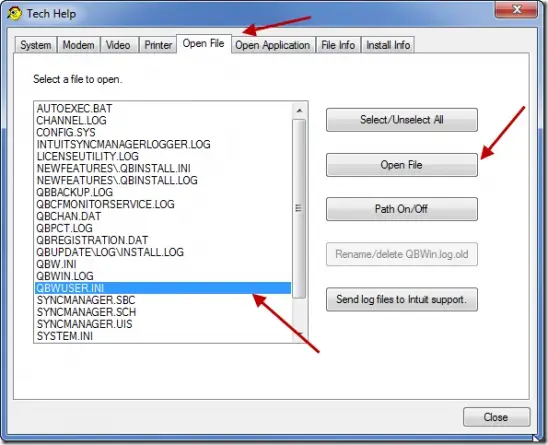
If QB opens after renaming QBWUSER.ini or EntitlementDataStore.ecml, try opening a sample company file.
When you can open the sample company file but not the original one, copy it to a different folder, then try opening it from that location. If you can open the file, the problem may be with a damaged folder or folder permissions.
If you still cannot sign into the file, it may be damaged. For this, try restoring a backup file.
However, if you cannot open the sample company file or QuickBooks won’t start, the QuickBooks installation is damaged.
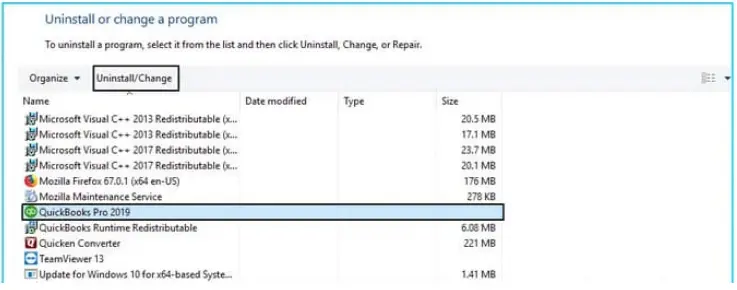
If QuickBooks won’t start due to software issues, you must repair it. Check below to learn how you can go about it:
End the open QB background processes and run a quick repair on the program.
Resolve the common installation issues using the QuickBooks Install Diagnostic tool:
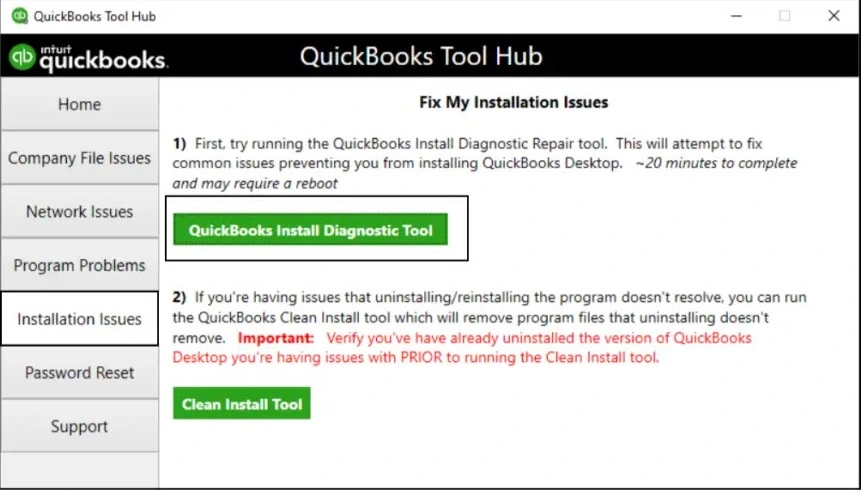
Still getting the ‘QuickBooks closes unexpectedly’ issue? Proceed to the next solution.
Windows Firewall is a security application that controls the ports on your computer and can block a program if it is considered a threat, such as QuickBooks Desktop. This will block the processes from running and can cause the software to crash suddenly during startup or when opening a company file. Configure the Windows Firewall for QuickBooks to ensure it’s not blocked.
Is your QuickBooks freezing even after trying these steps? If so, go to the next solution.
If nothing fixes the ‘QuickBooks closes unexpectedly’ issue, there might be a problem with the Windows components.
Make sure to perform these steps if you are an IT professional, a confident Windows user, or get help from Microsoft support experts.
The steps are applicable for Windows 10 and newer:
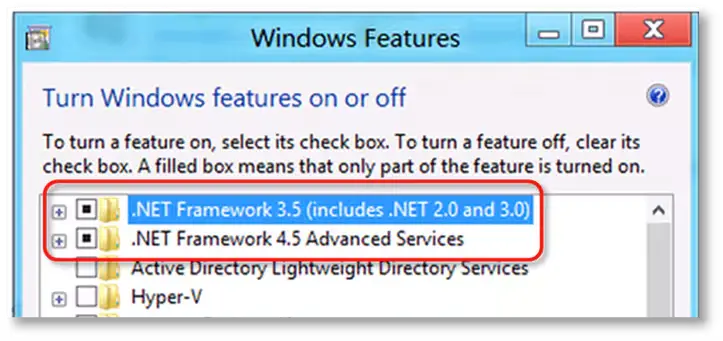
Note: The steps to fix .NET Framework 4.5, 4.6, 4.7, and 4.8 are the same.
i. Check NET Framework 4.5 (or later)
If the .NET Framework 4.5 (or later) option isn’t selected:
If the .NET Framework 4.5 (or later) option is already selected:
ii. Check NET Framework 3.5 SP1
If the .NET Framework 3.5 SP1 checkbox isn’t checked:
If the .NET Framework 3.5 SP1 option is already checked:
What If you get an error when turning the .NET Framework on or off, contact IT professionals or Microsoft. The issue may be related to your operating system, not QuickBooks.
Register MSXML in a 64-bit operating system with the following steps:
Register MSXML in a 32-bit operating system with the following steps:
If the problem persists, contact an IT professional for guidance.
If you open or run QuickBooks Desktop without any interruption, you’re good to go. Move to the next solution if you still see any issues.
If QuickBooks loads incredibly slowly, a clean install is the process of completely erasing a hard drive and reinstalling the operating system from scratch, resolving the associated issues.
If you get an error when renaming the folder, do this:
QuickBooks keeps crashing, no matter what you do. Follow the steps below or dial +1(866)500-0076.
If QuickBooks closes in multi-user mode, follow the steps below to restore the connection and run the program without errors.
| Note: If you use QB in single-user mode, skip these steps. |
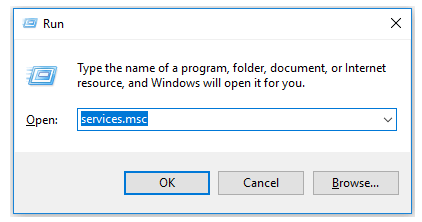
Make sure the QBCFMonitor service is not running on the workstation. Let’s end the service from the Task Manager:
When done, make sure the QBCFMonitorService does not automatically start up.
If nothing helps in resolving the ‘QuickBooks has stopped working‘ issue, consider professional assistance.
It would be challenging even to open a company file or run basic operations if ‘QuickBooks closes unexpectedly,’ crashes, or stops working. With a list of possible factors and appropriate troubleshooting steps, you can easily resolve such problems and get back to business.
However, if the issue persists or needs professional assistance, connect with professionals at QuickBookSupportNet. Dial +1(866)500-0076 now!
What causes QuickBooks to stop working?
QuickBooks may stop working if the QuickBooks installation is corrupted, there’s an issue with Windows components and how they interact, Windows Firewall is blocking the connection, or there’s possible damage or corruption. Moreover, issues with the QBWuser.ini file can also cause ‘QuickBooks closes unexpectedly.’
How to resolve QuickBooks has stopped working?
Make sure QuickBooks is up to date, that the company file or the file storing the software registration details isn’t damaged, and that if the installation is incorrect or program files are causing problems, reinstall QuickBooks Desktop.
Additionally, you’ll need to ensure that Windows components aren’t causing the problem and configure Windows Firewall for a secure connection.
Is there a QuickBooks outage right now?
No, there is no QuickBooks outage right now. The software for both the Desktop and Online versions is still available. However, there are no software upgrades or new editions, such as QB 2025, for QuickBooks Desktop.
Why does QuickBooks crashes when opening company file?
QuickBooks crashing when opening a company file is primarily caused by damage or corruption to the company file itself, but also by opening the file over a network. The problem could be related to the QuickBooks Database Services Manager or services, an outdated QuickBooks version, or Windows security settings.
Other causes, such as conflicts with the QBWUSER.INI file or Windows system files, may also be the reason.
Can I restore or reinstall programs without losing my company files?
Yes, restoring or reinstalling programs will not affect your company files. Your files will remain intact on the computer and accessible in the same location as before.
Does QuickBooks automatically shut down because of Windows issues?
No, QuickBooks does not automatically shut down due to Windows problems. If you encounter issues with either Windows or QuickBooks, it’s recommended to reach out to an expert for support.


Quick, clear, and hassle-free QuickBooks assistance.
Learn to Recover Lost QuickBooks Files
Apr 9, 2026
Learn to Add Inventory Products in QuickBooks
Apr 8, 2026