How to Repair Your QuickBooks Desktop for Windows? 

Jan 5, 2026

Admin |

Estimated Read Time : 5 MIN

Is your QuickBooks Desktop freezing, shutting down, or facing other performance issues? You may encounter different performance issues when emailing reports, opening the company file, or running payroll with errors such as

This shows that either the QuickBooks installation is incorrect or the program files are damaged or corrupted. Repair your QuickBooks Desktop for Windows following this comprehensive guide. Let’s proceed further.

Let’s Run Different Tools to Repair QuickBooks Desktop for Windows 

To repair your QuickBooks Desktop for Windows, Intuit offers different tools in the QuickBooks Tool Hub. Proceed below to learn how to utilize these tools to resolve the software problems. 

Before moving on, make sure to download and install QuickBooks Tool Hub in the latest version (1.6.0.8) available. You must also close QuickBooks when using the Tool Hub. For an improved experience, it is recommended to use the Tool Hub on Windows 11, 64-bit.

1. Run Quick Fix my Program 

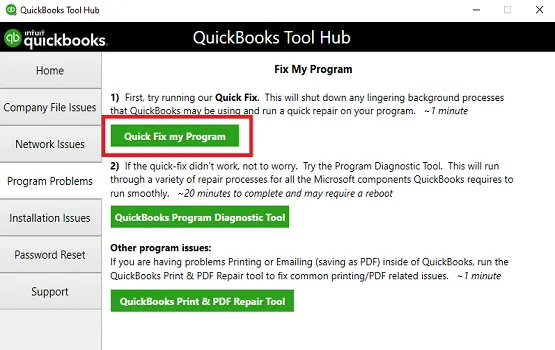
The Quick Fix will shut down any open background processes QuickBooks uses.  It’ll run a quick repair on your program.

  • Launch the QuickBooks Tool Hub. 
  • In the left panel, choose Program Problems.
  • Hit on Quick Fix my Program.
Quick Fix my Program

Open QuickBooks Desktop and then your company file.

If you still encounter the error, proceed to Solution 2. 

2. Run the QuickBooks Install Diagnostic tool

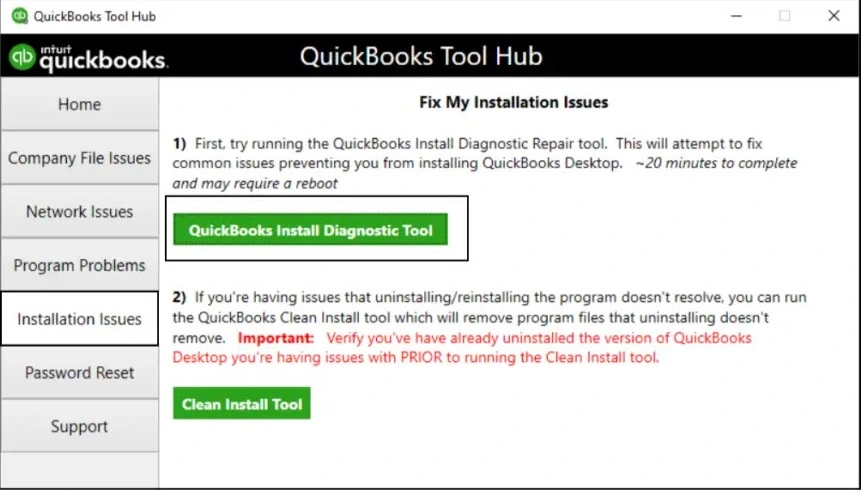
If something went wrong during the QuickBooks install, it could cause problems when you try to use it. Run the QuickBooks Install Diagnostic Tool to fix common install issues.

  • Open QuickBooks Tool Hub. 
  • Go to Installation Issues in the left pane.
  • Click on QuickBooks Install Diagnostic Tool. The utility may take up to 20 minutes; let it run until then. 
QuickBooks Install Diagnostic Tool
  • Once the tool finishes, restart your computer and launch QuickBooks Desktop, then open your company file. 
  • Keep your QuickBooks up to date with the latest release to ensure you use the most recent features, fixes, and security updates.  

3. Manually repair QuickBooks Desktop 

Manually repairing QuickBooks Desktop can save time and resources by recovering data from damaged files, minimizing downtime, and preventing financial mistakes.

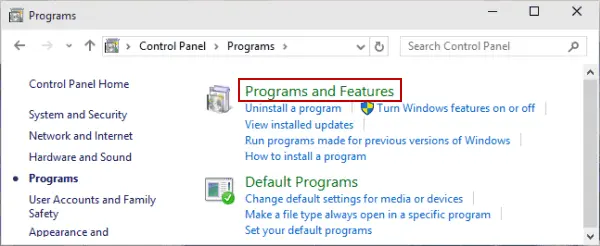
  • Press the Windows Logo icon to open the Windows Start menu. 
  • Search for Control Panel and press Enter
  • Click on Programs and Features
Programs and Features
  • Choose the QuickBooks program version you use. 
  • Right-click on the program and select Change.
  • Click Yes on the UAC prompt to allow the changes to your computer. 
  • Select Repair to repair QuickBooks Desktop manually.

Conclusion 

Repairing the program helps you resolve issues with the software file and its folders, as well as associated errors. Following the steps above will help you repair your QuickBooks Desktop for Windows using both QuickBooks Tool Hub and the manual method.

For further assistance, it is recommended that you consult your QuickBooks professionals. Dial Call Us : +1(866)500-0076 to talk to a QB ProAdvisors and get your issues resolved. 

Frequently Asked Questions 

Where is the QuickBooks repair tool?

The QuickBooks repair tool is located within the QuickBooks Tool Hub, such as Quick Fix My Program or QuickBooks Install Diagnostic Tool. There is a manual method too, where you will run the system repair from the Control Panel. 

How to repair a QuickBooks file?

To repair a QuickBooks file, start by using the QuickBooks Tool Hub to run QuickBooks File Doctor or, for a more thorough repair, the built-in File > Utilities > Verify Data and File > Utilities > Rebuild Data utilities. 

How to repair QuickBooks using the QB Tool Hub? 

To repair QuickBooks using the QB Tool Hub, first open the Tool Hub and select Program Problems. Click Quick Fix my Program to repair program files, then open QuickBooks. If that doesn’t work, go to Company File Issues and run Quick Fix My File.

About The Author

Lana Creston

Lana Creston is an experienced technical and accounting writer with a total of 9 years of experience. She currently works on QuickBooks accounting and technical guides at QuickBookSupportNet. Lana has a passion for reading and writing about various technical topics, especially exploring new accounting methods and software, while continuously expanding her expertise in the ever-evolving field of finance and technology.

Quick, clear, and hassle-free QuickBooks assistance.

Get a Free Consultation with Our QB Tax Experts
Connnect with Our Certified QuickBooks Professionals - Dial Tollfree: +1(866)500-0076