Fix QuickBooks Error PS038 with a Complete Roadmap on QuickBooks
Sep 9, 2025
Admin |
Estimated Read Time : 5 MIN
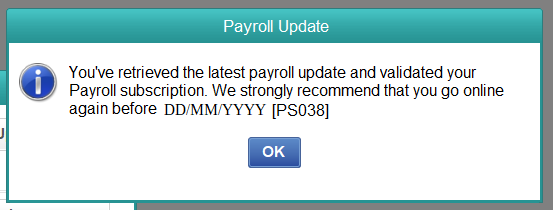
QuickBooks Error PS038 is a payroll error that pops up when you are running the payroll service. Are you facing the payroll issue and dealing with stuck paychecks? Simply apply the steps below and you can fix this error quickly. However, it depends on your QuickBooks version and your technical efficiency, as sometimes the error requires an advanced technical solution.
You will be getting a complete roadmap from fixing the error to what not to do during the process. Do not forget to bookmark and share this guide for further use.
Before you start (1 minute)
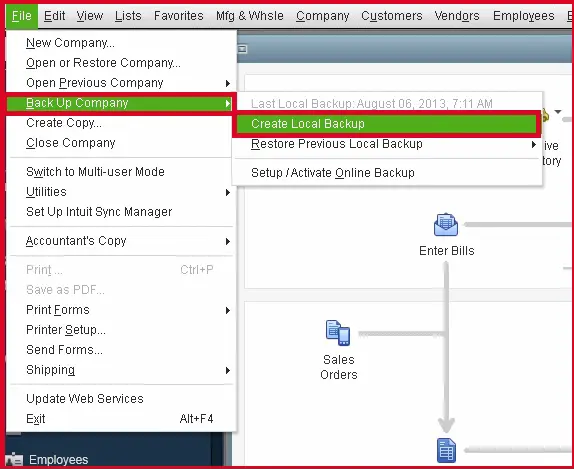
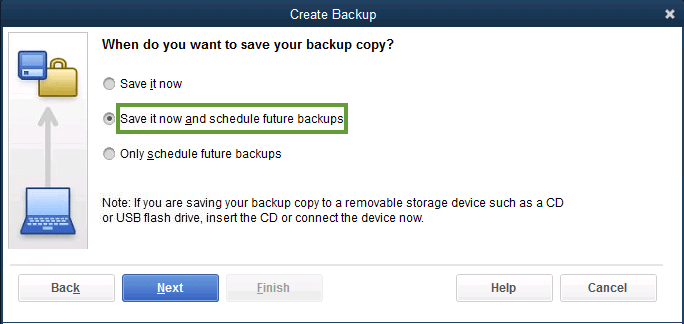
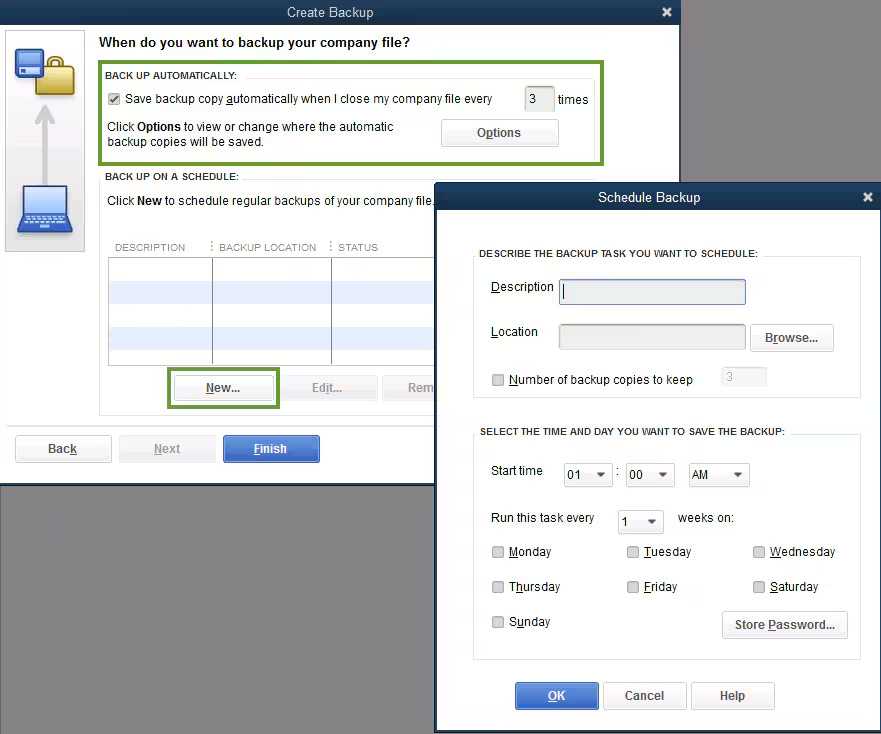
Back up your company file as a priority.
Follow the steps mentioned in this guide.
If you are not technical enough, call a QuickBooks specialist.
Update your QuickBooks Desktop.
Confirm any corrupt files.
Ensure you have a stable internet connection.
What not to do?
Do not try any unverified solutions outside of this guide or Intuit’s.
If you have tried 2-3 attempts to resolve the error and it is still not fixed, do not proceed further and call a QuickBooks specialist.
Call a QuickBooks if any of the situations apply to you:
Payroll deadline within 24 hours
Multiple failed attempts to fix the error.
QuickBooks Error PS038 may require an advanced technical solution after you have tried all the available solutions.
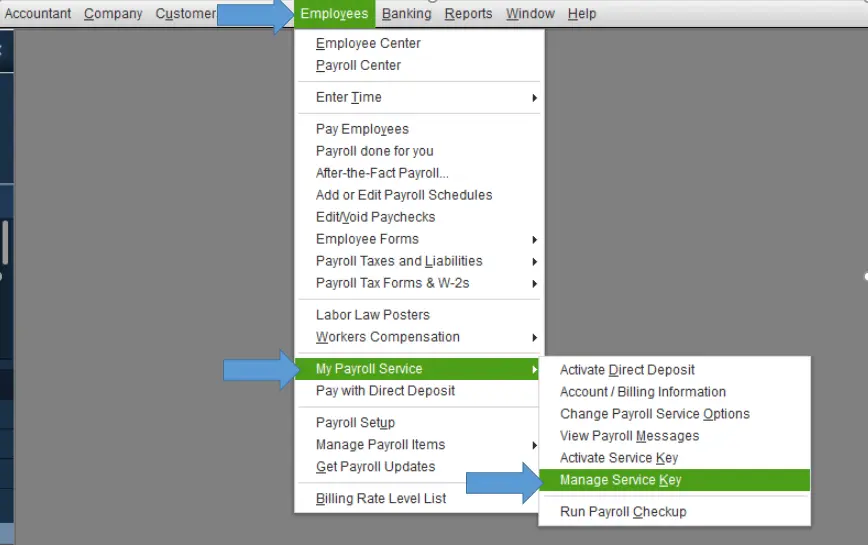
Navigate to Employees and select Send Payroll Data.
Select Send All in the Send/Receive Payroll Data.
If prompted, you need to enter your payroll service PIN.
Check if the payroll data is sent, get your payroll updates again, and the error code PS038 is resolved. If the error is not resolved, try solution 3.
Step 3: Confirm any stuck paychecks
Click on Edit and select Find.
Click on the Advanced tab.
Select the Choose Filter section.
From the Filterlist, select DetailLevel.
Select SummaryOnly and navigate back to the Filterlist.
Click on Online Status and select Online to Send.
Select Find, and you will have failed paychecks to Intuit.
Note:- Note down the Number of matches and proceed to Step 4.
Step 4: Verify and Rebuild Your QuickBooks Data
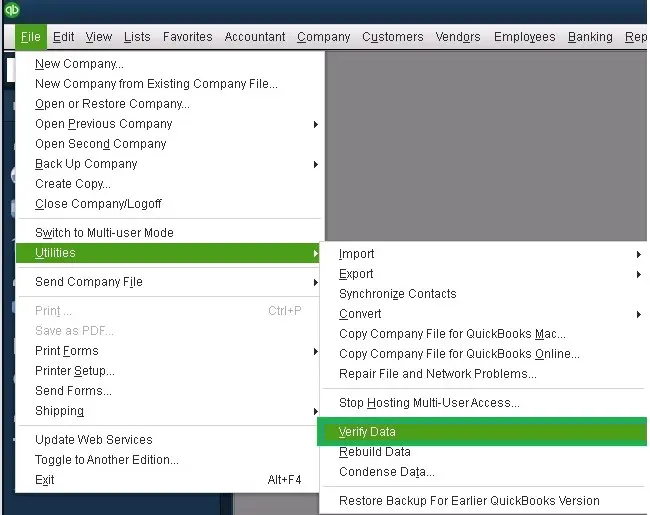
Exit from the Find window and run a verify data to get stuck paychecks that are required to send.
Now, you are required to rebuild your data file.
Finally, download your payroll updates again.
Confirm if the error is resolved or if it still requires another solution. If you do not see any error, you are good to go with your tasks; if there is an error, apply step 5.
Note:- Remember that these paychecks are the same as those found in Step 3.
Open the stuck paycheck (Oldest).
Click on the Paycheck Detail.
Add the earnings amount to the same as the last earnings item in the list, under the Earnings section, in the Review Paycheck window.
For example, if you found that the last item in the list belongs to Hourly Rate, you need to add another earnings item similar to the last earnings item within the list.
Click on No when a message appears, “Net Pay Locked”.
Note:- Ensure that there will be no changes to your net pay and tax amounts.
Click Ok and select Yes if you receive a Past Transaction message.
Save the changes and close the Paycheck.
Click on Yes when you see the Recording Transaction warning pop up.
Open your paycheck and select Paycheck Details.
Now, remove the recently added earnings items from the Earnings section.
Note:- Ensure no change to your net pay and tax amounts.
Click OK. Now, repeat these steps for each stuck paycheck you found in Step 2.
Repeat Step 1 and download the recent tax table.
Bonus tips to Prevent QuickBooks Error Code PS038
Keep an eye out for any stuck paychecks and fix them in a timely manner before the situation becomes complex.
Use only the updated QuickBooks version.
If required, do not hesitate to contact a QuickBooks specialist at +1(866)500-0076.
Conclusion
In this dedicated blog on QuickBooks Error PS038, we have shared the verified steps to fix the error. Even after trying all the steps, the error is not resolved; it is high time to call a QuickBooks specialist at a Free Number+1(866)500-0076.
Frequently Asked Questions
How do I resolve QuickBooks Error PS038?
Open this guide and follow a few simple steps to fix the QB error code PS038. This guide covers everything that a QuickBooks user needs.
What is QuickBooks Payroll Error PS038?
Error PS038 is a payroll issue that appears when you try to run a payroll update.
Would I lose all my data due to QuickBooks Desktop Payroll Error ps038?
Your data is completely safe. The error just stops you from processing the payroll. But we recommend that you call a QuickBooks specialist if you are not able to fix it.
How to avoid the QuickBooks error PS038 in the future?
You should update your tax tables regularly and verify your payroll setup. Also, use only the updated QuickBooks application and ensure that you have a clean company file.
About The Author
Lana Creston is an experienced technical and accounting writer with a total of 9 years of experience. She currently works on QuickBooks accounting and technical guides at QuickBookSupportNet. Lana has a passion for reading and writing about various technical topics, especially exploring new accounting methods and software, while continuously expanding her expertise in the ever-evolving field of finance and technology.
Effortlessly handle data tasks or get expert assistance with: