
Oct 22, 2026
Admin |
Estimated Read Time : 5 MIN
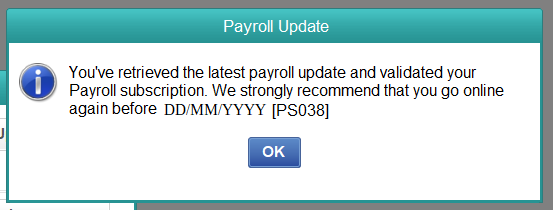
QuickBooks Error PS038 happens in QuickBooks Desktop Payroll when one or more of your paychecks are held in the ‘Online to send’ status. Because these paychecks never successfully send their data to Intuit, the program can’t complete a payroll update, and you may get a message indicating that your paychecks are stuck or that the payroll update hasn’t finished.
The good news is that the error can be corrected and that your company’s data is not at any risk. Usually, you can fix the problem yourself within about 30 to 60 minutes by finding the paychecks in question, checking your company file and rebuilding it, resending your payroll data, and, if needed, turning the stuck paychecks on and off. The guide explains how to carry out each step in the order Intuit recommends, explains the error, and tells you how to prevent it from happening again.

Table of Contents
ToggleThe following table provides a summary of the points mentioned in this article regarding error code PS038 in QuickBooks.
| Error | Payroll Error PS038 |
| Product affected | QuickBooks Desktop with an active Payroll subscription (Pro, Premier, Enterprise) |
| What you see | A message saying one or more paychecks are stuck, or that the payroll update could not be completed |
| Main cause | Paychecks remain in the “Online to send” status and never reach Intuit’s payroll servers |
| Other possible causes | Outdated software, damaged company data, inactive subscription, unstable connection, firewall interference |
| Time needed | Roughly 30 to 60 minutes, depending on how many paychecks are affected |
| Skill level | Beginner to intermediate |
| Before you begin | Create a backup of your company file and install the latest QuickBooks Desktop update |
| Is your data lost? | No. The error blocks the payroll update; it does not delete your records |
The information in the paychecks you prepare using QuickBooks Desktop Payroll is sent to Intuit to ensure your tax returns, tax payments, and payroll records remain accurate. Each paycheck has a status; one that has been created but not yet transmitted shows as ‘Online to send’.
QuickBooks error PS038 occurs when a paycheck remains in that state and cannot be cleared; because QuickBooks considers the paycheck unsent, any further attempt to download a payroll update or send the payroll data leads to the same problem. The error will likely reappear until the stuck paychecks are cleared.
You may notice one or more of these signs:
Several conditions can cause a paycheck to get stuck. If you know which one applies to your situation, you can then decide where to direct your efforts.
Spending a few minutes preparing before you start troubleshooting error code PS038 in QuickBooks will save you time and help keep your records safe.
Install the most recent release and also apply the most recent update to the payroll tax table. Intuit advises you to remain on a supported version.
To check that your connection is working, open a web page in your browser. Remember, a wired connection is more reliable than Wi-Fi for payroll transmissions.
When going through these steps, only one person should be in the company file; if other users are logged in, ask them to log out.
Because many of the steps below require administrator privileges, log in as an administrator before running payroll or correcting QuickBooks error PS038.
Tip: If your payroll deadline falls within the next 24 hours, complete the steps below as quickly as possible, and contact Intuit Support early rather than waiting until the last minute.
Since rebuilding and editing paychecks will change your data, keep a recent backup; if anything unexpected happens while you resolve Payroll update Error PS038 in QuickBooks, you can restore it and try again.
If you also wish to have automatic backups later on, make sure to select ‘Save it now’ and then arrange your future backups in the last step. You can set QuickBooks to back up each time you close the company file or on a schedule you select.
Note that when setting up a scheduled backup in QuickBooks, if it asks for your Windows sign-in credentials, then you should enter your Windows password so that the backup can be run automatically.
In this section, we’ll have a look at the various components and aspects involved in resolving QuickBooks error PS038; go through the steps which are given in detail and carry them out as instructed.
The most straightforward explanation is that the version is outdated or the transmission was interrupted, and this remedy covers both.
If the update downloads without any message, your paychecks will be sent, and the error will be resolved. If the QuickBooks error message PS038 appears once again, go to Solution 2.
First, determine precisely which paychecks are stuck and make a list of them since you will need this list in the subsequent solutions.
The list QuickBooks produces includes all transactions that have not yet been sent. Identify the oldest paycheck that has not been sent and note the number of matches displayed in the window. Also, record the employee’s name and the date for each paycheck on the list. After that, close the Find window.
If the search produces no results, you likely have no stuck paychecks, and the issue is probably your subscription, your connection, or a faulty component. You should then proceed with Solution 4 and the solutions that come after it to resolve update error PS038 in QuickBooks Desktop.
Damaged data in the company file may prevent paychecks from being sent. The Verify Data and Rebuild Data utilities will check your file and fix many common problems.
After the rebuild, try downloading the payroll update again, as outlined in Solution 1. However, if error code PS038 still shows up and you have paychecks that are listed as stuck from Solution 2, then proceed to the following solution.
Important – if the rebuild process is interrupted, then restore the backup that you made before the rebuild started and attempt it once again.
To toggle a paycheck, make a small temporary change and then reverse it; this causes QuickBooks to update the paycheck status so it can be sent. For each paycheck on the list that you prepared in Solution 2, carry out this solution starting with the oldest one.
Note the net pay and tax figures; they must be the same at all stages.
After you switch all the stuck paychecks, send your payroll information and download the payroll update again, as shown in Solution 1.
Warning: do not alter the pay or tax amounts on a paycheck; if you are uncertain that your edit has left these amounts unchanged, then stop and get in touch with Intuit Support or your accountant before saving.
For QuickBooks to confirm you are entitled to use its payroll features, you need an active subscription and a valid service key; payroll updates may fail if either is missing or incorrect, even if your paychecks are fine.
The update should now go through if you had the wrong key and have since corrected it. If this doesn’t fix QuickBooks error PS038, move to the next solution.
The folder CPS uses contains the payroll update files QuickBooks downloads. Whenever these files are damaged, the updates may fail repeatedly. By renaming the folder, QuickBooks will create a new copy the next time you carry out an update.
When QuickBooks sets about downloading, it creates a new CPS folder; after the update has been successfully carried out, you should carry out a test of the payroll to make sure that the error is no longer there.
Note that if Windows prompts you for administrative permission to rename the folder, you should grant the request; if you don’t have administrative rights, then you should ask your IT contact for assistance.
The issue could be due to a problem with QuickBooks itself. A free Intuit utility called QuickBooks Tool Hub brings several repair tools together in one place.
If you rebuilt your file and Verify Data still shows problems, the QuickBooks File Doctor can locate and repair further damage.
If the PS038 error in QuickBooks Desktop persists, consider restoring a backup you made before the error occurred. Since restoring brings your file back to an earlier state, you must review any transactions you entered after the backup was created.
To send paychecks and download updates, QuickBooks must connect to Intuit’s servers, but security software or outdated internet settings can block that connection.
If you’re not sure the firewall is the cause, turn it off for a moment, run the payroll update, then turn it back on immediately. Always avoid leaving your firewall off.
The QuickBooks Tool Hub has a Network Issues tab which contains further tools for dealing with connection problems.
When you have finished carrying out the solutions that apply to you, make sure that all of them work.
Well-intentioned shortcuts can make it harder to fix payroll problems such as error code PS038.
A couple of simple habits will keep your paychecks from getting stuck again and prevent the QuickBooks error PS038.
Reach out to a QuickBooks professional and seek assistance for QuickBooks Payroll Error PS038 if any of the following applies:
Moreover, if self-troubleshooting feels like a hassle, takes too much time, or you get stuck or have a question, it is best to speak to a seasoned professional.
However, before you call or chat, gather your QuickBooks version, the exact wording of the error message, your list of stuck paychecks, and your payroll service PIN. This helps the advisor team resolve your case faster. You can speak to a QuickBooks professional at Call Us : +1(866)500-0076.
QuickBooks Error PS038 means paychecks are stuck in the “Online to send” status and can’t reach Intuit. Start by backing up your company file, updating QuickBooks, and resending your payroll data. If the error persists, locate the stuck paychecks, verify and rebuild your data, and toggle each paycheck while keeping net pay and taxes unchanged. If that still doesn’t work, check your subscription and service key, rename the CPS folder, repair QuickBooks with Tool Hub, run File Doctor, and review your firewall and internet settings.
With regular updates, timely payroll data submission, and periodic data checks, you can keep payroll running smoothly. If you get stuck at any point, Intuit Support can help you finish the job.
What is Error PS038 in QuickBooks Desktop Payroll?
Error PS038 is a payroll error that appears when one or more paychecks remain in the “Online to send” status and cannot be sent to Intuit. Because QuickBooks treats those paychecks as unsent, it blocks payroll updates and the tax table download. The error does not remove anything from your company file. It simply means the stuck paychecks must be cleared before your payroll service can work normally again.
Will I lose data because of Error PS038?
No, this error does not delete or damage your data. PS038 stops paychecks from sending and blocks payroll updates, but your employee records, company file, and past paychecks remain intact. You should still create a backup before you verify, rebuild, or edit anything, because those actions modify your file. With a recent backup, you can restore your records and start over if something goes wrong.
How do I find the paychecks that are stuck?
Open the Edit menu, choose Find, and go to the Advanced tab. Set the Detail Level filter to Summary only, then add the Online Status filter and select Online to send. Click Find, and QuickBooks will list every paycheck waiting to be sent. Write down the number of matches, along with each employee name and date, because you will need that list to toggle the paychecks.
Is it safe to edit a paycheck to fix the error?
Yes, it is safe if you follow the steps carefully. Toggling a paycheck means adding a temporary duplicate earnings line and then removing it, which refreshes the paycheck status without changing the employee’s pay. The key is to make sure net pay and tax amounts stay the same before you save. Create a backup first, and start with the oldest paycheck before moving on to newer ones.
What does renaming the CPS folder do?
The CPS folder stores payroll update files downloaded by QuickBooks. If those files become damaged, updates can fail repeatedly. Renaming the folder, for example to CPSOLD, tells QuickBooks to create a new one the next time you download the full update. Because you rename it instead of deleting it, you can always restore the original. This solution works best when your paychecks are not stuck.
Why does Error PS038 keep coming back?
The error usually comes back when the underlying cause hasn’t been fixed. Common reasons include an unstable internet connection, a firewall or antivirus program blocking QuickBooks, an outdated version of the software, an inactive subscription or incorrect service key, or a damaged company file. Review the prevention tips in this guide, send payroll data right after creating paychecks, and contact Intuit Support if the problem continues.
Lana Creston is an experienced technical and accounting writer with a total of 9 years of experience. She currently works on QuickBooks accounting and technical guides at QuickBookSupportNet. Lana has a passion for reading and writing about various technical topics, especially exploring new accounting methods and software, while continuously expanding her expertise in the ever-evolving field of finance and technology.
QuickBooks Desktop 2023 is ending — Upgrade QuickBooks Desktop 2023 to 2024 for continued performance and support.
How to Delete an Inventory Adjustment in QuickBooks
Oct 22, 2026