Fix QuickBooks Error 6000, 83 with Preventive Tips
Dec 27, 2025
Dec 27, 2025
Admin |
Estimated Read Time : 5 MIN
Not able to open and function with your Company file? What do you think about the QuickBooks error you are dealing with? We recognize this error with the number QuickBooks Error 6000, 83.
QuickBooks 6000, 83 is an issue when the company file will not open, and the user is unable to function with it to operate further in the QuickBooks accounting application.
Thousands of QuickBooks users have experienced this error. Depending on your system settings, host settings, and file location path, the solutions are standard and do not require an advanced solution until these standard fixes are successful.
Table of Contents
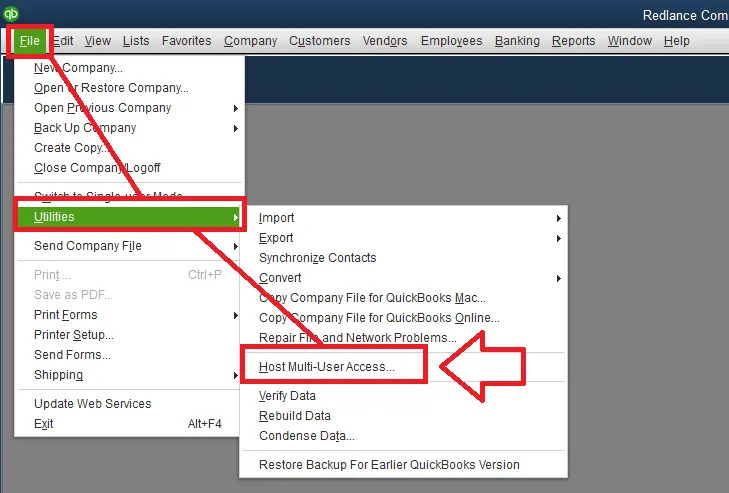
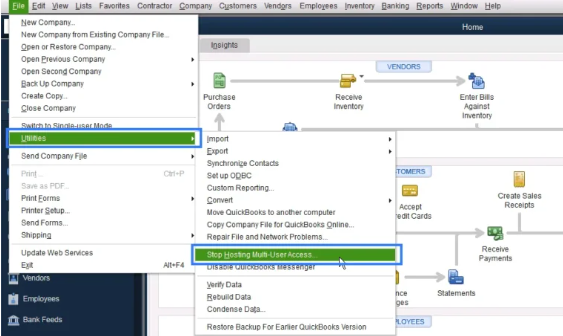
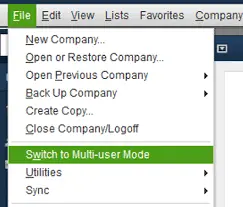
ToggleIf you are hosting your company files on a network, ensure that the Host Multi-User Access option is set to OFF on your computers. Be aware that these are the computers connected to the network and do not host the company’s files.

Note:- Selecting Host Multi-User Access will lead to a more complex situation, resulting in the QuickBooks error code 6000, -83.

Confirm if the error -6000,-83 is resolved or not. If you are still experiencing the error, proceed to Solution 2.

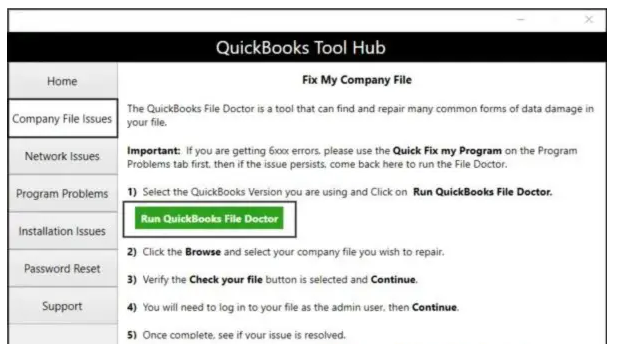
Note:- It may take a minute to open, and if it does not open, click on the Windows Start menu and search for QuickBooks Desktop File Doctor and open it.
Note:- In case you did not get the file, you can browse your file.
Wait for a while since scanning time depends on your file size and may take up to 10-15 minutes. Also, we would like to inform you that a scan could still give you a notification of its process being unsuccessful, even if the issue may be resolved. Confirm whether the error is fixed or not, and to do so, launch QuickBooks and open your company file.
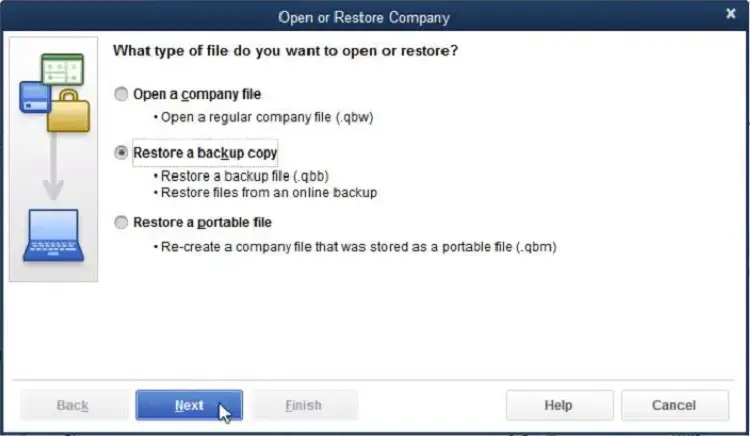
Step 1: If you have a fresh backup of your company file, you can use it to restore your company file.
Step 2: Move your company file
Important:- QuickBooks could ask you to rebuild the company file. If so, continue with the on-screen guide.

If you are unable to access the File Doctor or continue to experience errors after using it, you will need to resolve the issue manually.
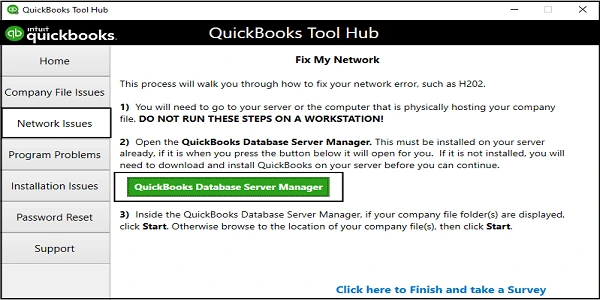
In case you are not already using QuickBooks Database Server Manager, you need to download and install the application.
Open your company file and confirm if you are able to function with it. If yes, you are good to go; you need to continue with the next step.
Your workstations may have hosting settings on automatic reset mode using QuickBooks Database Server Manager. Once you scan the folders, follow the steps shared below:
Confirm if the error -6000,-83 is resolved or not.
Test the network and confirm it is the one that may be causing the QuickBooks error 6000, -83. You can operate on any of your workstations and apply these steps to edit your Windows hosts file. Operate on your server computer since it is the only one that hosts your QuickBooks company file(s).

Note:- In case QuickBooks is not on your server, it would ask you to install the application.

Note:- If you are using your server computer as your workstation, check this PC too.
If you keep your company file on a Linux Server.
Confirm if you would be able to function with your company file. If you are able to do so, congratulations, the QB error 6000 -83 is fixed. If not, try step 2.
Note:- Files in Linux systems are case sensitive. Ensure to enter your names with the correct case.
If you are able to function with it, it means everything is fixed. If not, it is time to reach out to our senior QuickBooks specialist at Call Us : +1(866)500-0076.
In conclusion, we would like to thank you for being with us so far! Our team of QuickBooks specialist create and designs such solution-oriented content to help you fix QuickBooks error 6000, 83, and the like.
For more information on QuickBooks, contact our senior QuickBooks specialist at Call Us : +1(866)500-0076.
What is QuickBooks error 6000, -83?
QuickBooks Error -6000, -83 is a company file error that prevents the file from opening, restoring, and backing up.
What are the causes behind the error -6000, 83?
There could be any causes behind the error, including a corrupt company file, host settings, network issues, insufficient folder permissions, or third-party interference.
How to fix QuickBooks error 6000, -83?
To fix a single error in QuickBooks, you need to check various standard fixes that work best for your error. In order to do so, we recommend that you visit the site: www.quickbooksupportnet.com.
Lana Creston is an experienced technical and accounting writer with a total of 9 years of experience. She currently works on QuickBooks accounting and technical guides at QuickBookSupportNet. Lana has a passion for reading and writing about various technical topics, especially exploring new accounting methods and software, while continuously expanding her expertise in the ever-evolving field of finance and technology.
Quick, clear, and hassle-free QuickBooks assistance.
Fix QuickBooks Error 6000, 83 with Preventive Tips
Dec 27, 2025
Let’s Change EIN in QuickBooks Payroll Subscription
Dec 26, 2025