Jan 16, 2026
Admin |
Estimated Read Time : 5 MIN
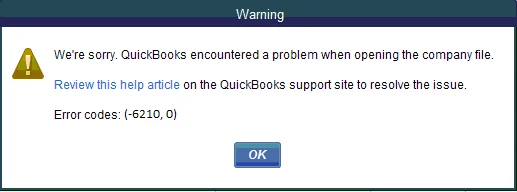
QuickBooks error 6210 is one of the 6XXX series of errors that occur when you try to open a company file in a multi-user network setup.

It typically occurs when the company file is hosted on a workstation rather than the designated server, or when critical firewall ports, such as port 8019, are blocked. When this happens, users may be unable to access the company file, leading to delays, potential data access issues, or even permanent damage.
In this blog, we will learn how hosting and firewall settings affect QuickBooks and cause QB error 6210, and the suitable methods to restore access to the company file.
Table of Contents
ToggleBelow is a list of all the possible reasons that may trigger error code 6210 in QuickBooks when trying to open a company file on the network or when hosting:
Below is a step-by-step troubleshooting guide, starting with the most effective fixes for QuickBooks Desktop error 6210 0: to help resolve conflicts, network issues, and multi-user setup problems.
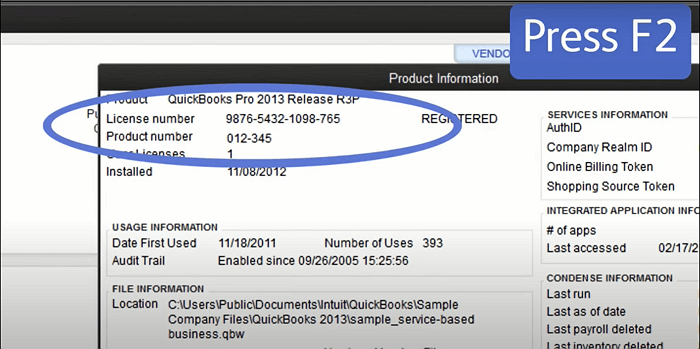
If your QuickBooks Desktop is outdated, it can cause incompatibility with the system and even your company file. This may trigger QuickBooks error 6210 when trying to open a company file on the network. Make sure to update QuickBooks Desktop to the most recent version available.
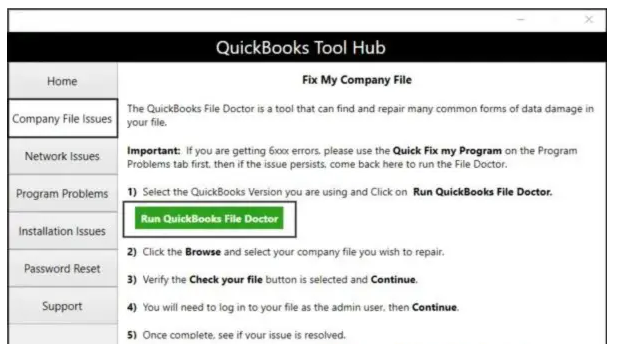
The QuickBooks File Doctor utility checks the company file for potential damage and network connectivity issues during hosting. If it detects any problems, it immediately attempts to repair them.
| Note: Download and install QuickBooks Tool Hub (1.6.0.8) in the latest version available. For best results, use Windows 11, 64-bit. |

Note: If QB File Doctor doesn’t open, search for QuickBooks Desktop File Doc in the Windows search and open it manually.
Make sure the hosting settings are enabled on the server and not on the workstation. The server is your main computer that hosts the company file, and others are just connected to it.

The .ND and .TLG files are components of your QuickBooks company files. These configuration files enable QuickBooks to access a company file on the network.
Any damage to these files can cause QuickBooks error 6210 when trying to open the company file on the network. Renaming these files will replace them with the new ones when you open the company file on the network or with the QuickBooks Database Server Manager scan.
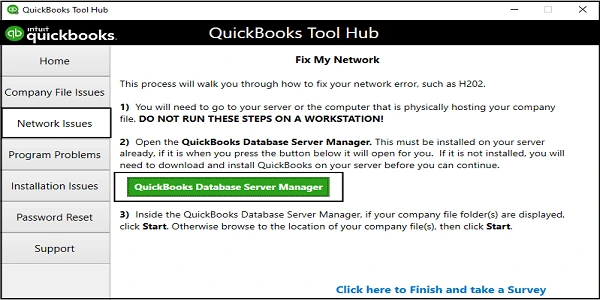
The QuickBooks Database Server Manager allows you host your QuickBooks company files. Restart the QB Database Server Manager and then scan your company file after renaming the .ND and .TLG files.
Here’s how to run QuickBooks Database Server Manager from the Tool Hub:

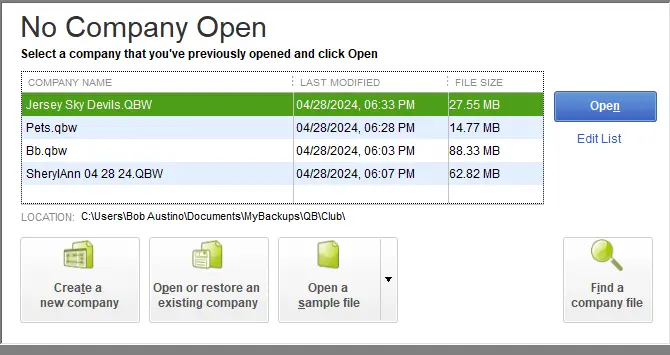
Opening the sample company file from a workstation, test whether the issue is with the company file or your QuickBooks. If you fail to open the same company file and get an error, the QuickBooks Desktop installation is damaged, and you must repair it promptly to resolve the QuickBooks multi-user mode error 6210, 0.
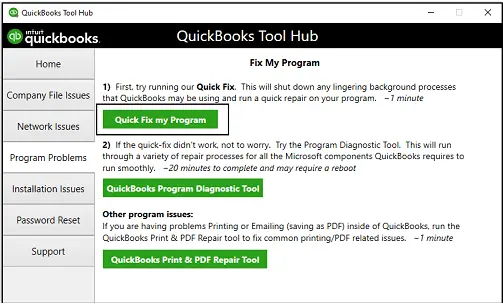
Let’s repair the QuickBooks Desktop installation using the QuickBooks Tool Hub. Make sure to download and install the utility if you haven’t done so yet.
The Quick Fix my Program closes all QuickBooks processes running in the background and then quickly repairs the program.

If something went wrong during the software installation, it may cause problems when trying to run different operations. Run the QuickBooks Install Diagnostic tool in the Tool Hub to repair the QuickBooks installation files.
Copying and opening your company file on the desktop helps determine whether the problem lies with the company file itself or its location.
If you can open the company file from the desktop, it may mean there is damage to the location where you save the file. The company file might be in multiple folders, exceeding the system path limit. If you fail to open the company file from another location, it may be damaged.

When you close the QuickBooks processes in Task Manager, it forcefully ends any stuck processes that might be causing QB error code 6210 when trying to open a company file on the network.
The user account may not have Full Control over the folder that contains the company file. As a result, you may be unable to host or open the company file over the network, which can trigger QuickBooks error code 6210 0. Setting up the correct folder and Windows access permissions allows full administrative rights and ensures seamless access to the company file.
Windows Firewall is a built-in Windows security feature that monitors and controls incoming and outgoing network traffic to prevent unauthorized access and protect your system from threats like viruses and hackers. If it incorrectly flags QuickBooks Desktop as a threat, it may block related processes. To resolve this, make sure to configure Windows Firewall settings for QuickBooks to allow proper access.
Hosting a company file over the network allows you work from anywhere using any device, but QuickBooks error 6210 can make it challenging. By enabling hosting settings only on the server, allowing QuickBooks through Windows Firewall, and taking other steps, you can successfully open a company file on the network.
For further assistance, contact the technical experts at QuickBookSupportNet. Dial +1(866)500-0076 to talk to an expert now!
How do I fix QuickBooks already has a company file open?
Restart your computer, run QuickBooks as an administrator, and then close all QuickBooks processes that might be running with the company file in Task Manager so you can open your company file without any issues.
When does QuickBooks error 6210 occur?
QuickBooks error 6210 occurs when attempting to open a company file in multi-user mode, primarily due to Windows firewall or antivirus blocking the connection, or if hosting is enabled on your workstation.
Is QuickBooks error 6210 related to multi-user mode?
Yes, QuickBooks error 6210 is related to multi-user mode and typically occurs due to incorrect server or workstation hosting settings, damage to the company file, or Windows Firewall.
How to fix the error that cannot communicate with the company file due to the firewall?
To resolve the issue of not being able to communicate with the company file due to a firewall issue, run QuickBooks Database Server Manager from the Tool Hub, add QuickBooks program exceptions in Windows Firewall, ensure the company file folder is shared, and temporarily disable the firewall.
How to fix QuickBooks multi-user mode not working when opening a company file?
To fix QuickBooks multi-user mode, ensure the Database Server Manager is running, and the company file folder is scanned on the server. Check that hosting is enabled only on the server and stopped on workstations, and verify folder permissions.
Lana Creston is an experienced technical and accounting writer with a total of 9 years of experience. She currently works on QuickBooks accounting and technical guides at QuickBookSupportNet. Lana has a passion for reading and writing about various technical topics, especially exploring new accounting methods and software, while continuously expanding her expertise in the ever-evolving field of finance and technology.
Quick, clear, and hassle-free QuickBooks assistance.
Troubleshooting QuickBooks Error 15217 When Updating
Feb 10, 2026